Spring Boot Profiles & Configuration: The Art of Environment Management
Master Spring profiles, externalized configuration, secrets management, and the 12-factor app approach to configuration.
Moshiour Rahman
Advertisement
The Configuration Problem
Your app needs different settings for different environments:
| Setting | Development | Staging | Production |
|---|---|---|---|
| Database | localhost:5432 | staging-db.internal | prod-db.cluster |
| Log level | DEBUG | INFO | WARN |
| Cache TTL | 60s | 300s | 3600s |
| API keys | test_key | staging_key | REAL_KEY |
The wrong way: If-else statements everywhere, hardcoded values, .properties files committed with secrets.
The right way: Externalized configuration with profiles.
The Configuration Hierarchy
Spring Boot loads configuration from multiple sources in a specific order. Higher sources override lower ones:
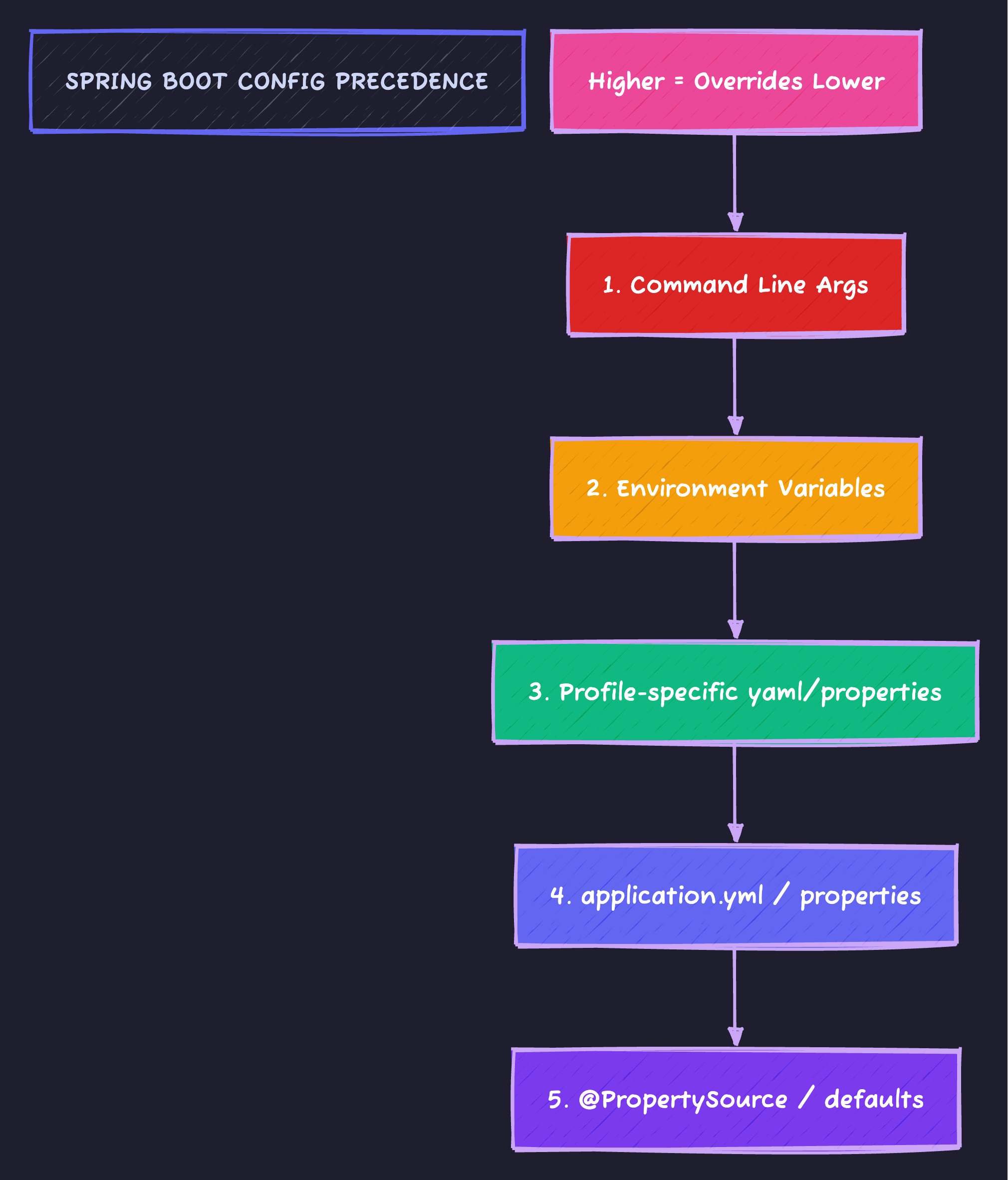
Command line args beat environment variables, which beat profile-specific YAML, which beats the base application.yml.
Basic Profile Setup
application.yml (Base configuration)
spring:
  application:
    name: my-service

server:
  port: 8080

app:
  name: My Service
  feature:
    new-dashboard: false  # Feature flag default
application-dev.yml
spring:
  datasource:
    url: jdbc:postgresql://localhost:5432/myapp_dev
    username: dev_user
    password: dev_password

logging:
  level:
    root: INFO
    io.techyowls: DEBUG
    org.hibernate.SQL: DEBUG

app:
  feature:
    new-dashboard: true  # Enable in dev for testing
application-prod.yml
spring:
  datasource:
    url: ${DATABASE_URL}  # From environment variable
    username: ${DATABASE_USER}
    password: ${DATABASE_PASSWORD}

logging:
  level:
    root: WARN
    io.techyowls: INFO

server:
  tomcat:
    max-threads: 200
Activating Profiles
# Command line
java -jar app.jar --spring.profiles.active=prod

# Environment variable
export SPRING_PROFILES_ACTIVE=prod
java -jar app.jar

# In application.yml (default profile)
spring:
  profiles:
    active: dev

# Multiple profiles
java -jar app.jar --spring.profiles.active=prod,metrics,ssl
Profile Groups (Spring Boot 2.4+)
# application.yml
spring:
  profiles:
    group:
      production:
        - prod
        - ssl
        - metrics
      development:
        - dev
        - debug
        - mock-services
# Activates: prod + ssl + metrics
java -jar app.jar --spring.profiles.active=productionConditional Beans
@Configuration
public class DataSourceConfig {

    @Bean
    @Profile("dev")
    public DataSource devDataSource() {
        // In-memory H2 for development
        return new EmbeddedDatabaseBuilder()
            .setType(EmbeddedDatabaseType.H2)
            .build();
    }

    @Bean
    @Profile("prod")
    public DataSource prodDataSource(
        @Value("${spring.datasource.url}") String url,
        @Value("${spring.datasource.username}") String username,
        @Value("${spring.datasource.password}") String password
    ) {
        HikariDataSource ds = new HikariDataSource();
        ds.setJdbcUrl(url);
        ds.setUsername(username);
        ds.setPassword(password);
        ds.setMaximumPoolSize(20);
        return ds;
    }

    @Bean
    @Profile("!prod")  // NOT production
    public DatabaseInitializer testDataInitializer() {
        return new DatabaseInitializer();  // Seeds test data
    }
}
Type-Safe Configuration with @ConfigurationProperties
@ConfigurationProperties(prefix = "app")
@Validated
public class AppProperties {

    @NotBlank
    private String name;

    private final Feature feature = new Feature();
    private final Security security = new Security();

    public static class Feature {
        private boolean newDashboard = false;
        private boolean betaApi = false;
        // Getters and setters
    }

    public static class Security {
        @NotBlank
        private String jwtSecret;

        @Min(3600)
        private int tokenExpirationSeconds = 3600;
        // Getters and setters
    }

    // Getters and setters
}@Configuration
@EnableConfigurationProperties(AppProperties.class)
public class AppConfig {
}@Service
public class FeatureService {
private final AppProperties appProperties;
public FeatureService(AppProperties appProperties) {
this.appProperties = appProperties;
}
public boolean isNewDashboardEnabled() {
return appProperties.getFeature().isNewDashboard();
}
}Environment Variables Best Practices
Spring Boot uses relaxed binding to convert YAML properties to environment variables:
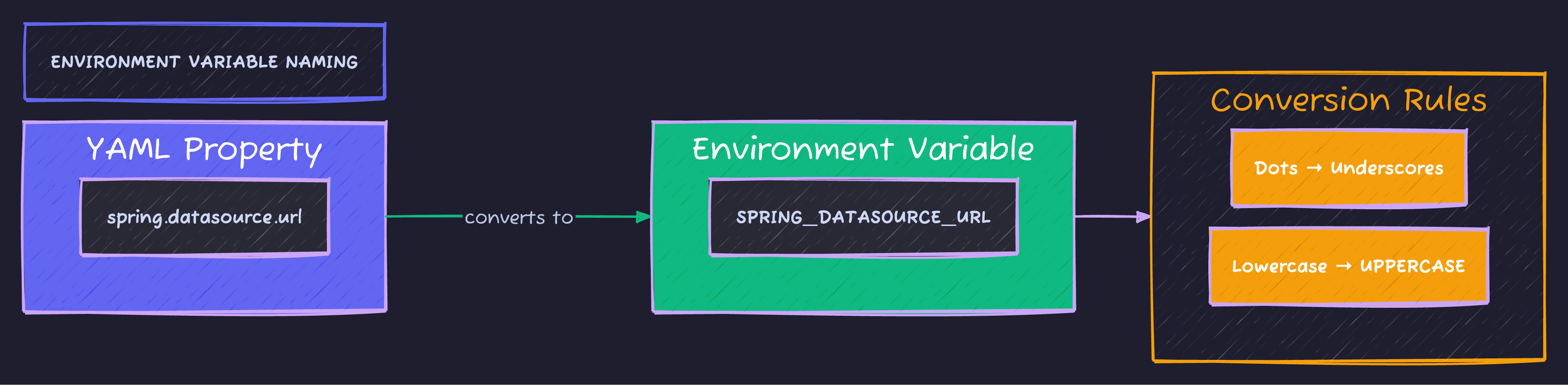
Replace dots with underscores, convert to UPPERCASE. spring.datasource.url becomes SPRING_DATASOURCE_URL. Spring automatically binds all variations.
Secrets Management
Never commit secrets to Git. Here are proper approaches:
Option 1: Environment Variables
# application-prod.yml
spring:
  datasource:
    password: ${DATABASE_PASSWORD}  # From environment

app:
  security:
    jwt-secret: ${JWT_SECRET}
    api-key: ${EXTERNAL_API_KEY}
# Set in deployment environment
export DATABASE_PASSWORD="super-secret-password"
export JWT_SECRET="$(openssl rand -base64 64)"Option 2: External Config File
# /etc/myapp/secrets.yml (not in Git)
spring:
  datasource:
    password: actual-password

app:
  security:
    jwt-secret: actual-jwt-secret
java -jar app.jar --spring.config.additional-location=/etc/myapp/Option 3: Vault Integration
<dependency>
    <groupId>org.springframework.cloud</groupId>
    <artifactId>spring-cloud-starter-vault-config</artifactId>
</dependency>spring:
cloud:
vault:
uri: https://vault.internal:8200
authentication: TOKEN
token: ${VAULT_TOKEN}
kv:
enabled: true
backend: secret
default-context: myappOption 4: AWS Secrets Manager / Parameter Store
# application-prod.yml
spring:
  datasource:
    password: ${/myapp/prod/database/password}  # SSM Parameter path
Profile-Specific Beans with Conditional
@Service
@ConditionalOnProperty(name = "app.notifications.enabled", havingValue = "true")
public class NotificationService {
    // Only created if app.notifications.enabled=true
}

@Service
@ConditionalOnProperty(
    name = "app.feature.new-dashboard",
    havingValue = "true",
    matchIfMissing = false
)
public class NewDashboardService {
    // Only created when feature flag is enabled
}

@Configuration
@ConditionalOnExpression("${app.caching.enabled:true} and '${spring.profiles.active}'.contains('prod')")
public class ProductionCacheConfig {
    // Complex conditional based on multiple properties
}
Testing with Profiles
@SpringBootTest
@ActiveProfiles("test")
class UserServiceTest {
    // Uses application-test.yml
}

@SpringBootTest(properties = {
    "app.feature.new-dashboard=true",
    "app.security.jwt-secret=test-secret"
})
class FeatureToggleTest {
    // Override specific properties
}

@SpringBootTest
@TestPropertySource(locations = "classpath:test-override.properties")
class CustomPropertyTest {
    // Load custom test properties file
}
# application-test.yml
spring:
datasource:
url: jdbc:h2:mem:testdb
app:
security:
jwt-secret: test-jwt-secret-at-least-256-bits-long-for-hs256Configuration Documentation
Generate documentation for your properties:
<dependency>
    <groupId>org.springframework.boot</groupId>
    <artifactId>spring-boot-configuration-processor</artifactId>
    <optional>true</optional>
</dependency>@ConfigurationProperties(prefix = "app.mail")
public class MailProperties {
/**
* SMTP server host.
*/
private String host = "localhost";
/**
* SMTP server port.
*/
private int port = 25;
/**
* Whether to enable TLS.
*/
private boolean tls = false;
}This generates META-INF/spring-configuration-metadata.json for IDE autocomplete.
Multi-Document YAML (Spring Boot 2.4+)
# Single file with multiple profiles
spring:
  config:
    activate:
      on-profile: default

server:
  port: 8080

---
spring:
  config:
    activate:
      on-profile: dev

server:
  port: 8081

logging:
  level:
    root: DEBUG

---
spring:
  config:
    activate:
      on-profile: prod

server:
  port: 80

logging:
  level:
    root: WARN
Real-World Configuration Structure
src/main/resources/
├── application.yml                 # Base config (all environments)
├── application-dev.yml             # Local development
├── application-test.yml            # Unit/integration tests
├── application-staging.yml         # Staging environment
├── application-prod.yml            # Production (minimal, uses env vars)
└── config/
    ├── logback-spring.xml          # Logging configuration
    └── banner.txt                  # Startup banner
application.yml (Complete Example)
spring:
  application:
    name: techyowls-api
  profiles:
    active: ${SPRING_PROFILES_ACTIVE:dev}
    group:
      local:
        - dev
        - debug
      cloud:
        - prod
        - metrics
        - ssl

server:
  port: ${PORT:8080}
  shutdown: graceful
  servlet:
    context-path: /api

management:
  endpoints:
    web:
      exposure:
        include: health,info,metrics
  endpoint:
    health:
      show-details: when_authorized

app:
  name: TechyOwls API
  version: @project.version@
  feature:
    new-dashboard: ${FEATURE_NEW_DASHBOARD:false}
    beta-api: ${FEATURE_BETA_API:false}
  cors:
    allowed-origins:
      - ${CORS_ORIGIN:http://localhost:3000}
  rate-limit:
    enabled: ${RATE_LIMIT_ENABLED:true}
    requests-per-minute: ${RATE_LIMIT_RPM:60}
Validating Configuration at Startup
@ConfigurationProperties(prefix = "app")
@Validated
public class AppProperties {

    @NotBlank(message = "App name must not be blank")
    private String name;

    @Valid
    private final Database database = new Database();

    public static class Database {
        @NotBlank
        private String url;

        @Min(value = 1, message = "Pool size must be at least 1")
        @Max(value = 100, message = "Pool size must not exceed 100")
        private int poolSize = 10;
    }
}@Component
public class ConfigurationValidator implements ApplicationRunner {
private final AppProperties appProperties;
private final Environment environment;
@Override
public void run(ApplicationArguments args) {
log.info("Starting {} with profiles: {}",
appProperties.getName(),
Arrays.toString(environment.getActiveProfiles()));
// Validate critical configuration
if (environment.acceptsProfiles(Profiles.of("prod"))) {
if (appProperties.getDatabase().getUrl().contains("localhost")) {
throw new IllegalStateException(
"Production profile detected but database URL points to localhost!");
}
}
}
}The 12-Factor App Approach

The 12-factor methodology emphasizes storing configuration in environment variables, enabling one codebase to serve many deployments without code changes.
Code Sample
Full working example: github.com/Moshiour027/techyowls-io-blog-public/spring-profiles-guide
Summary
| Concept | Use For |
|---|---|
| Profiles | Environment-specific behavior |
| @ConfigurationProperties | Type-safe config binding |
| Environment variables | Secrets, deployment config |
| Config groups | Bundling related profiles |
| Validation | Fail-fast on misconfiguration |
Golden rules:
- Base
application.ymlfor shared defaults - Profile files for environment overrides
- Environment variables for secrets and deployment-specific values
- Validate configuration at startup
- Never commit secrets
Configuration is the bridge between your code and its runtime environment. Build that bridge carefully.
Advertisement
Moshiour Rahman
Software Architect & AI Engineer
Enterprise software architect with deep expertise in financial systems, distributed architecture, and AI-powered applications. Building large-scale systems at Fortune 500 companies. Specializing in LLM orchestration, multi-agent systems, and cloud-native solutions. I share battle-tested patterns from real enterprise projects.
Related Articles
Flyway Database Migrations: Never Run ALTER TABLE in Production by Hand Again
Version control your database schema. Learn Flyway migration strategies, rollback approaches, and how to handle team collaboration without conflicts.
Spring BootOpenAPI & Swagger: Your API Documentation That Actually Stays Updated
Generate beautiful, interactive API docs that can't go stale. Learn contract-first vs code-first, customization, and generating client SDKs.
Spring BootRedis Caching Patterns: The Difference Between 200ms and 2ms Response Times
Beyond @Cacheable - learn cache-aside, write-through, read-through patterns, cache invalidation strategies, and how to avoid the thundering herd problem.
Comments
Comments are powered by GitHub Discussions.
Configure Giscus at giscus.app to enable comments.