OpenAPI & Swagger: Your API Documentation That Actually Stays Updated
Generate beautiful, interactive API docs that can't go stale. Learn contract-first vs code-first, customization, and generating client SDKs.
Moshiour Rahman
Advertisement
The Problem: Documentation Lies
Your README says the endpoint returns { "user": {...} }.
The actual response is { "data": { "user": {...} } }.
The README was updated 6 months ago. The code changed 47 times since.
Documentation that isn’t generated from code will always drift.
OpenAPI: The Solution
OpenAPI (formerly Swagger) is a specification for describing REST APIs. From this spec, you can generate:
- Interactive documentation (Swagger UI)
- Client SDKs (any language)
- Server stubs
- Mock servers
- Test cases
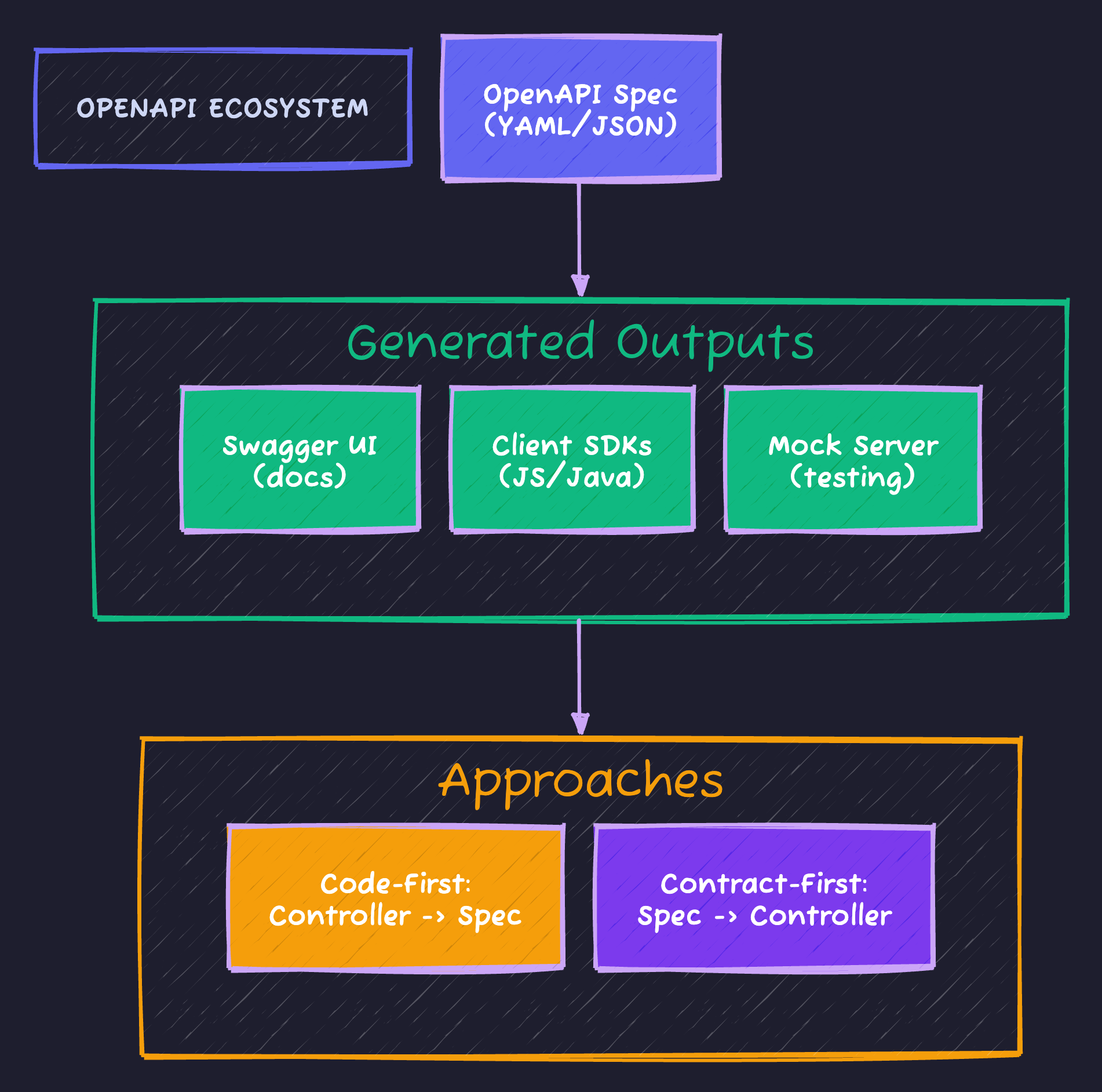
OpenAPI supports two development workflows: Code-First (write controller annotations → generate spec) or Contract-First (design spec → generate controllers). Most Spring Boot teams use Code-First for rapid development.
Setup: Code-First with SpringDoc
<dependency>
    <groupId>org.springdoc</groupId>
    <artifactId>springdoc-openapi-starter-webmvc-ui</artifactId>
    <version>2.3.0</version>
</dependency>springdoc:
api-docs:
path: /api-docs
swagger-ui:
path: /swagger-ui.html
operationsSorter: method
tagsSorter: alphaThat’s it. Visit /swagger-ui.html to see auto-generated docs.
Basic Annotations
@RestController
@RequestMapping("/api/users")
@Tag(name = "Users", description = "User management endpoints")
public class UserController {

    @Operation(
        summary = "Get user by ID",
        description = "Returns a single user by their unique identifier"
    )
    @ApiResponses({
        @ApiResponse(
            responseCode = "200",
            description = "User found",
            content = @Content(schema = @Schema(implementation = UserResponse.class))
        ),
        @ApiResponse(
            responseCode = "404",
            description = "User not found",
            content = @Content(schema = @Schema(implementation = ErrorResponse.class))
        )
    })
    @GetMapping("/{id}")
    public UserResponse getUser(
        @Parameter(description = "User ID", example = "123")
        @PathVariable Long id
    ) {
        return userService.findById(id);
    }

    @Operation(summary = "Create a new user")
    @ApiResponse(responseCode = "201", description = "User created")
    @PostMapping
    @ResponseStatus(HttpStatus.CREATED)
    public UserResponse createUser(
        @RequestBody @Valid CreateUserRequest request
    ) {
        return userService.create(request);
    }
}
Documenting DTOs
@Schema(description = "Request to create a new user")
public record CreateUserRequest(

    @Schema(
        description = "User's email address",
        example = "john@example.com",
        requiredMode = Schema.RequiredMode.REQUIRED
    )
    @Email
    @NotBlank
    String email,

    @Schema(
        description = "User's display name",
        example = "John Doe",
        minLength = 2,
        maxLength = 100
    )
    @Size(min = 2, max = 100)
    @NotBlank
    String name,

    @Schema(
        description = "User's role",
        allowableValues = {"USER", "ADMIN", "MODERATOR"},
        defaultValue = "USER"
    )
    String role
) {}@Schema(description = "User response")
public record UserResponse(
@Schema(description = "Unique identifier", example = "12345")
Long id,
@Schema(description = "Email address", example = "john@example.com")
String email,
@Schema(description = "Display name", example = "John Doe")
String name,
@Schema(description = "Account creation timestamp")
Instant createdAt
) {}Pagination Documentation
@Operation(summary = "List all users with pagination")
@GetMapping
public Page<UserResponse> listUsers(
    @Parameter(description = "Page number (0-indexed)", example = "0")
    @RequestParam(defaultValue = "0") int page,

    @Parameter(description = "Page size", example = "20")
    @RequestParam(defaultValue = "20") int size,

    @Parameter(description = "Sort field", example = "createdAt")
    @RequestParam(defaultValue = "createdAt") String sort,

    @Parameter(description = "Sort direction", schema = @Schema(allowableValues = {"asc", "desc"}))
    @RequestParam(defaultValue = "desc") String direction
) {
    Pageable pageable = PageRequest.of(page, size, Sort.Direction.fromString(direction), sort);
    return userService.findAll(pageable);
}
Security Documentation
@Configuration
public class OpenApiConfig {

    @Bean
    public OpenAPI customOpenAPI() {
        return new OpenAPI()
            .info(new Info()
                .title("TechyOwls API")
                .version("1.0.0")
                .description("REST API for TechyOwls platform")
                .contact(new Contact()
                    .name("TechyOwls Team")
                    .email("contact@techyowls.io")
                    .url("https://techyowls.io"))
                .license(new License()
                    .name("MIT")
                    .url("https://opensource.org/licenses/MIT")))
            .components(new Components()
                .addSecuritySchemes("bearer-jwt", new SecurityScheme()
                    .type(SecurityScheme.Type.HTTP)
                    .scheme("bearer")
                    .bearerFormat("JWT")
                    .description("Enter JWT token")));
    }
}@RestController
@RequestMapping("/api/admin")
@Tag(name = "Admin", description = "Admin-only endpoints")
@SecurityRequirement(name = "bearer-jwt") // Apply to all endpoints in controller
public class AdminController {
@Operation(summary = "Get admin dashboard")
@GetMapping("/dashboard")
public DashboardResponse getDashboard() {
return adminService.getDashboard();
}
}Grouping APIs
For larger APIs, group endpoints into multiple specs:
@Configuration
public class OpenApiGroupConfig {

    @Bean
    public GroupedOpenApi publicApi() {
        return GroupedOpenApi.builder()
            .group("public")
            .displayName("Public API")
            .pathsToMatch("/api/public/**")
            .build();
    }

    @Bean
    public GroupedOpenApi adminApi() {
        return GroupedOpenApi.builder()
            .group("admin")
            .displayName("Admin API")
            .pathsToMatch("/api/admin/**")
            .addOpenApiCustomizer(openApi ->
                openApi.info(new Info()
                    .title("Admin API")
                    .description("Administrative endpoints")))
            .build();
    }

    @Bean
    public GroupedOpenApi internalApi() {
        return GroupedOpenApi.builder()
            .group("internal")
            .displayName("Internal API")
            .pathsToMatch("/internal/**")
            .build();
    }
}
Contract-First Approach
For teams where API design is done upfront:
# openapi.yaml
openapi: 3.0.3
info:
  title: User Service API
  version: 1.0.0

paths:
  /users/{id}:
    get:
      operationId: getUserById
      summary: Get user by ID
      parameters:
        - name: id
          in: path
          required: true
          schema:
            type: integer
            format: int64
      responses:
        '200':
          description: User found
          content:
            application/json:
              schema:
                $ref: '#/components/schemas/User'
        '404':
          description: User not found

components:
  schemas:
    User:
      type: object
      required:
        - id
        - email
        - name
      properties:
        id:
          type: integer
          format: int64
        email:
          type: string
          format: email
        name:
          type: string
Generate Code from Spec
<plugin>
    <groupId>org.openapitools</groupId>
    <artifactId>openapi-generator-maven-plugin</artifactId>
    <version>7.2.0</version>
    <executions>
        <execution>
            <goals>
                <goal>generate</goal>
            </goals>
            <configuration>
                <inputSpec>${project.basedir}/src/main/resources/openapi.yaml</inputSpec>
                <generatorName>spring</generatorName>
                <configOptions>
                    <interfaceOnly>true</interfaceOnly>
                    <useSpringBoot3>true</useSpringBoot3>
                    <useTags>true</useTags>
                </configOptions>
                <apiPackage>io.techyowls.api</apiPackage>
                <modelPackage>io.techyowls.api.model</modelPackage>
            </configuration>
        </execution>
    </executions>
</plugin>
This generates:
- API interfaces you implement
- Model classes (DTOs)
- Validation annotations
// Generated interface
public interface UsersApi {
    @GetMapping("/users/{id}")
    ResponseEntity<User> getUserById(@PathVariable Long id);
}

// Your implementation
@RestController
public class UsersApiController implements UsersApi {
    @Override
    public ResponseEntity<User> getUserById(Long id) {
        return ResponseEntity.ok(userService.findById(id));
    }
}
Generating Client SDKs
# Generate TypeScript client
openapi-generator generate \
  -i http://localhost:8080/api-docs \
  -g typescript-fetch \
  -o ./generated/typescript-client

# Generate Java client
openapi-generator generate \
  -i http://localhost:8080/api-docs \
  -g java \
  -o ./generated/java-client \
  --additional-properties=useJakartaEe=true
The SDK generation process automates client creation across all platforms:
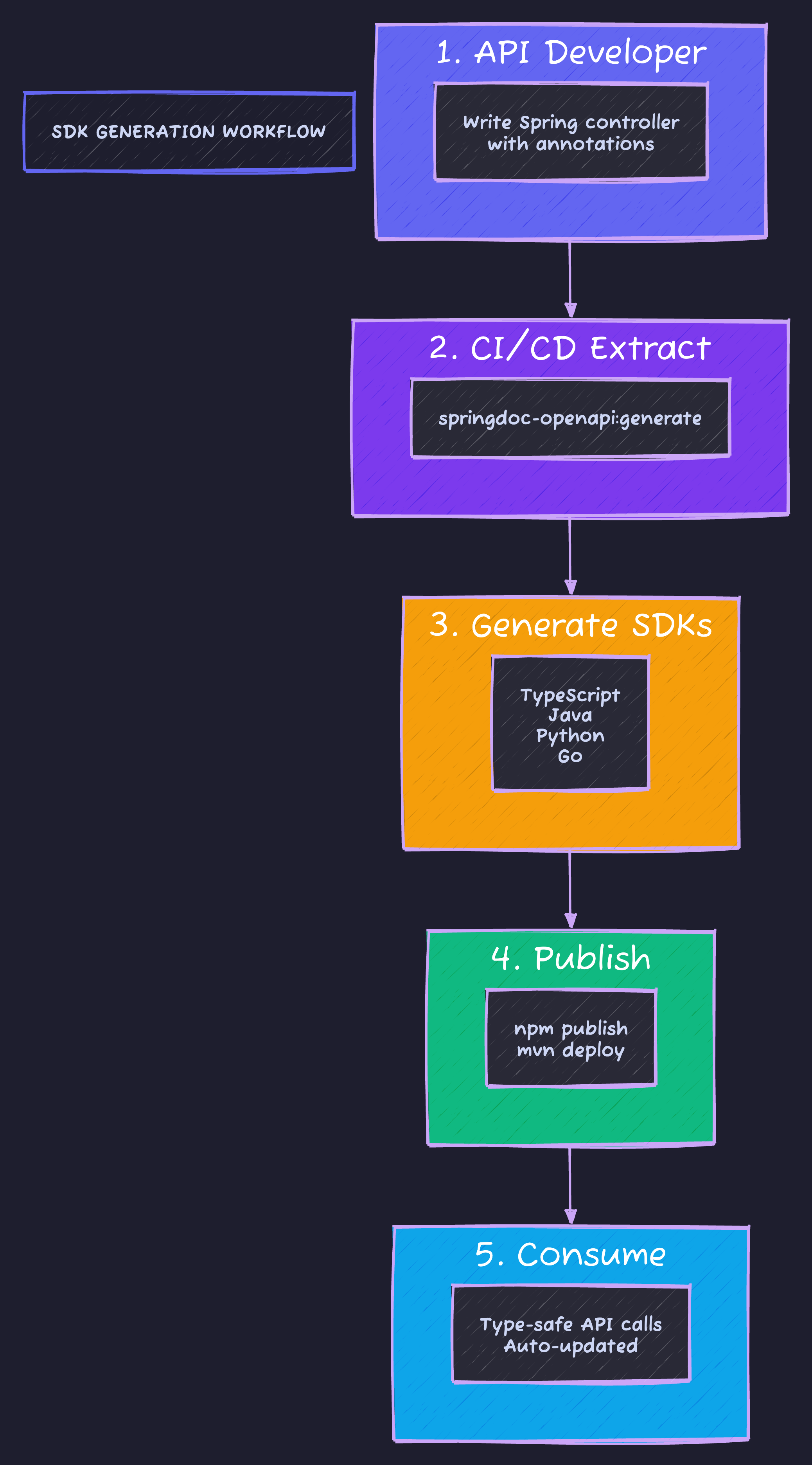
The result: type-safe API calls across TypeScript, Java, Python, and Go - automatically updated whenever your API changes.
Customizing Swagger UI
springdoc:
  swagger-ui:
    path: /docs
    display-request-duration: true
    filter: true
    show-extensions: true
    show-common-extensions: true
    doc-expansion: none  # none, list, full
    default-models-expand-depth: 3
    default-model-expand-depth: 3
    operations-sorter: method
    tags-sorter: alpha
    try-it-out-enabled: true
    persist-authorization: true  # Remember auth token
Custom CSS
@Bean
public OpenAPI customOpenAPI() {
    return new OpenAPI()
        .info(new Info()
            .title("My API")
            .extensions(Map.of(
                "x-logo", Map.of(
                    "url", "https://techyowls.io/logo.png",
                    "altText", "TechyOwls Logo"
                )
            )));
}
Production Considerations
Disable in Production
springdoc:
  api-docs:
    enabled: ${ENABLE_API_DOCS:false}
  swagger-ui:
    enabled: ${ENABLE_SWAGGER_UI:false}
Protect with Authentication
@Configuration
@Profile("!prod")  // Only enable in non-prod
public class SwaggerSecurityConfig {

    @Bean
    public SecurityFilterChain swaggerSecurityFilterChain(HttpSecurity http) throws Exception {
        return http
            .securityMatcher("/swagger-ui/**", "/api-docs/**")
            .authorizeHttpRequests(auth -> auth
                .requestMatchers("/swagger-ui/**", "/api-docs/**")
                .hasRole("DEVELOPER"))
            .httpBasic(Customizer.withDefaults())
            .build();
    }
}
Common Patterns
Polymorphic Types
@Schema(
    description = "Notification",
    oneOf = {EmailNotification.class, SmsNotification.class, PushNotification.class},
    discriminatorProperty = "type"
)
public abstract class Notification {
    @Schema(description = "Notification type")
    public abstract String getType();
}

@Schema(description = "Email notification")
public class EmailNotification extends Notification {
    @Override
    public String getType() { return "email"; }

    @Schema(description = "Recipient email")
    private String to;

    @Schema(description = "Email subject")
    private String subject;
}
File Upload
@Operation(summary = "Upload user avatar")
@PostMapping(value = "/{id}/avatar", consumes = MediaType.MULTIPART_FORM_DATA_VALUE)
public void uploadAvatar(
    @PathVariable Long id,
    @Parameter(description = "Avatar image file", content = @Content(mediaType = MediaType.APPLICATION_OCTET_STREAM_VALUE))
    @RequestParam("file") MultipartFile file
) {
    userService.uploadAvatar(id, file);
}
Deprecation
@Operation(
    summary = "Get user (deprecated)",
    deprecated = true,
    description = "Use GET /api/v2/users/{id} instead"
)
@GetMapping("/v1/users/{id}")
@Deprecated
public UserResponse getUserV1(@PathVariable Long id) {
    return userService.findById(id);
}
Code Sample
Full working example: github.com/Moshiour027/techyowls-io-blog-public/openapi-swagger-guide
Summary
| Approach | Best For | Trade-off |
|---|---|---|
| Code-First | Rapid development | Spec derived from code |
| Contract-First | API-first teams | Spec is source of truth |
| Hybrid | Large teams | Best of both worlds |
Start code-first, add annotations as you go. Move to contract-first when:
- Multiple teams consume your API
- Frontend needs to work before backend is ready
- You need generated SDKs
Documentation that generates from code never lies.
Advertisement
Moshiour Rahman
Software Architect & AI Engineer
Enterprise software architect with deep expertise in financial systems, distributed architecture, and AI-powered applications. Building large-scale systems at Fortune 500 companies. Specializing in LLM orchestration, multi-agent systems, and cloud-native solutions. I share battle-tested patterns from real enterprise projects.
Related Articles
REST API Design Best Practices: Complete Guide
Master REST API design with industry best practices. Learn naming conventions, versioning, error handling, pagination, and security patterns.
Spring BootREST API Best Practices in Java: Design APIs Developers Love
Build REST APIs that are consistent, discoverable, and maintainable. Naming, versioning, error handling, pagination, and HATEOAS explained.
Spring BootFlyway Database Migrations: Never Run ALTER TABLE in Production by Hand Again
Version control your database schema. Learn Flyway migration strategies, rollback approaches, and how to handle team collaboration without conflicts.
Comments
Comments are powered by GitHub Discussions.
Configure Giscus at giscus.app to enable comments.