Flyway Database Migrations: Never Run ALTER TABLE in Production by Hand Again
Version control your database schema. Learn Flyway migration strategies, rollback approaches, and how to handle team collaboration without conflicts.
Moshiour Rahman
Advertisement
The Horror Story
It’s Friday 4 PM. You need to add a column to the users table.
-- "Quick fix, what could go wrong?"
ALTER TABLE users ADD COLUMN phone VARCHAR(20);
You run it in production. The app breaks because the code expects phone_number.
You “fix” it:
ALTER TABLE users RENAME COLUMN phone TO phone_number;Now staging is broken because it still has phone. And your colleague’s local DB has neither column.
Three environments, three different schemas, zero documentation of what happened.
The Solution: Migration-Based Schema Management
The answer is version-controlled database migrations. Every schema change is a numbered SQL file, applied in order across all environments:
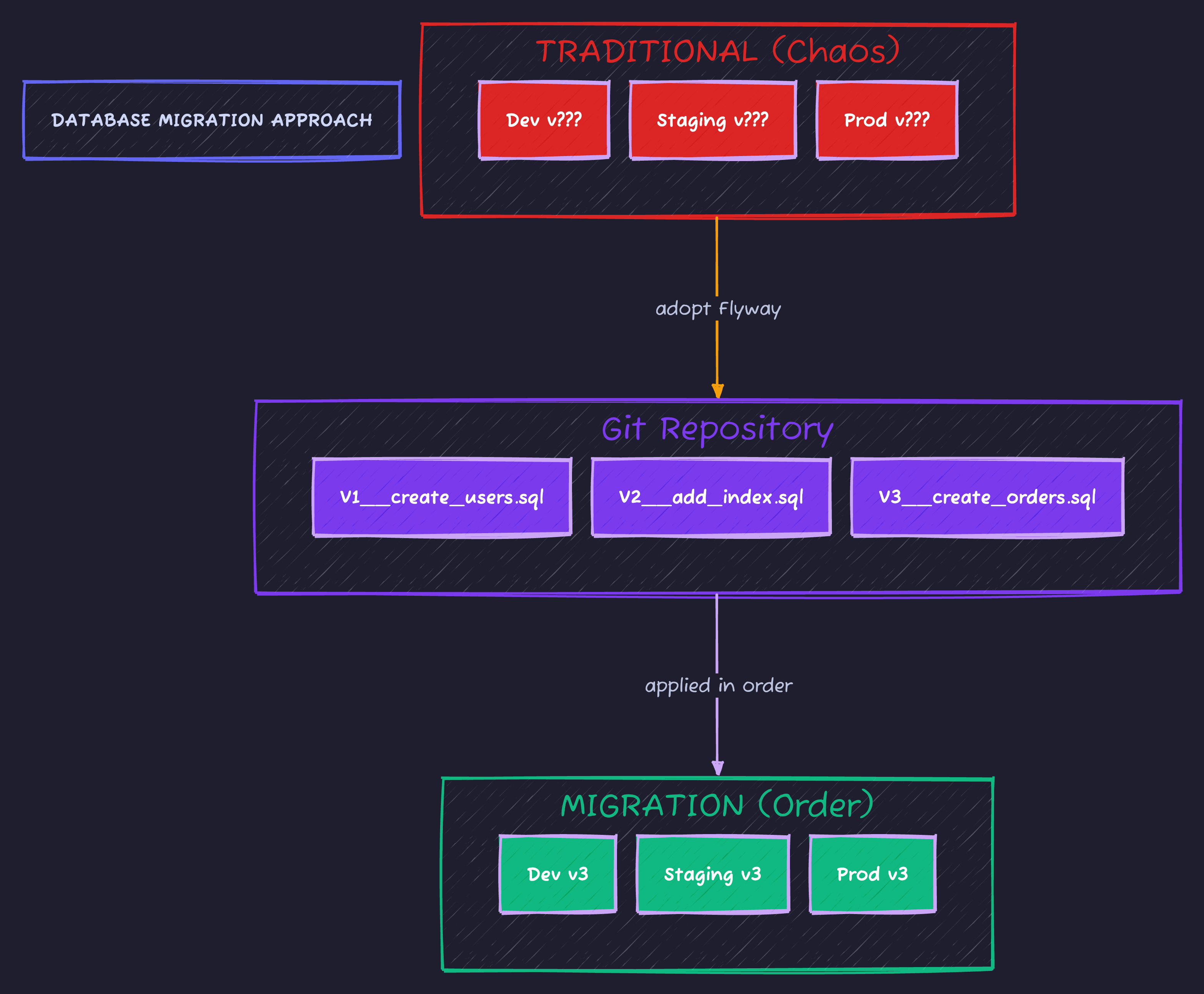
Flyway tracks applied migrations in a flyway_schema_history table, ensuring every environment stays in sync.
Setup: Spring Boot + Flyway
<dependency>
    <groupId>org.flywaydb</groupId>
    <artifactId>flyway-core</artifactId>
</dependency>

<!-- For PostgreSQL -->
<dependency>
    <groupId>org.flywaydb</groupId>
    <artifactId>flyway-database-postgresql</artifactId>
</dependency>spring:
flyway:
enabled: true
locations: classpath:db/migration
baseline-on-migrate: true # For existing databasesDirectory structure:
src/main/resources/
└── db/
    └── migration/
        ├── V1__create_users_table.sql
        ├── V2__add_email_index.sql
        └── V3__create_orders_table.sql
Migration Naming Convention
V{version}__{description}.sql
│    │           │
│    │           └── Descriptive name (underscores for spaces)
│    └── Version number (integer or semver-like: 1, 2, 1_1, 2_0_1)
└── V for versioned migration
Examples:
V1__create_users_table.sql✅V2__add_email_index.sql✅V1.1__add_phone_column.sql✅ (use 1_1 for sub-versions)V10__big_refactor.sql✅
Invalid:
create_users.sql❌ (missing V prefix)V1_create_users.sql❌ (single underscore)v1__create_users.sql❌ (lowercase v)
Your First Migrations
V1__create_users_table.sql
CREATE TABLE users (
    id BIGSERIAL PRIMARY KEY,
    email VARCHAR(255) NOT NULL UNIQUE,
    name VARCHAR(100) NOT NULL,
    created_at TIMESTAMP WITH TIME ZONE DEFAULT CURRENT_TIMESTAMP,
    updated_at TIMESTAMP WITH TIME ZONE DEFAULT CURRENT_TIMESTAMP
);

CREATE INDEX idx_users_email ON users(email);

COMMENT ON TABLE users IS 'Application users';
COMMENT ON COLUMN users.email IS 'User email address, used for login';
V2__create_orders_table.sql
CREATE TABLE orders (
    id BIGSERIAL PRIMARY KEY,
    user_id BIGINT NOT NULL REFERENCES users(id),
    status VARCHAR(20) NOT NULL DEFAULT 'PENDING',
    total_amount DECIMAL(10,2) NOT NULL,
    created_at TIMESTAMP WITH TIME ZONE DEFAULT CURRENT_TIMESTAMP,

    CONSTRAINT chk_order_status CHECK (status IN ('PENDING', 'CONFIRMED', 'SHIPPED', 'DELIVERED', 'CANCELLED'))
);

CREATE INDEX idx_orders_user_id ON orders(user_id);
CREATE INDEX idx_orders_status ON orders(status);
V3__add_phone_to_users.sql
-- Add phone column (nullable to not break existing rows)
ALTER TABLE users ADD COLUMN phone_number VARCHAR(20);

-- Add index for lookups
CREATE INDEX idx_users_phone ON users(phone_number) WHERE phone_number IS NOT NULL;

COMMENT ON COLUMN users.phone_number IS 'User phone number for notifications';
How Flyway Tracks Migrations
-- Flyway creates this table automatically
SELECT * FROM flyway_schema_history;

-- Output:
-- installed_rank | version | description        | type | script                      | checksum   | installed_by | installed_on        | execution_time | success
-- 1              | 1       | create users table | SQL  | V1__create_users_table.sql  | 1234567890 | myapp        | 2024-01-15 10:30:00 | 45            | true
-- 2              | 2       | create orders table| SQL  | V2__create_orders_table.sql | -987654321 | myapp        | 2024-01-15 10:30:01 | 32            | true
-- 3              | 3       | add phone to users | SQL  | V3__add_phone_to_users.sql  | 555555555  | myapp        | 2024-01-20 14:15:00 | 12            | true
Checksum ensures migration files haven’t been modified after being applied.
The Golden Rule: Never Edit Applied Migrations
Once a migration is applied to any environment, it’s frozen forever:
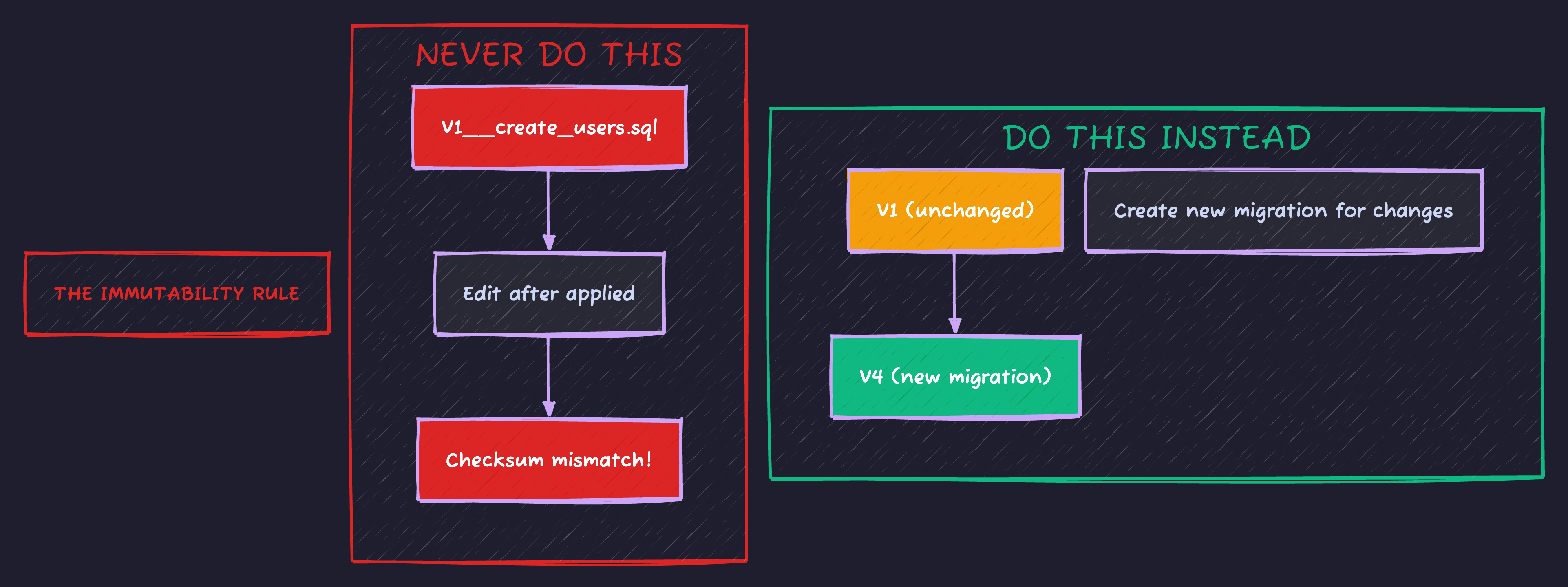
Editing applied migrations causes checksum mismatches and Flyway will refuse to start. Always create a new migration to alter existing tables.
Handling Team Collaboration
What happens when two developers create migrations simultaneously?
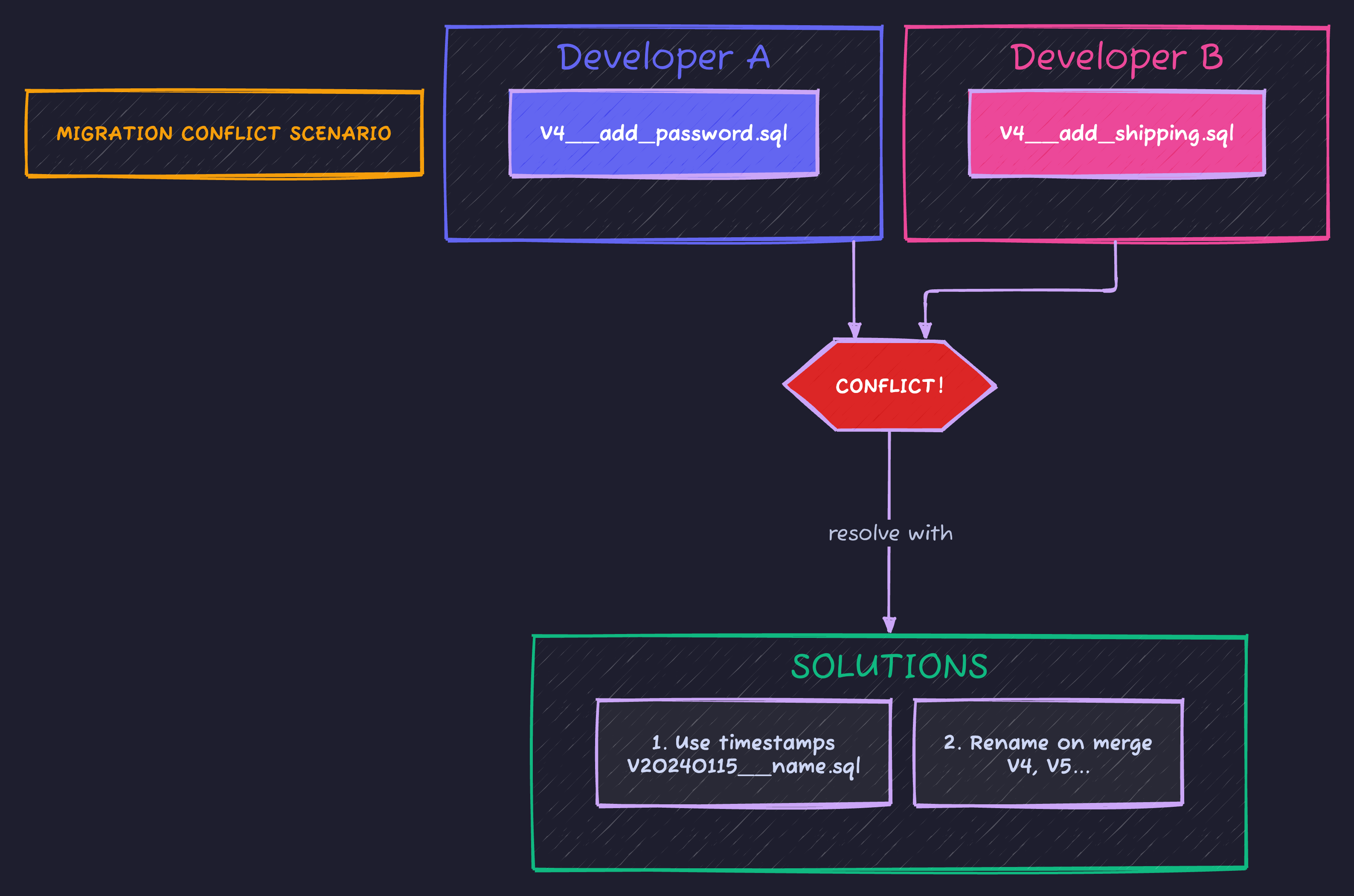
The best solution for teams: use timestamp-based versions (V20240115_1030__description.sql) to avoid conflicts entirely.
Repeatable Migrations
For things that should be recreated on every change (views, functions):
src/main/resources/db/migration/
├── V1__create_users.sql
├── V2__create_orders.sql
└── R__create_views.sql       # R__ prefix = repeatable
-- R__create_views.sql
-- This runs whenever the file content changes
DROP VIEW IF EXISTS user_order_summary;
CREATE VIEW user_order_summary AS
SELECT
u.id AS user_id,
u.name AS user_name,
COUNT(o.id) AS order_count,
COALESCE(SUM(o.total_amount), 0) AS total_spent
FROM users u
LEFT JOIN orders o ON u.id = o.user_id
GROUP BY u.id, u.name;Zero-Downtime Migrations
Adding a NOT NULL column naively locks the table:
-- ❌ BAD: Locks entire table, rewrites all rows
ALTER TABLE users ADD COLUMN status VARCHAR(20) NOT NULL DEFAULT 'active';
For large tables, use expand-contract pattern:
-- V4__add_status_column_nullable.sql
-- Step 1: Add as nullable (instant, no lock)
ALTER TABLE users ADD COLUMN status VARCHAR(20);

-- V5__backfill_status_column.sql
-- Step 2: Backfill in batches (can run during traffic)
UPDATE users SET status = 'active' WHERE status IS NULL;
-- Do this in batches for huge tables

-- V6__make_status_not_null.sql
-- Step 3: Add constraint (after backfill complete)
ALTER TABLE users ALTER COLUMN status SET NOT NULL;
ALTER TABLE users ALTER COLUMN status SET DEFAULT 'active';
The expand-contract pattern ensures zero-downtime schema changes:
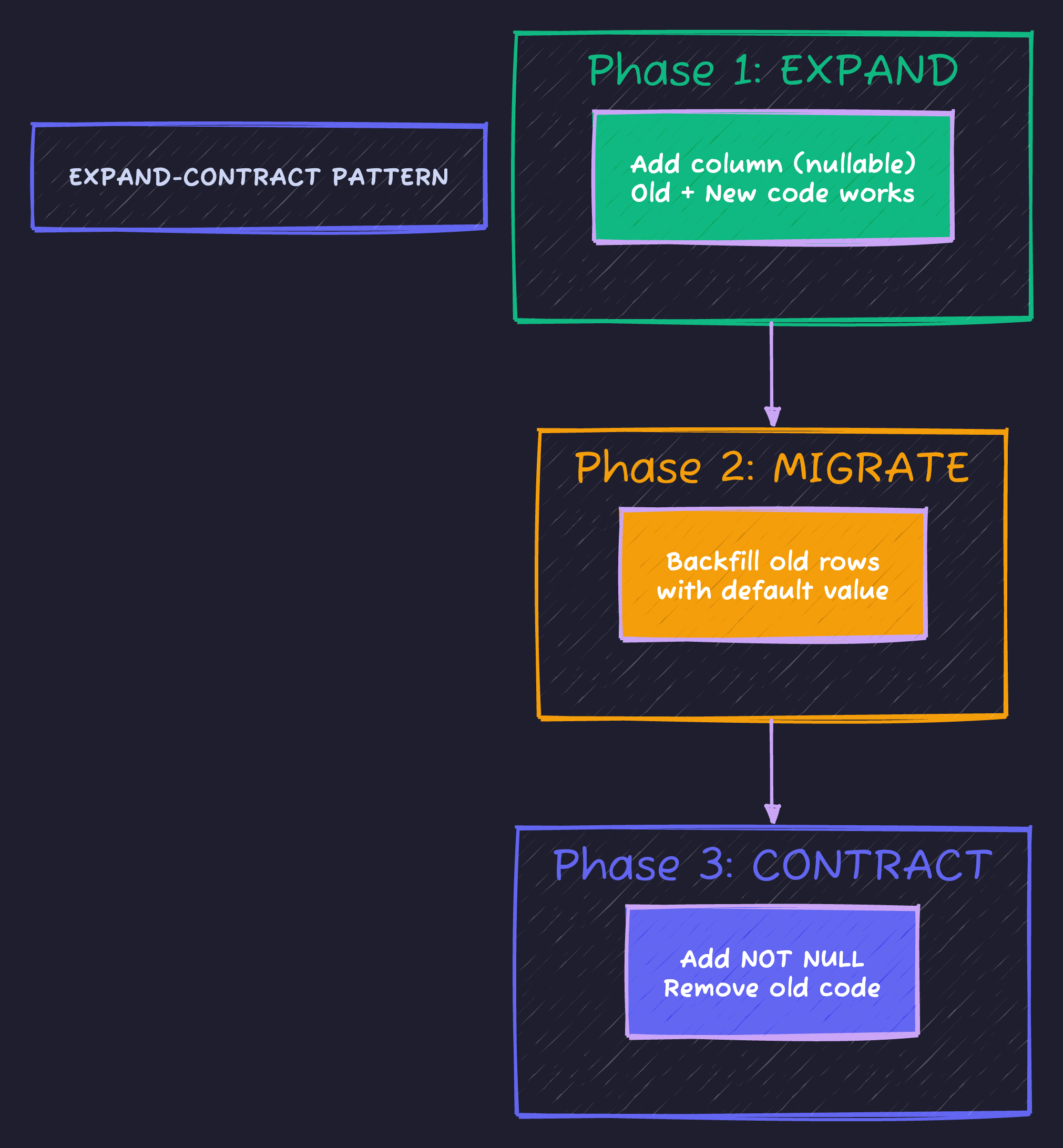
This approach allows old and new code to coexist during deployment, then tightens constraints after all data is migrated.
Callbacks: Run Code Around Migrations
spring:
  flyway:
callbacks: io.techyowls.db.FlywayCallbacks@Component
public class FlywayCallbacks implements Callback {
@Override
public boolean supports(Event event, Context context) {
return event == Event.BEFORE_MIGRATE || event == Event.AFTER_MIGRATE;
}
@Override
public boolean canHandleInTransaction(Event event, Context context) {
return true;
}
@Override
public void handle(Event event, Context context) {
if (event == Event.BEFORE_MIGRATE) {
log.info("Starting database migration...");
// Could send alert, pause traffic, etc.
}
if (event == Event.AFTER_MIGRATE) {
log.info("Migration complete. Applied {} migrations",
context.getMigrationInfo().length);
// Clear caches, send notification, etc.
}
}
@Override
public String getCallbackName() {
return "auditCallback";
}
}Testing Migrations
@SpringBootTest
@Testcontainers
class MigrationTest {

    @Container
    @ServiceConnection
    static PostgreSQLContainer<?> postgres = new PostgreSQLContainer<>("postgres:16-alpine");

    @Test
    void shouldApplyAllMigrations() {
        Flyway flyway = Flyway.configure()
            .dataSource(postgres.getJdbcUrl(), postgres.getUsername(), postgres.getPassword())
            .locations("classpath:db/migration")
            .load();

        flyway.migrate();

        MigrationInfo[] applied = flyway.info().applied();
        assertThat(applied).isNotEmpty();

        // Verify all migrations succeeded
        for (MigrationInfo info : applied) {
            assertThat(info.getState()).isEqualTo(MigrationState.SUCCESS);
        }
    }

    @Test
    void shouldCreateExpectedTables() {
        Flyway flyway = Flyway.configure()
            .dataSource(postgres.getJdbcUrl(), postgres.getUsername(), postgres.getPassword())
            .load();
        flyway.migrate();

        try (Connection conn = postgres.createConnection("")) {
            DatabaseMetaData meta = conn.getMetaData();

            // Verify tables exist
            ResultSet tables = meta.getTables(null, null, "users", null);
            assertThat(tables.next()).isTrue();

            // Verify columns
            ResultSet columns = meta.getColumns(null, null, "users", null);
            Set<String> columnNames = new HashSet<>();
            while (columns.next()) {
                columnNames.add(columns.getString("COLUMN_NAME"));
            }
            assertThat(columnNames).contains("id", "email", "name", "phone_number");
        }
    }
}
Rollback Strategy
Flyway Community doesn’t support automatic rollback. Here are your options:
Option 1: Manual Rollback Migrations
db/migration/
├── V1__create_users.sql
├── V2__add_orders.sql
└── undo/
    ├── U1__drop_users.sql       # Manual undo script
    └── U2__drop_orders.sql
-- U2__drop_orders.sql (manual undo)
DROP TABLE IF EXISTS orders CASCADE;Option 2: Forward-Only Fix
-- V3__add_bad_column.sql (mistake)
ALTER TABLE users ADD COLUMN bad_column VARCHAR(50);

-- V4__remove_bad_column.sql (fix it by moving forward)
ALTER TABLE users DROP COLUMN bad_column;
Option 3: Flyway Teams (Paid)
spring:
  flyway:
    undo-sql-migration-prefix: U  # Enable undo migrations
-- V3__add_feature.sql
CREATE TABLE feature_flags (...);
-- U3__add_feature.sql (auto-rollback)
DROP TABLE feature_flags;Environment-Specific Migrations
spring:
  flyway:
    locations:
      - classpath:db/migration
      - classpath:db/migration/${spring.profiles.active}
db/migration/
├── V1__create_users.sql # All environments
├── V2__create_orders.sql # All environments
├── dev/
│ └── V1000__seed_test_data.sql # Dev only
└── prod/
└── V1001__create_audit_table.sql # Prod onlyCI/CD Integration
# .github/workflows/migration-check.yml
name: Migration Check

on: [pull_request]

jobs:
  validate:
    runs-on: ubuntu-latest

    services:
      postgres:
        image: postgres:16-alpine
        env:
          POSTGRES_DB: testdb
          POSTGRES_USER: test
          POSTGRES_PASSWORD: test
        ports:
          - 5432:5432

    steps:
      - uses: actions/checkout@v4

      - name: Validate migrations
        run: |
          ./mvnw flyway:validate \
            -Dflyway.url=jdbc:postgresql://localhost:5432/testdb \
            -Dflyway.user=test \
            -Dflyway.password=test

      - name: Test migrations apply cleanly
        run: |
          ./mvnw flyway:migrate \
            -Dflyway.url=jdbc:postgresql://localhost:5432/testdb \
            -Dflyway.user=test \
            -Dflyway.password=test

      - name: Check for pending migrations
        run: |
          ./mvnw flyway:info \
            -Dflyway.url=jdbc:postgresql://localhost:5432/testdb \
            -Dflyway.user=test \
            -Dflyway.password=test
Code Sample
Full working example: github.com/Moshiour027/techyowls-io-blog-public/flyway-migrations-guide
Summary
| Command | Purpose |
|---|---|
flyway migrate | Apply pending migrations |
flyway validate | Check migrations match applied |
flyway info | Show migration status |
flyway repair | Fix checksum mismatches |
flyway clean | Drop all objects (DANGER!) |
flyway baseline | Mark existing DB as baseline |
Golden rules:
- Never edit applied migrations
- Test migrations against production-like data
- Use expand-contract for schema changes
- Version control everything
- Run migrations as part of deployment, not manually
Your database schema is code. Treat it like code.
Advertisement
Moshiour Rahman
Software Architect & AI Engineer
Enterprise software architect with deep expertise in financial systems, distributed architecture, and AI-powered applications. Building large-scale systems at Fortune 500 companies. Specializing in LLM orchestration, multi-agent systems, and cloud-native solutions. I share battle-tested patterns from real enterprise projects.
Related Articles
Testcontainers: Why Your Integration Tests Have Been Lying to You
Stop using H2 for tests. Learn how Testcontainers eliminates the 'works on my machine' problem by running real databases in Docker during tests.
Spring BootSpring Security Database Authentication: Custom UserDetailsService Guide
Implement database authentication in Spring Security. Learn UserDetailsService, password encoding, account locking, and multi-tenant authentication.
Spring BootSpring Data JPA: Advanced Queries and Best Practices
Master Spring Data JPA with advanced queries, custom repositories, specifications, projections, and performance optimization techniques.
Comments
Comments are powered by GitHub Discussions.
Configure Giscus at giscus.app to enable comments.