Redis Caching Patterns: The Difference Between 200ms and 2ms Response Times
Beyond @Cacheable - learn cache-aside, write-through, read-through patterns, cache invalidation strategies, and how to avoid the thundering herd problem.
Moshiour Rahman
Advertisement
The Caching Paradox
Caching is simple: store frequently accessed data closer to the consumer.
Caching is hard: knowing WHEN to cache, WHAT to cache, and HOW to invalidate.
The classic mistake: Cache everything, invalidate nothing, debug for weeks when users see stale data.
Why Redis?
The performance difference between Redis and your database is dramatic. Here’s the comparison that matters:
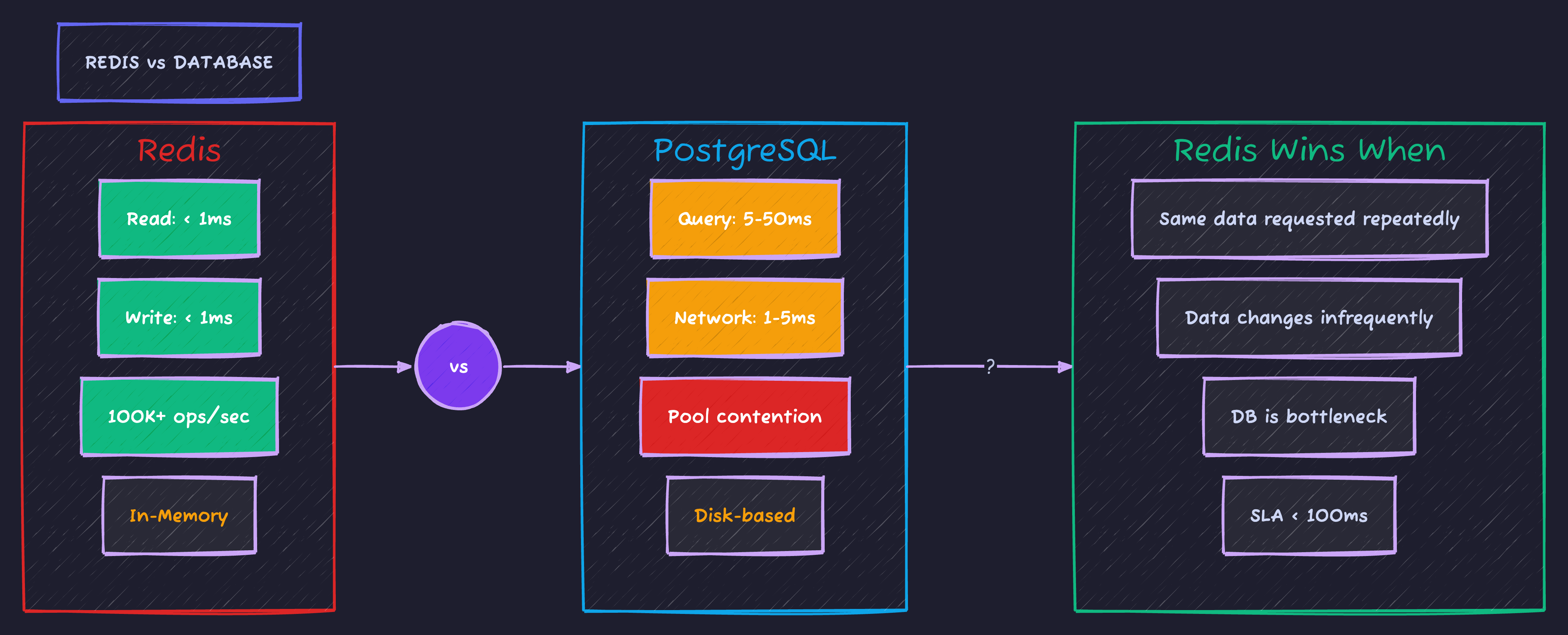
Sub-millisecond reads vs 5-50ms database queries. That’s the difference between a snappy UI and users hitting refresh.
Setup: Spring Boot + Redis
<dependency>
    <groupId>org.springframework.boot</groupId>
    <artifactId>spring-boot-starter-data-redis</artifactId>
</dependency>
<dependency>
    <groupId>org.springframework.boot</groupId>
    <artifactId>spring-boot-starter-cache</artifactId>
</dependency>spring:
data:
redis:
host: localhost
port: 6379
timeout: 2000ms
lettuce:
pool:
max-active: 8
max-idle: 8
min-idle: 2@Configuration
@EnableCaching
public class RedisConfig {
@Bean
public RedisCacheConfiguration cacheConfiguration() {
return RedisCacheConfiguration.defaultCacheConfig()
.entryTtl(Duration.ofMinutes(10))
.disableCachingNullValues()
.serializeKeysWith(
RedisSerializationContext.SerializationPair.fromSerializer(new StringRedisSerializer()))
.serializeValuesWith(
RedisSerializationContext.SerializationPair.fromSerializer(new GenericJackson2JsonRedisSerializer()));
}
@Bean
public RedisCacheManager cacheManager(RedisConnectionFactory factory) {
return RedisCacheManager.builder(factory)
.cacheDefaults(cacheConfiguration())
.withCacheConfiguration("users",
cacheConfiguration().entryTtl(Duration.ofHours(1)))
.withCacheConfiguration("products",
cacheConfiguration().entryTtl(Duration.ofMinutes(30)))
.build();
}
}Pattern 1: Cache-Aside (Most Common)
How it works: Application manages cache directly. Check cache first, fetch from DB if miss, update cache.
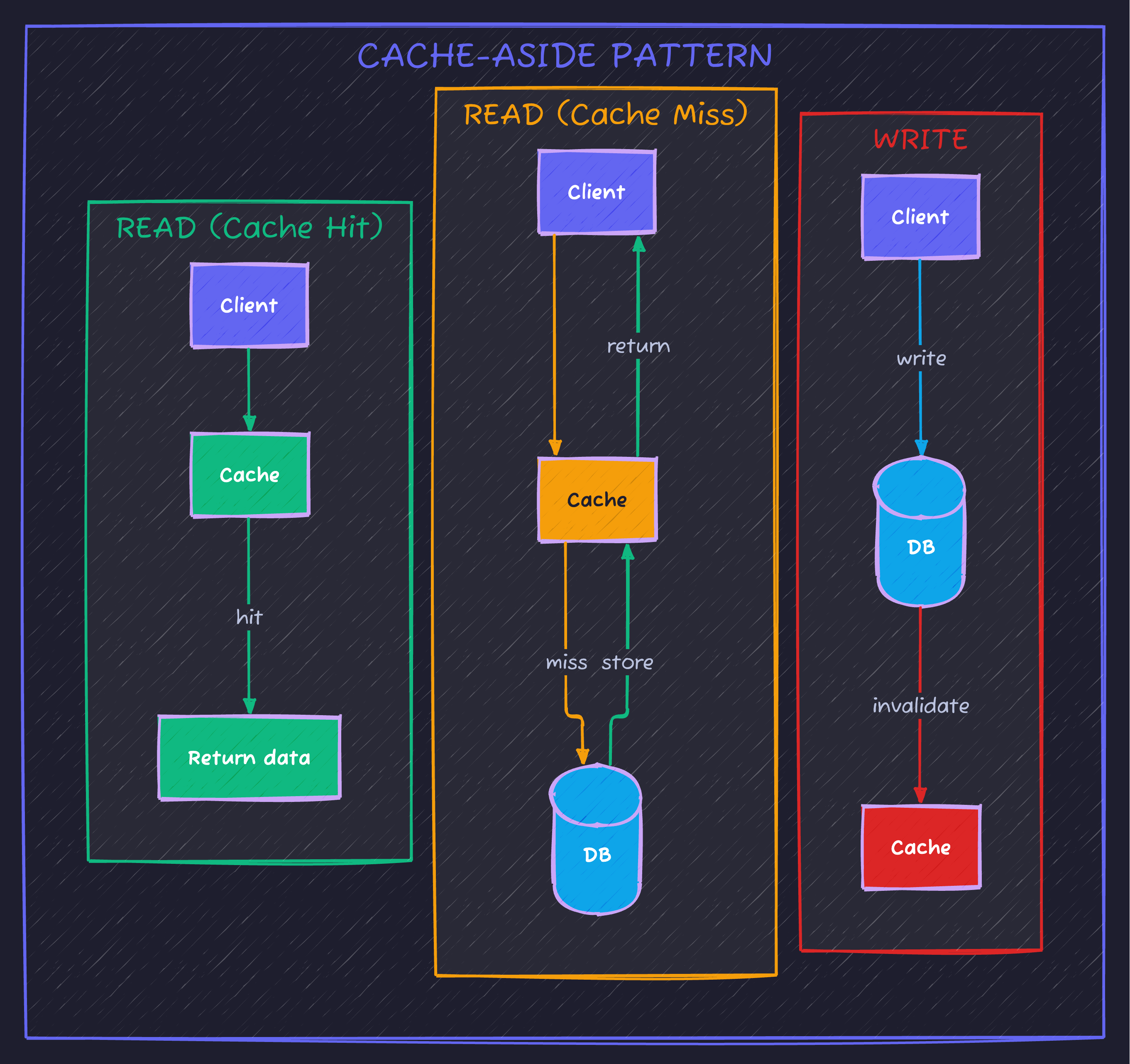
Implementation with @Cacheable
@Service
public class UserService {

    private final UserRepository userRepository;

    @Cacheable(value = "users", key = "#id")
    public User findById(Long id) {
        log.info("Cache miss for user {}", id);  // Only logs on miss
        return userRepository.findById(id)
            .orElseThrow(() -> new UserNotFoundException(id));
    }

    @Cacheable(value = "users", key = "#email")
    public User findByEmail(String email) {
        return userRepository.findByEmail(email)
            .orElseThrow(() -> new UserNotFoundException(email));
    }

    @CachePut(value = "users", key = "#result.id")
    public User create(String email, String name) {
        User user = new User(email, name);
        return userRepository.save(user);
    }

    @CacheEvict(value = "users", key = "#id")
    public void delete(Long id) {
        userRepository.deleteById(id);
    }

    @CacheEvict(value = "users", allEntries = true)
    public void clearUserCache() {
        // Clears entire user cache
    }
}
The Update Problem
// ❌ WRONG: Cache becomes stale
@Transactional
public User update(Long id, String newName) {
    User user = userRepository.findById(id).orElseThrow();
    user.setName(newName);
    return userRepository.save(user);
    // Cache still has old data!
}

// ✅ CORRECT: Evict then update
@CacheEvict(value = "users", key = "#id")
@Transactional
public User update(Long id, String newName) {
    User user = userRepository.findById(id).orElseThrow();
    user.setName(newName);
    return userRepository.save(user);
}

// ✅ ALSO CORRECT: Update cache with result
@CachePut(value = "users", key = "#id")
@Transactional
public User update(Long id, String newName) {
    User user = userRepository.findById(id).orElseThrow();
    user.setName(newName);
    return userRepository.save(user);
}
Pattern 2: Write-Through
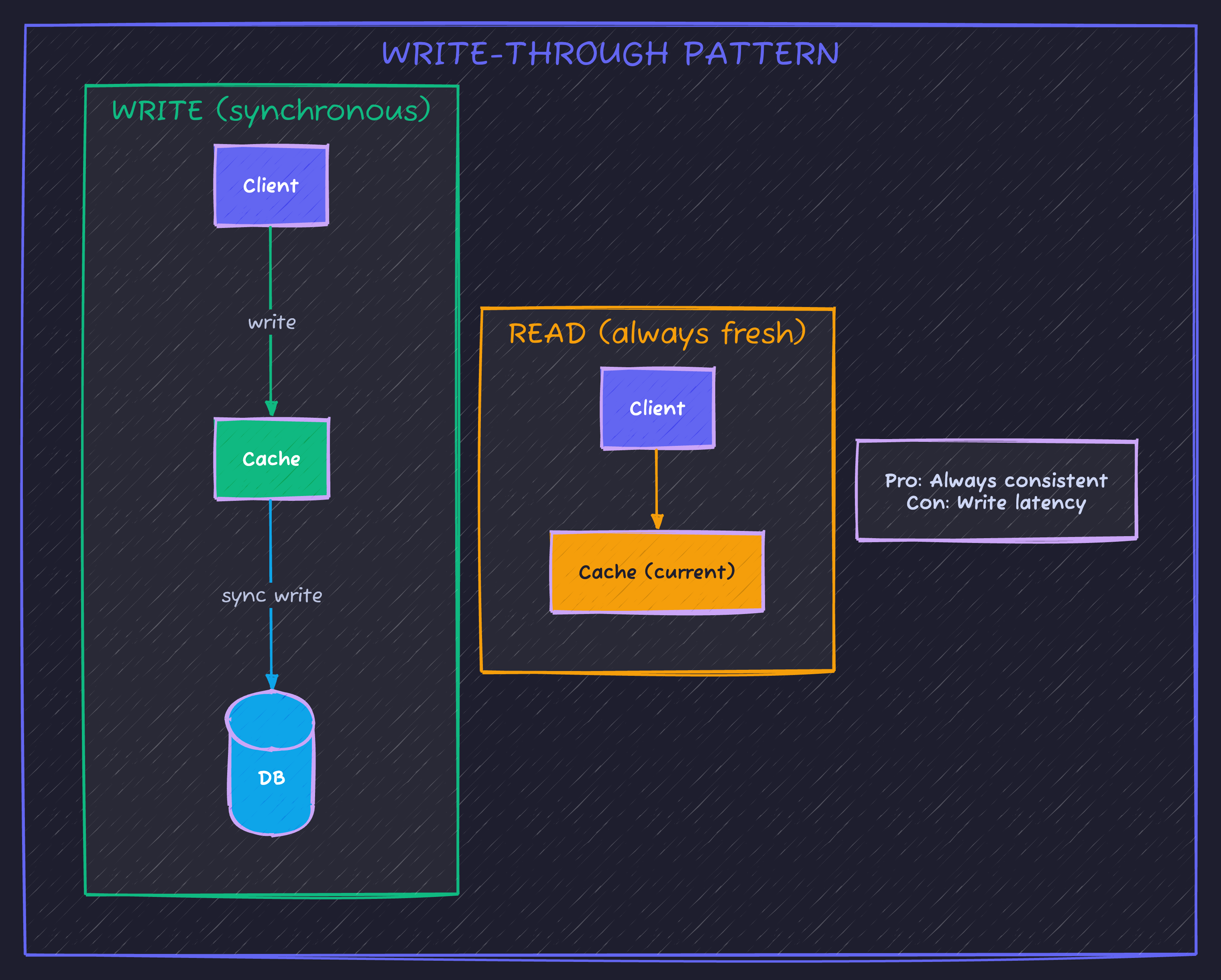
How it works: Writes go to cache AND database atomically. Cache is always current.
@Service
public class ProductService {

    private final ProductRepository productRepository;
    private final RedisTemplate<String, Product> redisTemplate;

    @Transactional
    public Product save(Product product) {
        // Write to database first
        Product saved = productRepository.save(product);

        // Then update cache
        String key = "product:" + saved.getId();
        redisTemplate.opsForValue().set(key, saved, Duration.ofHours(1));

        return saved;
    }

    public Product findById(Long id) {
        String key = "product:" + id;

        // Check cache first
        Product cached = redisTemplate.opsForValue().get(key);
        if (cached != null) {
            return cached;
        }

        // Cache miss - fetch and cache
        Product product = productRepository.findById(id)
            .orElseThrow(() -> new ProductNotFoundException(id));

        redisTemplate.opsForValue().set(key, product, Duration.ofHours(1));
        return product;
    }
}
Pattern 3: Write-Behind (Write-Back)
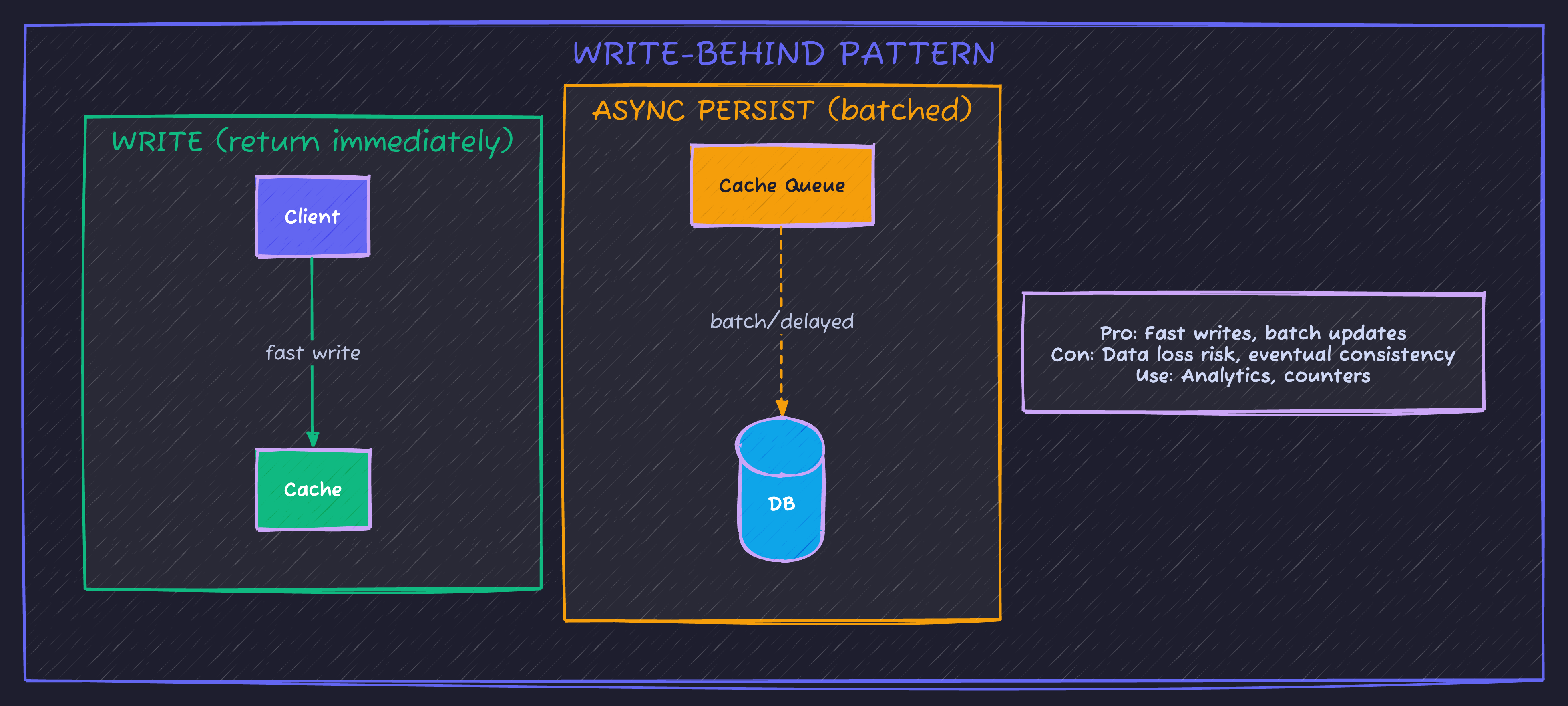
How it works: Write to cache immediately, asynchronously persist to DB later.
@Service
public class PageViewService {

    private final StringRedisTemplate redisTemplate;
    private final PageViewRepository repository;

    // Increment counter in Redis (fast)
    public void recordView(String pageId) {
        redisTemplate.opsForValue().increment("pageview:" + pageId);
    }

    // Batch persist to DB (scheduled)
    @Scheduled(fixedRate = 60000)  // Every minute
    public void persistViewCounts() {
        Set<String> keys = redisTemplate.keys("pageview:*");
        if (keys == null || keys.isEmpty()) return;

        Map<String, Long> counts = new HashMap<>();
        for (String key : keys) {
            String pageId = key.replace("pageview:", "");
            String value = redisTemplate.opsForValue().getAndDelete(key);
            if (value != null) {
                counts.put(pageId, Long.parseLong(value));
            }
        }

        // Batch insert to database
        repository.batchUpdateCounts(counts);
    }
}
The Thundering Herd Problem
When cache expires, hundreds of requests hit the database simultaneously. This is one of the most dangerous caching pitfalls:
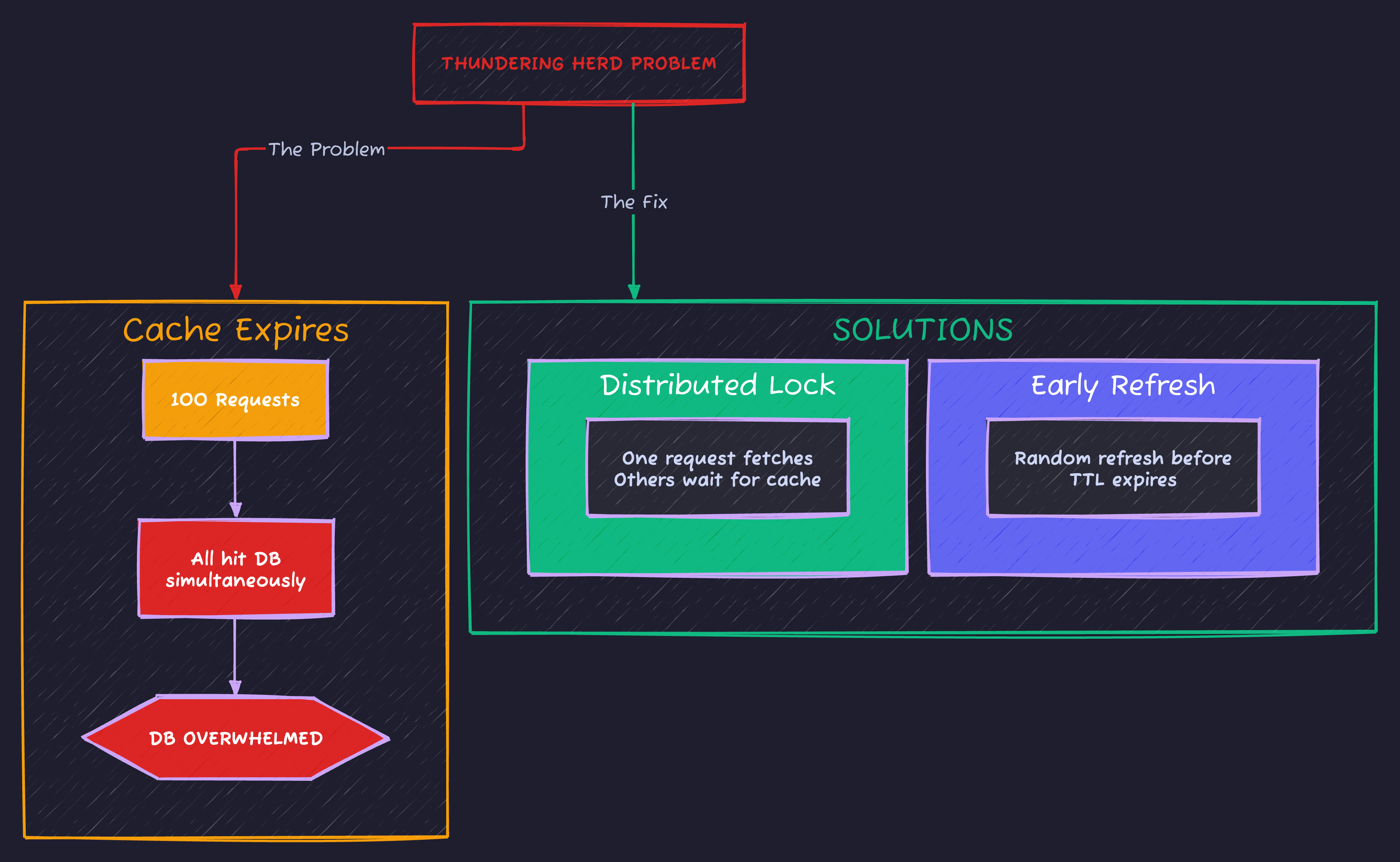
Two battle-tested solutions: distributed locks ensure only one request fetches while others wait, or probabilistic early refresh prevents cache from ever actually expiring.
Solution: Distributed Lock
@Service
public class CachedProductService {

    private final ProductRepository productRepository;
    private final RedisTemplate<String, Object> redisTemplate;
    private final RedisLockRegistry lockRegistry;

    public Product findById(Long id) {
        String cacheKey = "product:" + id;

        // Try cache first
        Product cached = (Product) redisTemplate.opsForValue().get(cacheKey);
        if (cached != null) {
            return cached;
        }

        // Cache miss - use lock to prevent thundering herd
        String lockKey = "lock:product:" + id;
        Lock lock = lockRegistry.obtain(lockKey);

        try {
            // Try to acquire lock (wait up to 5 seconds)
            if (lock.tryLock(5, TimeUnit.SECONDS)) {
                try {
                    // Double-check cache (another thread might have populated it)
                    cached = (Product) redisTemplate.opsForValue().get(cacheKey);
                    if (cached != null) {
                        return cached;
                    }

                    // Fetch from DB and cache
                    Product product = productRepository.findById(id)
                        .orElseThrow(() -> new ProductNotFoundException(id));

                    redisTemplate.opsForValue().set(cacheKey, product, Duration.ofHours(1));
                    return product;
                } finally {
                    lock.unlock();
                }
            } else {
                // Couldn't get lock - another thread is fetching
                // Wait a bit and try cache again
                Thread.sleep(100);
                cached = (Product) redisTemplate.opsForValue().get(cacheKey);
                if (cached != null) {
                    return cached;
                }
                // Still no cache - fall back to DB (rare)
                return productRepository.findById(id)
                    .orElseThrow(() -> new ProductNotFoundException(id));
            }
        } catch (InterruptedException e) {
            Thread.currentThread().interrupt();
            throw new RuntimeException("Lock acquisition interrupted", e);
        }
    }
}
Solution: Probabilistic Early Refresh
@Service
public class SmartCacheService {

    private final RedisTemplate<String, CacheEntry> redisTemplate;
    private final Random random = new Random();

    public <T> T getOrFetch(String key, Duration ttl, Supplier<T> fetcher) {
        CacheEntry entry = redisTemplate.opsForValue().get(key);

        if (entry != null) {
            // Check if we should proactively refresh
            long remainingTtl = entry.expiresAt() - System.currentTimeMillis();
            long softTtl = ttl.toMillis() * 8 / 10;  // 80% of TTL

            if (remainingTtl > softTtl) {
                // Fresh enough - return immediately
                return (T) entry.value();
            }

            // Getting stale - probabilistic refresh
            // Higher probability as we get closer to expiration
            double refreshProbability = 1.0 - (remainingTtl / (double) softTtl);
            if (random.nextDouble() < refreshProbability) {
                // This request will refresh (async)
                CompletableFuture.runAsync(() -> refresh(key, ttl, fetcher));
            }

            // Return current value while refresh happens
            return (T) entry.value();
        }

        // Cache miss - fetch synchronously
        return refresh(key, ttl, fetcher);
    }

    private <T> T refresh(String key, Duration ttl, Supplier<T> fetcher) {
        T value = fetcher.get();
        CacheEntry entry = new CacheEntry(value, System.currentTimeMillis() + ttl.toMillis());
        redisTemplate.opsForValue().set(key, entry, ttl);
        return value;
    }

    record CacheEntry(Object value, long expiresAt) {}
}
Cache Invalidation Strategies
“There are only two hard things in Computer Science: cache invalidation and naming things.” - Phil Karlton
Strategy 1: TTL-Based (Time-To-Live)
// Simple - cache expires after fixed time
@Cacheable(value = "products", key = "#id")
// TTL configured in RedisCacheConfiguration
Pros: Simple, eventually consistent Cons: Stale data for up to TTL duration
Strategy 2: Event-Based Invalidation
@Service
public class ProductService {

    private final ApplicationEventPublisher eventPublisher;

    @Transactional
    public Product update(Long id, UpdateProductRequest request) {
        Product product = productRepository.findById(id).orElseThrow();
        product.setName(request.name());
        product.setPrice(request.price());
        Product saved = productRepository.save(product);

        // Publish event
        eventPublisher.publishEvent(new ProductUpdatedEvent(saved.getId()));

        return saved;
    }
}

@Component
public class CacheInvalidationListener {

    private final CacheManager cacheManager;

    @EventListener
    public void onProductUpdated(ProductUpdatedEvent event) {
        Cache cache = cacheManager.getCache("products");
        if (cache != null) {
            cache.evict(event.productId());
        }
    }

    // For distributed systems, use Redis Pub/Sub or Kafka
    @EventListener
    public void onCategoryUpdated(CategoryUpdatedEvent event) {
        // Invalidate all products in this category
        // This is where it gets complex...
    }
}
Strategy 3: Version-Based Keys
@Service
public class VersionedCacheService {

    private final StringRedisTemplate redisTemplate;

    public Product getProduct(Long id) {
        // Get current version
        String version = redisTemplate.opsForValue().get("product:version:" + id);
        if (version == null) version = "1";

        // Cache key includes version
        String cacheKey = "product:" + id + ":v" + version;

        Product cached = getFromCache(cacheKey);
        if (cached != null) {
            return cached;
        }

        // Fetch and cache with versioned key
        Product product = fetchFromDb(id);
        putInCache(cacheKey, product);
        return product;
    }

    public void invalidateProduct(Long id) {
        // Increment version - old cache key becomes orphaned
        redisTemplate.opsForValue().increment("product:version:" + id);
        // Old cached values will eventually expire via TTL
    }
}
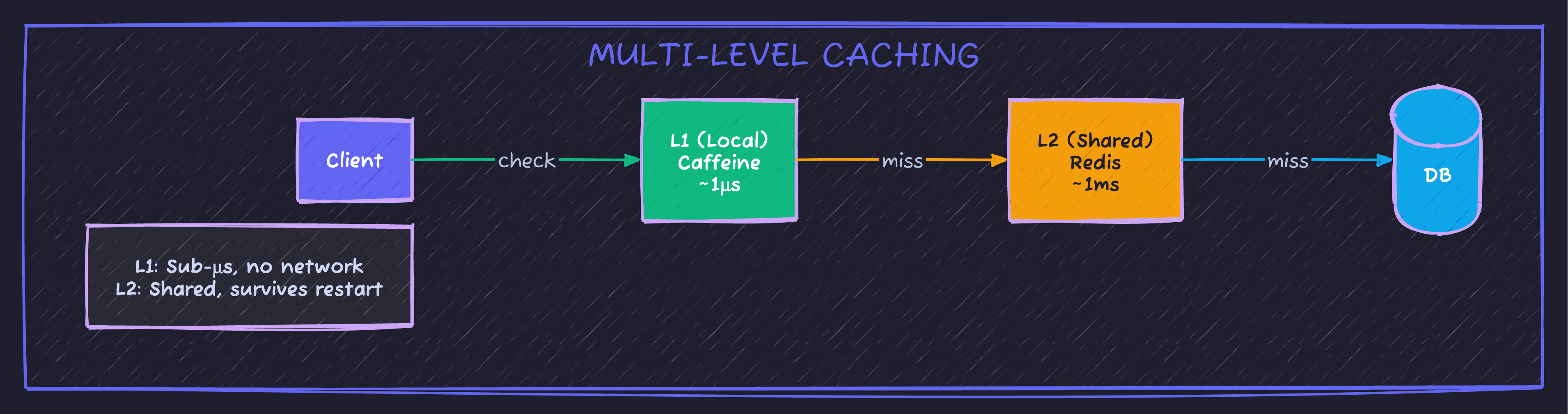
Multi-Level Caching (L1 + L2)
@Configuration
@EnableCaching
public class MultiLevelCacheConfig {

    @Bean
    public CacheManager cacheManager(RedisConnectionFactory redisFactory) {
        // L1: Caffeine (local, fast)
        CaffeineCacheManager caffeineManager = new CaffeineCacheManager();
        caffeineManager.setCaffeine(Caffeine.newBuilder()
            .maximumSize(1000)
            .expireAfterWrite(Duration.ofMinutes(5)));

        // L2: Redis (distributed, shared)
        RedisCacheManager redisManager = RedisCacheManager.builder(redisFactory)
            .cacheDefaults(RedisCacheConfiguration.defaultCacheConfig()
                .entryTtl(Duration.ofMinutes(30)))
            .build();

        // Composite: Check L1 first, then L2
        return new CompositeCacheManager(caffeineManager, redisManager);
    }
}
Monitoring Cache Performance
@Component
public class CacheMetrics {

    private final MeterRegistry meterRegistry;
    private final Counter cacheHits;
    private final Counter cacheMisses;
    private final Timer cacheFetchTime;

    public CacheMetrics(MeterRegistry meterRegistry) {
        this.meterRegistry = meterRegistry;
        this.cacheHits = Counter.builder("cache.hits")
            .tag("cache", "products")
            .register(meterRegistry);
        this.cacheMisses = Counter.builder("cache.misses")
            .tag("cache", "products")
            .register(meterRegistry);
        this.cacheFetchTime = Timer.builder("cache.fetch.time")
            .tag("cache", "products")
            .register(meterRegistry);
    }

    public <T> T getWithMetrics(String key, Supplier<T> cacheGetter, Supplier<T> dbFetcher) {
        return cacheFetchTime.record(() -> {
            T cached = cacheGetter.get();
            if (cached != null) {
                cacheHits.increment();
                return cached;
            }
            cacheMisses.increment();
            return dbFetcher.get();
        });
    }
}
# Prometheus metrics to watch
- cache_hits_total
- cache_misses_total
- cache_hit_ratio (hits / (hits + misses))
- cache_fetch_time_seconds (p99)When NOT to Cache
| Scenario | Why |
|---|---|
| Data changes every request | Cache hit rate ≈ 0% |
| User-specific data | Cache grows unboundedly |
| Real-time requirements | Any staleness is unacceptable |
| Write-heavy workloads | Invalidation overhead > benefit |
| Small datasets | Database is fast enough |
Code Sample
Full working example: github.com/Moshiour027/techyowls-io-blog-public/redis-caching-guide
Summary
| Pattern | Best For | Trade-off |
|---|---|---|
| Cache-Aside | General use | Cold start latency |
| Write-Through | Consistency priority | Write latency |
| Write-Behind | Write performance | Data loss risk |
| Multi-Level | Extreme performance | Complexity |
The golden rule: Cache only what you can afford to be stale, for as long as you can tolerate.
Start with @Cacheable and TTL. Add complexity only when metrics prove you need it.
Advertisement
Moshiour Rahman
Software Architect & AI Engineer
Enterprise software architect with deep expertise in financial systems, distributed architecture, and AI-powered applications. Building large-scale systems at Fortune 500 companies. Specializing in LLM orchestration, multi-agent systems, and cloud-native solutions. I share battle-tested patterns from real enterprise projects.
Related Articles
Redis Caching with Spring Boot: Complete Implementation Guide
Master Redis caching in Spring Boot applications. Learn cache configuration, annotations, TTL management, and performance optimization techniques.
Spring BootSpring Boot 3 Virtual Threads: Complete Guide to Java 21 Concurrency
Master virtual threads in Spring Boot 3. Learn configuration, performance benchmarks, when to use them, common pitfalls, and production-ready patterns for high-throughput applications.
Spring BootIntroduction to Spring Data Redis
Learn how to integrate Redis with Spring Boot using Spring Data Redis. Complete guide with Docker setup and practical examples.
Comments
Comments are powered by GitHub Discussions.
Configure Giscus at giscus.app to enable comments.