API Design Part 1: HTTP & REST Fundamentals
Master HTTP methods, status codes, and REST maturity model. The foundation every API developer needs - from GET/POST basics to idempotency and proper status code selection.
Moshiour Rahman
Advertisement
API Design Mastery Series
This is Part 1 of our comprehensive API Design series. By the end, you’ll master everything from HTTP fundamentals to production-grade system design patterns.
| Part | Topic | Level |
|---|---|---|
| 1 | HTTP & REST Fundamentals | Beginner |
| 2 | Security & Authentication | Beginner |
| 3 | Rate Limiting & Pagination | Intermediate |
| 4 | Versioning & Idempotency | Intermediate |
| 5 | Caching Strategies | Intermediate |
| 6 | GraphQL & gRPC | Intermediate |
| 7 | Resilience & Observability | Advanced |
| 8 | Production Mastery | Advanced |
This is not another surface-level API tutorial. This is the comprehensive reference that senior engineers wish they had when they started. Let’s start with the foundations that every API is built upon.
The Complete HTTP Method Reference
Every developer knows GET and POST. But understanding the full HTTP vocabulary separates senior engineers from juniors.
| Method | Idempotent | Safe | Cacheable | Request Body | Use Case |
|---|---|---|---|---|---|
| GET | Yes | Yes | Yes | No | Retrieve resources |
| POST | No | No | No | Yes | Create resources, complex queries |
| PUT | Yes | No | No | Yes | Full resource replacement |
| PATCH | No | No | No | Yes | Partial updates |
| DELETE | Yes | No | No | Optional | Remove resources |
| HEAD | Yes | Yes | Yes | No | Get headers only (check existence) |
| OPTIONS | Yes | Yes | No | No | CORS preflight, discover methods |
| TRACE | Yes | Yes | No | No | Debug request path (disable in prod) |
| CONNECT | No | No | No | No | Establish tunnel (HTTPS proxy) |
The PUT vs PATCH Debate (Interview Deep Dive)
// The Order resource
interface Order {
  id: string;
  customerId: string;
  items: OrderItem[];
  status: 'pending' | 'processing' | 'shipped' | 'delivered';
  shippingAddress: Address;
  totalAmount: number;
  createdAt: Date;
  updatedAt: Date;
}

// PUT: Full replacement - you MUST send everything
// PUT /orders/123
{
  "customerId": "cust_456",
  "items": [{ "productId": "prod_789", "quantity": 2 }],
  "status": "processing",
  "shippingAddress": {
    "street": "123 Main St",
    "city": "NYC",
    "zip": "10001"
  },
  "totalAmount": 99.99
}

// If you omit shippingAddress, it becomes null/undefined!
// This is why PUT is dangerous for partial updates

// PATCH: Partial update - only what changes
// PATCH /orders/123
{
  "status": "shipped"
}

// Only status changes, everything else preserved
Interview Question: “When would you use PUT over PATCH?”
Strong Answer: “PUT for complete resource replacement where client owns the full state, like updating a configuration file. PATCH for field-level updates in CRUD applications. But here’s the nuance: PUT is idempotent by definition - sending the same PUT request twice has the same effect. PATCH’s idempotency depends on implementation. If PATCH increments a counter ({"views": "+1"}), it’s not idempotent. This matters for retry logic in distributed systems.”
Follow-up: “How would you make PATCH idempotent?”
Answer: “Use absolute values instead of deltas, add version/ETag checks, or use JSON Patch (RFC 6902) with test operations.”
HTTP Status Codes: The Complete Mental Model
Status codes aren’t just numbers - they’re a contract between your API and clients.
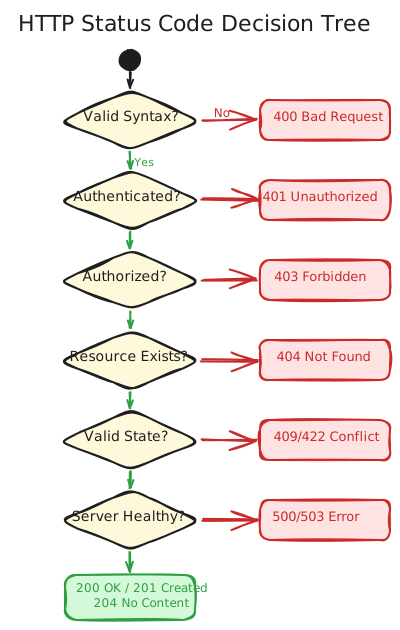
The Status Codes You Actually Need
// response-helpers.ts - Production-ready response utilities

interface ApiResponse<T> {
  success: boolean;
  data?: T;
  error?: {
    code: string;
    message: string;
    details?: Record<string, string[]>;
    traceId?: string;
  };
  meta?: {
    pagination?: PaginationMeta;
    rateLimit?: RateLimitMeta;
  };
}

// Success responses
export const ok = <T>(data: T, meta?: ApiResponse<T>['meta']): Response =>
  Response.json({ success: true, data, meta }, { status: 200 });

export const created = <T>(data: T, location?: string): Response => {
  const headers = location ? { Location: location } : {};
  return Response.json({ success: true, data }, { status: 201, headers });
};

export const accepted = (trackingUrl: string): Response =>
  Response.json(
    { success: true, data: { trackingUrl } },
    { status: 202, headers: { Location: trackingUrl } }
  );

export const noContent = (): Response =>
  new Response(null, { status: 204 });

// Client error responses
export const badRequest = (message: string, details?: Record<string, string[]>): Response =>
  Response.json({
    success: false,
    error: { code: 'BAD_REQUEST', message, details }
  }, { status: 400 });

export const unauthorized = (message = 'Authentication required'): Response =>
  Response.json({
    success: false,
    error: { code: 'UNAUTHORIZED', message }
  }, { status: 401, headers: { 'WWW-Authenticate': 'Bearer' } });

export const forbidden = (message = 'Insufficient permissions'): Response =>
  Response.json({
    success: false,
    error: { code: 'FORBIDDEN', message }
  }, { status: 403 });

export const notFound = (resource = 'Resource'): Response =>
  Response.json({
    success: false,
    error: { code: 'NOT_FOUND', message: `${resource} not found` }
  }, { status: 404 });

export const conflict = (message: string): Response =>
  Response.json({
    success: false,
    error: { code: 'CONFLICT', message }
  }, { status: 409 });

export const unprocessable = (message: string, details?: Record<string, string[]>): Response =>
  Response.json({
    success: false,
    error: { code: 'UNPROCESSABLE_ENTITY', message, details }
  }, { status: 422 });

export const tooManyRequests = (retryAfter: number): Response =>
  Response.json({
    success: false,
    error: {
      code: 'RATE_LIMITED',
      message: `Rate limit exceeded. Retry after ${retryAfter} seconds`
    }
  }, {
    status: 429,
    headers: { 'Retry-After': String(retryAfter) }
  });

// Server error responses
export const serverError = (traceId: string): Response =>
  Response.json({
    success: false,
    error: {
      code: 'INTERNAL_ERROR',
      message: 'An unexpected error occurred',
      traceId
    }
  }, { status: 500 });

export const serviceUnavailable = (retryAfter: number): Response =>
  Response.json({
    success: false,
    error: { code: 'SERVICE_UNAVAILABLE', message: 'Service temporarily unavailable' }
  }, {
    status: 503,
    headers: { 'Retry-After': String(retryAfter) }
  });
Interview Question: “What’s the difference between 401 and 403?”
Strong Answer: “401 means ‘I don’t know who you are’ - authentication failed or missing. 403 means ‘I know who you are, but you can’t do this’ - authenticated but not authorized. A common mistake is returning 403 for invalid tokens - that should be 401. And here’s a subtle point: some APIs return 404 instead of 403 for resources the user shouldn’t even know exist - this prevents information disclosure.”
Follow-up: “When would you use 422 vs 400?”
Answer: “400 for syntactically invalid requests - malformed JSON, wrong content-type, missing required fields. 422 for semantically invalid requests - the JSON is valid but the values don’t make business sense. For example, creating an order with quantity=-5 is 422, but {quantity: 'five'} is 400.”
REST Maturity Model (Richardson)
Understanding where your API sits on the maturity model helps communicate design decisions.
| Level | Example | Characteristics |
|---|---|---|
| 3 - HATEOAS | GET /orders/123 returns _links: {cancel, pay} | Clients discover actions from responses |
| 2 - HTTP Verbs | GET /orders, POST /orders, DELETE /orders/123 | Proper HTTP methods and status codes |
| 1 - Resources | POST /getOrder, POST /createOrder | Multiple endpoints, RPC-style |
| 0 - POX | POST /api with {action: "getOrder"} | Single endpoint, SOAP-like |
Most production APIs target Level 2. HATEOAS (Level 3) is rarely worth the complexity unless you’re building a truly hypermedia-driven application.
URL Design Patterns That Scale
Resource Naming Conventions
| Pattern | Good | Bad | Why |
|---|---|---|---|
| Plural nouns | /users, /orders | /user, /order | Consistency, collection semantics |
| Lowercase | /api/users | /api/Users | URLs are case-sensitive |
| Hyphens | /user-profiles | /user_profiles, /userProfiles | URL-friendly, readable |
| No verbs | POST /orders | POST /createOrder | HTTP method is the verb |
| Hierarchical | /users/123/orders | /orders?userId=123 | Shows ownership clearly |
Nested vs Flat Resources
// Hierarchical (shows relationship, limited scope)
GET /users/123/orders          // Orders for user 123
GET /users/123/orders/456      // Order 456 of user 123

// Flat (flexible, good for cross-cutting queries)
GET /orders?userId=123         // Same result, but can filter by more
GET /orders?status=pending&createdAfter=2025-01-01

// Rule of thumb:
// - Nest when child ONLY exists under parent
// - Flatten when child can be queried independently
Action Endpoints (When REST Doesn’t Fit)
// Some operations don't map to CRUD - use sub-resources
POST /orders/123/cancel        // Cancel order (not DELETE - order still exists)
POST /orders/123/refund        // Refund order
POST /users/123/verify-email   // Trigger verification
POST /reports/generate         // Start async report generation

// Return 200 for immediate actions, 202 for async
Content Negotiation
// Request specific format
fetch('/api/users', {
  headers: {
    'Accept': 'application/json',           // Preferred format
    'Accept-Language': 'en-US,en;q=0.9',    // Preferred language
    'Accept-Encoding': 'gzip, deflate'      // Compression
  }
});

// Server responds with what it provides
// Content-Type: application/json; charset=utf-8
// Content-Language: en-US
// Content-Encoding: gzip

// Version negotiation via Accept header
'Accept': 'application/vnd.api+json;version=2'
Common Mistakes to Avoid
| Mistake | Problem | Fix |
|---|---|---|
GET /users/delete/123 | Using GET for mutations | DELETE /users/123 |
POST /search | POST for reads (not cacheable) | GET /search?q=term |
| 200 for errors | Breaks client error handling | Use proper 4xx/5xx |
404 for empty list | Empty list isn’t “not found” | 200 with [] |
Ignoring Accept header | Forces single format | Support content negotiation |
PUT for partial updates | Can accidentally nullify fields | Use PATCH |
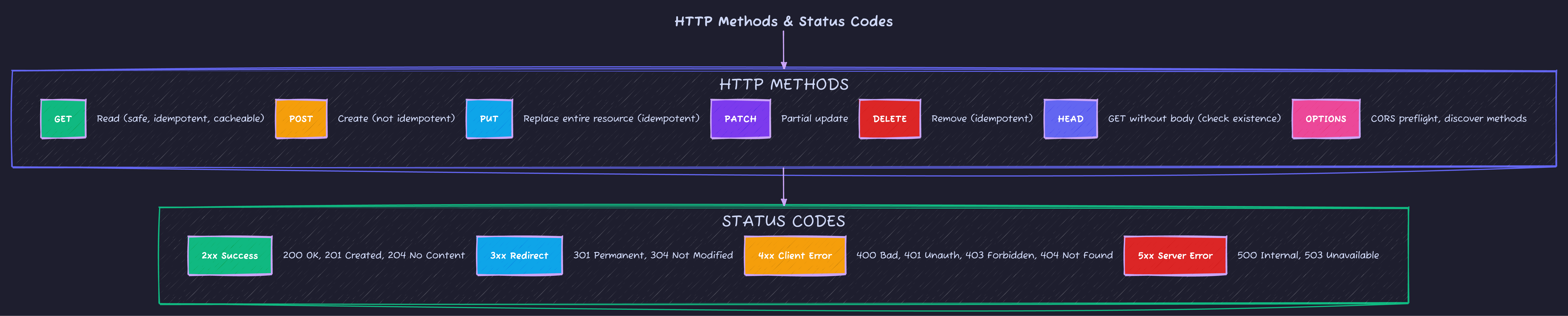
Quick Reference Card
What’s Next?
Now that you understand HTTP fundamentals and REST principles, Part 2: Security & Authentication covers JWT implementation, OAuth 2.0 flows, and the security layers that protect production APIs.
Advertisement
Moshiour Rahman
Software Architect & AI Engineer
Enterprise software architect with deep expertise in financial systems, distributed architecture, and AI-powered applications. Building large-scale systems at Fortune 500 companies. Specializing in LLM orchestration, multi-agent systems, and cloud-native solutions. I share battle-tested patterns from real enterprise projects.
Related Articles
API Design Mastery: Complete 8-Part Series
Master API design from HTTP fundamentals to production systems. 8-part comprehensive guide covering REST, security, caching, GraphQL, gRPC, resilience, and interview preparation.
System DesignAPI Design Part 4: Versioning & Idempotency
Master API versioning strategies and idempotency patterns. Learn URL vs header versioning, version lifecycle management, and Stripe-style idempotency keys for reliable APIs.
System DesignAPI Design Part 8: Production Mastery
Master real interview questions, production debugging, multi-tenancy, streaming, cost-aware design, and API governance. Complete your journey to senior API engineer.
Comments
Comments are powered by GitHub Discussions.
Configure Giscus at giscus.app to enable comments.