API Design Part 2: Security & Authentication
Master API security layers, JWT implementation, OAuth 2.0 flows with PKCE. Production-grade patterns for authentication and authorization in modern APIs.
Moshiour Rahman
Advertisement
API Design Mastery Series
This is Part 2 of our comprehensive API Design series.
| Part | Topic | Level |
|---|---|---|
| 1 | HTTP & REST Fundamentals | Beginner |
| 2 | Security & Authentication | Beginner |
| 3 | Rate Limiting & Pagination | Intermediate |
| 4 | Versioning & Idempotency | Intermediate |
| 5 | Caching Strategies | Intermediate |
| 6 | GraphQL & gRPC | Intermediate |
| 7 | Resilience & Observability | Advanced |
| 8 | Production Mastery | Advanced |
The Security Layers
API security isn’t a single concern - it’s a layered defense strategy. Each layer protects against different attack vectors.

| Layer | Components | Protects Against |
|---|---|---|
| Application | Input validation, output encoding | SQL injection, XSS |
| Session/Token | JWT validation, session management | Session hijacking |
| Authentication | OAuth 2.0, API Keys, mTLS | Identity spoofing |
| Rate Limiting | Request throttling, quotas | DDoS, abuse |
| Transport | TLS 1.3, HSTS | Man-in-the-middle |
| Network | Firewall, VPC isolation | Unauthorized access |
Authentication Methods Compared
| Method | Use Case | Pros | Cons |
|---|---|---|---|
| API Keys | Server-to-server, simple integrations | Easy to implement, no expiry needed | Can’t revoke single key easily, often over-permissioned |
| JWT | Stateless auth, microservices | No DB lookup, contains claims | Can’t revoke before expiry, size grows with claims |
| OAuth 2.0 | Third-party access, user consent | Scoped permissions, standard flows | Complex, requires token exchange |
| mTLS | Service mesh, high-security APIs | Strong identity, mutual auth | Certificate management overhead |
| Session Cookies | Traditional web apps | Simple, browser handles | Stateful, CSRF vulnerable |
JWT Implementation: Production Grade
// jwt-service.ts - Battle-tested JWT implementation

import { SignJWT, jwtVerify, JWTPayload } from 'jose';
import { createHash, randomBytes } from 'crypto';

interface TokenConfig {
  accessTokenSecret: Uint8Array;
  refreshTokenSecret: Uint8Array;
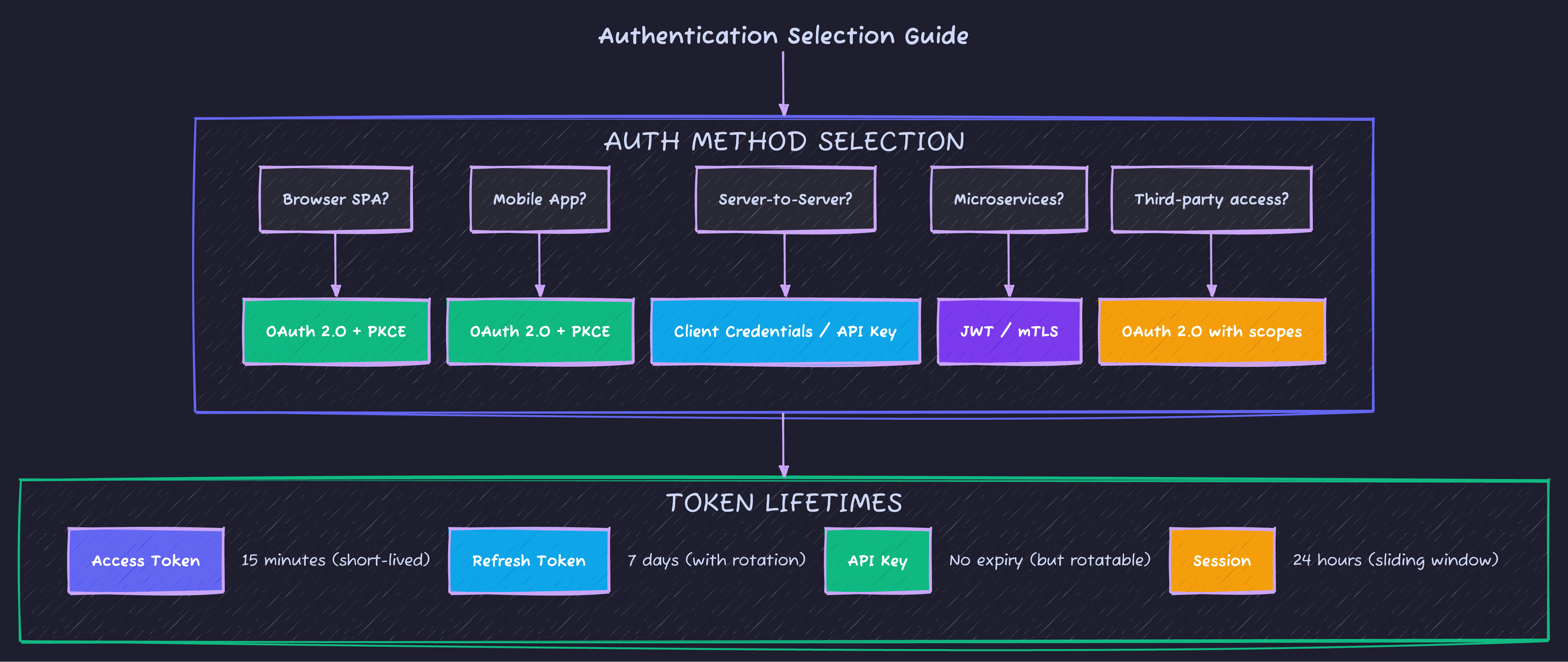
  accessTokenTTL: string;      // '15m'
  refreshTokenTTL: string;     // '7d'
  issuer: string;
  audience: string;
}

interface UserClaims extends JWTPayload {
  sub: string;           // User ID
  email: string;
  roles: string[];
  permissions: string[];
  sessionId: string;     // For revocation
}

interface TokenPair {
  accessToken: string;
  refreshToken: string;
  expiresIn: number;
  tokenType: 'Bearer';
}

export class JWTService {
  private config: TokenConfig;
  private revokedSessions: Set<string> = new Set(); // In prod: Redis

  constructor(config: TokenConfig) {
    this.config = config;
  }

  async generateTokenPair(user: {
    id: string;
    email: string;
    roles: string[];
    permissions: string[];
  }): Promise<TokenPair> {
    const sessionId = randomBytes(16).toString('hex');
    const now = Math.floor(Date.now() / 1000);

    // Access token - short-lived, contains full claims
    const accessToken = await new SignJWT({
      email: user.email,
      roles: user.roles,
      permissions: user.permissions,
      sessionId
    })
      .setProtectedHeader({ alg: 'HS256', typ: 'JWT' })
      .setSubject(user.id)
      .setIssuer(this.config.issuer)
      .setAudience(this.config.audience)
      .setIssuedAt(now)
      .setExpirationTime(this.config.accessTokenTTL)
      .setJti(randomBytes(16).toString('hex')) // Unique token ID
      .sign(this.config.accessTokenSecret);

    // Refresh token - long-lived, minimal claims
    const refreshToken = await new SignJWT({
      sessionId,
      type: 'refresh'
    })
      .setProtectedHeader({ alg: 'HS256', typ: 'JWT' })
      .setSubject(user.id)
      .setIssuer(this.config.issuer)
      .setAudience(this.config.audience)
      .setIssuedAt(now)
      .setExpirationTime(this.config.refreshTokenTTL)
      .setJti(randomBytes(16).toString('hex'))
      .sign(this.config.refreshTokenSecret);

    return {
      accessToken,
      refreshToken,
      expiresIn: 900, // 15 minutes in seconds
      tokenType: 'Bearer'
    };
  }

  async verifyAccessToken(token: string): Promise<UserClaims> {
    try {
      const { payload } = await jwtVerify(token, this.config.accessTokenSecret, {
        issuer: this.config.issuer,
        audience: this.config.audience
      });

      // Check if session was revoked
      if (this.revokedSessions.has(payload.sessionId as string)) {
        throw new Error('Session revoked');
      }

      return payload as UserClaims;
    } catch (error) {
      if (error instanceof Error) {
        if (error.message.includes('expired')) {
          throw new TokenExpiredError('Access token expired');
        }
        if (error.message.includes('signature')) {
          throw new TokenInvalidError('Invalid token signature');
        }
      }
      throw new TokenInvalidError('Token validation failed');
    }
  }

  async refreshTokens(refreshToken: string): Promise<TokenPair> {
    const { payload } = await jwtVerify(
      refreshToken,
      this.config.refreshTokenSecret,
      {
        issuer: this.config.issuer,
        audience: this.config.audience
      }
    );

    if (payload.type !== 'refresh') {
      throw new TokenInvalidError('Not a refresh token');
    }

    if (this.revokedSessions.has(payload.sessionId as string)) {
      throw new TokenRevokedError('Session has been revoked');
    }

    // In production: Look up user from database
    const user = await this.getUserById(payload.sub as string);

    // Rotate refresh token (invalidate old one)
    this.revokedSessions.add(payload.sessionId as string);

    return this.generateTokenPair(user);
  }

  revokeSession(sessionId: string): void {
    this.revokedSessions.add(sessionId);
  }

  revokeAllUserSessions(userId: string): void {
    // In production: Clear all sessions for user in Redis
    // Pattern: sessions:user:{userId}:*
  }

  private async getUserById(id: string) {
    // Database lookup
    return { id, email: 'user@example.com', roles: ['user'], permissions: [] };
  }
}

// Custom error classes
class TokenExpiredError extends Error {
  constructor(message: string) {
    super(message);
    this.name = 'TokenExpiredError';
  }
}

class TokenInvalidError extends Error {
  constructor(message: string) {
    super(message);
    this.name = 'TokenInvalidError';
  }
}

class TokenRevokedError extends Error {
  constructor(message: string) {
    super(message);
    this.name = 'TokenRevokedError';
  }
}
OAuth 2.0 Flows: When to Use Which
| Flow | Use Case | Security Level |
|---|---|---|
| Authorization Code + PKCE | SPAs, Mobile apps | Recommended |
| Authorization Code | Server-side apps | Good (with secret) |
| Client Credentials | Machine-to-machine | Recommended |
| Resource Owner Password | First-party apps only | Discouraged |
| Implicit | None | Deprecated |
Authorization Code Flow with PKCE (Recommended)
// oauth-pkce.ts - Complete PKCE implementation

import { randomBytes, createHash } from 'crypto';

interface PKCEChallenge {
  codeVerifier: string;
  codeChallenge: string;
  codeChallengeMethod: 'S256';
}

interface OAuthConfig {
  clientId: string;
  redirectUri: string;
  authorizationEndpoint: string;
  tokenEndpoint: string;
  scopes: string[];
}

export function generatePKCE(): PKCEChallenge {
  // Code verifier: 43-128 character random string
  const codeVerifier = randomBytes(32)
    .toString('base64url')
    .slice(0, 43);

  // Code challenge: SHA256 hash of verifier, base64url encoded
  const codeChallenge = createHash('sha256')
    .update(codeVerifier)
    .digest('base64url');

  return {
    codeVerifier,
    codeChallenge,
    codeChallengeMethod: 'S256'
  };
}

export function buildAuthorizationUrl(
  config: OAuthConfig,
  pkce: PKCEChallenge,
  state: string
): string {
  const params = new URLSearchParams({
    response_type: 'code',
    client_id: config.clientId,
    redirect_uri: config.redirectUri,
    scope: config.scopes.join(' '),
    state,
    code_challenge: pkce.codeChallenge,
    code_challenge_method: pkce.codeChallengeMethod
  });

  return `${config.authorizationEndpoint}?${params}`;
}

export async function exchangeCodeForTokens(
  config: OAuthConfig,
  code: string,
  codeVerifier: string
): Promise<{
  accessToken: string;
  refreshToken?: string;
  expiresIn: number;
  tokenType: string;
  scope: string;
}> {
  const response = await fetch(config.tokenEndpoint, {
    method: 'POST',
    headers: {
      'Content-Type': 'application/x-www-form-urlencoded'
    },
    body: new URLSearchParams({
      grant_type: 'authorization_code',
      client_id: config.clientId,
      redirect_uri: config.redirectUri,
      code,
      code_verifier: codeVerifier
    })
  });

  if (!response.ok) {
    const error = await response.json();
    throw new OAuthError(error.error, error.error_description);
  }

  const data = await response.json();
  return {
    accessToken: data.access_token,
    refreshToken: data.refresh_token,
    expiresIn: data.expires_in,
    tokenType: data.token_type,
    scope: data.scope
  };
}

class OAuthError extends Error {
  constructor(public code: string, description: string) {
    super(description);
    this.name = 'OAuthError';
  }
}
Interview Question: “Why was the Implicit Flow deprecated?”
Strong Answer: “The Implicit Flow returned tokens directly in the URL fragment, creating several security issues: tokens exposed in browser history, server logs (if redirected), and vulnerable to token leakage through referrer headers. The Authorization Code Flow with PKCE solves this by never exposing tokens in URLs - the authorization code is exchanged server-side for tokens. PKCE adds protection even for public clients by proving the token requester is the same entity that started the flow.”
API Key Best Practices
// api-key.ts - Secure API key handling

interface APIKeyConfig {
  prefix: string;      // 'sk_live_', 'pk_test_'
  length: number;      // 32+ characters
}

// Generate cryptographically secure API key
export function generateAPIKey(config: APIKeyConfig): string {
  const randomPart = randomBytes(config.length).toString('base64url');
  return `${config.prefix}${randomPart}`;
}

// Store hashed version in database
export function hashAPIKey(key: string): string {
  return createHash('sha256').update(key).digest('hex');
}

// Validate API key (constant-time comparison)
export function validateAPIKey(provided: string, storedHash: string): boolean {
  const providedHash = hashAPIKey(provided);
  return timingSafeEqual(
    Buffer.from(providedHash),
    Buffer.from(storedHash)
  );
}| Best Practice | Why |
|---|---|
| Hash before storing | Compromised DB doesn’t leak keys |
| Use prefixes | Identify key type at glance (sk_live_, pk_test_) |
| Support multiple keys | Rotation without downtime |
| Log key prefix only | sk_live_...abc for audit trails |
| Scope by permission | Read-only vs full access keys |
Essential Security Headers
// security-headers.ts - Production middleware

export function securityHeaders(req: Request, res: Response, next: () => void) {
  // Prevent clickjacking
  res.setHeader('X-Frame-Options', 'DENY');

  // Prevent MIME type sniffing
  res.setHeader('X-Content-Type-Options', 'nosniff');

  // Enable XSS filter
  res.setHeader('X-XSS-Protection', '1; mode=block');

  // Control referrer information
  res.setHeader('Referrer-Policy', 'strict-origin-when-cross-origin');

  // Content Security Policy
  res.setHeader('Content-Security-Policy', "default-src 'self'");

  // Force HTTPS
  res.setHeader('Strict-Transport-Security', 'max-age=31536000; includeSubDomains');

  // Permissions Policy (restrict browser features)
  res.setHeader('Permissions-Policy', 'geolocation=(), camera=(), microphone=()');

  next();
}
CORS Configuration
// cors.ts - Proper CORS setup

interface CorsConfig {
  allowedOrigins: string[];      // ['https://app.example.com']
  allowedMethods: string[];      // ['GET', 'POST', 'PUT', 'DELETE']
  allowedHeaders: string[];      // ['Content-Type', 'Authorization']
  exposedHeaders: string[];      // ['X-RateLimit-Remaining']
  maxAge: number;                // 86400 (preflight cache)
  credentials: boolean;          // true for cookies
}

export function corsMiddleware(config: CorsConfig) {
  return (req: Request, res: Response, next: () => void) => {
    const origin = req.headers.get('Origin');

    // Check if origin is allowed
    if (origin && config.allowedOrigins.includes(origin)) {
      res.setHeader('Access-Control-Allow-Origin', origin);
    }

    if (config.credentials) {
      res.setHeader('Access-Control-Allow-Credentials', 'true');
    }

    // Handle preflight
    if (req.method === 'OPTIONS') {
      res.setHeader('Access-Control-Allow-Methods', config.allowedMethods.join(', '));
      res.setHeader('Access-Control-Allow-Headers', config.allowedHeaders.join(', '));
      res.setHeader('Access-Control-Max-Age', String(config.maxAge));
      return res.status(204).end();
    }

    res.setHeader('Access-Control-Expose-Headers', config.exposedHeaders.join(', '));
    next();
  };
}| CORS Mistake | Risk | Fix |
|---|---|---|
Access-Control-Allow-Origin: * | Any site can access | Whitelist specific origins |
| Reflecting any Origin header | CSRF-like attacks | Validate against whitelist |
| Exposing sensitive headers | Information leak | Only expose necessary headers |
Common Security Mistakes
| Mistake | Attack Vector | Prevention |
|---|---|---|
| SQL in string concat | SQL Injection | Parameterized queries |
| Reflecting user input | XSS | Output encoding |
| JWT in localStorage | XSS steals token | HttpOnly cookies |
| No rate limiting | Brute force, DDoS | Implement throttling |
| Verbose errors | Information disclosure | Generic error messages |
| Missing HTTPS | Man-in-the-middle | Force TLS everywhere |
| Long-lived tokens | Token theft window | Short expiry + refresh |
| No input validation | Various injections | Validate and sanitize |
Security Quick Reference
What’s Next?
Now that you understand authentication and security layers, Part 3: Rate Limiting & Pagination covers protecting your API from abuse and efficiently serving large datasets.
Advertisement
Moshiour Rahman
Software Architect & AI Engineer
Enterprise software architect with deep expertise in financial systems, distributed architecture, and AI-powered applications. Building large-scale systems at Fortune 500 companies. Specializing in LLM orchestration, multi-agent systems, and cloud-native solutions. I share battle-tested patterns from real enterprise projects.
Related Articles
API Design Part 5: Caching Strategies
Master multi-layer caching architecture, HTTP cache headers, ETags, and cache invalidation patterns. Build fast, scalable APIs with proper caching.
System DesignAPI Design Part 6: GraphQL & gRPC
Master modern API protocols beyond REST. Learn when to use GraphQL for flexible queries, gRPC for high-performance microservices, and how to implement both in production.
System DesignAPI Design Part 1: HTTP & REST Fundamentals
Master HTTP methods, status codes, and REST maturity model. The foundation every API developer needs - from GET/POST basics to idempotency and proper status code selection.
Comments
Comments are powered by GitHub Discussions.
Configure Giscus at giscus.app to enable comments.