API Design Part 3: Rate Limiting & Pagination
Master rate limiting algorithms, production Redis implementations, and cursor pagination. Protect your API from abuse while efficiently serving large datasets.
Moshiour Rahman
Advertisement
API Design Mastery Series
This is Part 3 of our comprehensive API Design series.
| Part | Topic | Level |
|---|---|---|
| 1 | HTTP & REST Fundamentals | Beginner |
| 2 | Security & Authentication | Beginner |
| 3 | Rate Limiting & Pagination | Intermediate |
| 4 | Versioning & Idempotency | Intermediate |
| 5 | Caching Strategies | Intermediate |
| 6 | GraphQL & gRPC | Intermediate |
| 7 | Resilience & Observability | Advanced |
| 8 | Production Mastery | Advanced |
Rate Limiting Deep Dive

Algorithm Comparison
| Algorithm | Pros | Cons | Best For |
|---|---|---|---|
| Fixed Window | Simple, memory efficient | Burst at window edges | Simple use cases |
| Sliding Window Log | Most accurate | High memory (stores timestamps) | Small scale, audit trails |
| Sliding Window Counter | Accurate, moderate memory | Slight approximation | Production systems |
| Token Bucket | Handles bursts, smooth rate | More complex state | APIs allowing bursts |
| Leaky Bucket | Consistent output rate | No burst handling | Strict rate enforcement |
Production Rate Limiter Implementation
// rate-limiter.ts - Production-grade sliding window counter

import { Redis } from 'ioredis';

interface RateLimitConfig {
  windowMs: number;      // Window size in milliseconds
  maxRequests: number;   // Max requests per window
  keyPrefix?: string;
}

interface RateLimitResult {
  allowed: boolean;
  limit: number;
  remaining: number;
  resetAt: Date;
  retryAfter?: number;   // Seconds until retry (if blocked)
}

export class SlidingWindowRateLimiter {
  private redis: Redis;
  private config: RateLimitConfig;

  constructor(redis: Redis, config: RateLimitConfig) {
    this.redis = redis;
    this.config = {
      keyPrefix: 'ratelimit:',
      ...config
    };
  }

  async check(identifier: string): Promise<RateLimitResult> {
    const now = Date.now();
    const windowStart = now - this.config.windowMs;
    const key = `${this.config.keyPrefix}${identifier}`;

    // Lua script for atomic operation
    const script = `
      local key = KEYS[1]
      local now = tonumber(ARGV[1])
      local window_start = tonumber(ARGV[2])
      local window_ms = tonumber(ARGV[3])
      local max_requests = tonumber(ARGV[4])

      -- Remove old entries
      redis.call('ZREMRANGEBYSCORE', key, '-inf', window_start)

      -- Count requests in current window
      local current_count = redis.call('ZCARD', key)

      if current_count < max_requests then
        -- Add new request
        redis.call('ZADD', key, now, now .. ':' .. math.random())
        redis.call('PEXPIRE', key, window_ms)
        return {1, current_count + 1}
      else
        -- Get oldest entry to calculate retry time
        local oldest = redis.call('ZRANGE', key, 0, 0, 'WITHSCORES')
        local retry_at = oldest[2] and (oldest[2] + window_ms) or (now + window_ms)
        return {0, current_count, retry_at}
      end
    `;

    const result = await this.redis.eval(
      script,
      1,
      key,
      now,
      windowStart,
      this.config.windowMs,
      this.config.maxRequests
    ) as [number, number, number?];

    const [allowed, count, retryAt] = result;
    const resetAt = new Date(now + this.config.windowMs);

    return {
      allowed: allowed === 1,
      limit: this.config.maxRequests,
      remaining: Math.max(0, this.config.maxRequests - count),
      resetAt,
      retryAfter: allowed === 0 && retryAt
        ? Math.ceil((retryAt - now) / 1000)
        : undefined
    };
  }

  // Get current status without consuming a request
  async status(identifier: string): Promise<RateLimitResult> {
    const now = Date.now();
    const windowStart = now - this.config.windowMs;
    const key = `${this.config.keyPrefix}${identifier}`;

    await this.redis.zremrangebyscore(key, '-inf', windowStart);
    const count = await this.redis.zcard(key);

    return {
      allowed: count < this.config.maxRequests,
      limit: this.config.maxRequests,
      remaining: Math.max(0, this.config.maxRequests - count),
      resetAt: new Date(now + this.config.windowMs)
    };
  }
}

// Middleware factory
export function createRateLimitMiddleware(
  limiter: SlidingWindowRateLimiter,
  keyGenerator: (req: Request) => string
) {
  return async (req: Request): Promise<Response | null> => {
    const key = keyGenerator(req);
    const result = await limiter.check(key);

    // Always set rate limit headers
    const headers = {
      'X-RateLimit-Limit': String(result.limit),
      'X-RateLimit-Remaining': String(result.remaining),
      'X-RateLimit-Reset': String(Math.floor(result.resetAt.getTime() / 1000)),
      'X-RateLimit-Policy': `${result.limit};w=${limiter['config'].windowMs / 1000}`
    };

    if (!result.allowed) {
      return new Response(
        JSON.stringify({
          success: false,
          error: {
            code: 'RATE_LIMITED',
            message: 'Too many requests',
            retryAfter: result.retryAfter
          }
        }),
        {
          status: 429,
          headers: {
            ...headers,
            'Retry-After': String(result.retryAfter),
            'Content-Type': 'application/json'
          }
        }
      );
    }

    return null; // Continue to handler
  };
}
Multi-Tier Rate Limiting Strategy
| Tier | Scope | Example Limits |
|---|---|---|
| 1 - Global DDoS | CDN/Edge (Cloudflare, AWS Shield) | 10,000 req/sec globally |
| 2 - API Gateway | Per-IP unauthenticated | 100 req/min |
| 3 - User/API Key | Subscription-based | Free: 100/hr, Pro: 1K/hr |
| 4 - Endpoint | Resource type | Search: 20/min, Write: 30/min |
| 5 - Resource | Specific actions | 5 failed logins/account/hr |
Interview Question: “How would you handle rate limiting in a distributed system with multiple API servers?”
Strong Answer: “The key challenge is shared state. Options include:
-
Centralized store (Redis): Single source of truth, but adds latency and is a potential bottleneck. Use Redis Cluster for HA.
-
Sticky sessions: Route users to same server, local rate limiting works. Simple but bad for load distribution.
-
Approximate consensus: Each server tracks locally, periodically syncs. Allows some over-limit requests but highly available.
-
Cell-based: Partition users to specific server groups, each group has its own Redis. Limits blast radius.
For most cases, I’d use Redis with the sliding window counter algorithm - it’s a good balance of accuracy and performance. The Lua script I showed ensures atomicity without distributed locks.”
Pagination Strategies
Complete Pagination Comparison
| Strategy | Pros | Cons | Best For |
|---|---|---|---|
| Offset/Limit | Simple, random access | Slow on large offsets, inconsistent with changes | Small datasets, admin UIs |
| Cursor-based | Consistent, efficient | No random access, cursor can expire | Feeds, timelines, large datasets |
| Keyset | Very efficient, consistent | Requires sortable unique key | Time-series, logs |
| Page Number | User-friendly UX | Same issues as offset | Content sites, search results |
Production Cursor Pagination
// cursor-pagination.ts - Robust cursor implementation

import { z } from 'zod';

interface CursorData {
  id: string;
  sortValue: string | number;
  sortField: string;
  direction: 'asc' | 'desc';
}

// Encode cursor (opaque to client)
export function encodeCursor(data: CursorData): string {
  const json = JSON.stringify(data);
  return Buffer.from(json).toString('base64url');
}

// Decode and validate cursor
export function decodeCursor(cursor: string): CursorData | null {
  try {
    const json = Buffer.from(cursor, 'base64url').toString('utf-8');
    const data = JSON.parse(json);

    // Validate structure
    const schema = z.object({
      id: z.string(),
      sortValue: z.union([z.string(), z.number()]),
      sortField: z.string(),
      direction: z.enum(['asc', 'desc'])
    });

    return schema.parse(data);
  } catch {
    return null;
  }
}

interface PaginationParams {
  first?: number;    // Forward pagination
  after?: string;    // Cursor for forward
  last?: number;     // Backward pagination
  before?: string;   // Cursor for backward
}

interface PaginatedResponse<T> {
  edges: Array<{
    node: T;
    cursor: string;
  }>;
  pageInfo: {
    hasNextPage: boolean;
    hasPreviousPage: boolean;
    startCursor: string | null;
    endCursor: string | null;
    totalCount?: number;
  };
}

// Generic cursor pagination implementation
export async function paginateWithCursor<T extends { id: string }>(
  query: (params: {
    where?: Record<string, unknown>;
    orderBy: Record<string, 'asc' | 'desc'>;
    take: number;
    cursor?: { id: string };
    skip?: number;
  }) => Promise<T[]>,
  countQuery: () => Promise<number>,
  params: PaginationParams,
  sortField: keyof T = 'id' as keyof T,
  sortDirection: 'asc' | 'desc' = 'desc'
): Promise<PaginatedResponse<T>> {
  const limit = params.first || params.last || 20;
  const maxLimit = 100;
  const take = Math.min(limit, maxLimit) + 1; // Fetch one extra to check hasMore

  let cursor: CursorData | null = null;
  let direction = sortDirection;

  if (params.after) {
    cursor = decodeCursor(params.after);
    if (!cursor) throw new Error('Invalid cursor');
  } else if (params.before) {
    cursor = decodeCursor(params.before);
    if (!cursor) throw new Error('Invalid cursor');
    // Reverse direction for backward pagination
    direction = direction === 'asc' ? 'desc' : 'asc';
  }

  // Build query
  const queryParams: Parameters<typeof query>[0] = {
    orderBy: { [sortField]: direction },
    take
  };

  if (cursor) {
    queryParams.cursor = { id: cursor.id };
    queryParams.skip = 1; // Skip the cursor item itself
  }

  const items = await query(queryParams);

  // Check if there are more items
  const hasMore = items.length > limit;
  if (hasMore) items.pop(); // Remove the extra item

  // Reverse if backward pagination
  if (params.before || params.last) {
    items.reverse();
  }

  // Build edges with cursors
  const edges = items.map(item => ({
    node: item,
    cursor: encodeCursor({
      id: item.id,
      sortValue: String(item[sortField]),
      sortField: String(sortField),
      direction: sortDirection
    })
  }));

  // Get total count (optional, can be expensive)
  const totalCount = await countQuery();

  return {
    edges,
    pageInfo: {
      hasNextPage: params.before ? true : hasMore,
      hasPreviousPage: params.after ? true : (params.before ? hasMore : false),
      startCursor: edges[0]?.cursor || null,
      endCursor: edges[edges.length - 1]?.cursor || null,
      totalCount
    }
  };
}
GraphQL Connection Pattern
# schema.graphql - Relay-style connections

type Query {
  users(
    first: Int
    after: String
    last: Int
    before: String
    filter: UserFilter
  ): UserConnection!
}

type UserConnection {
  edges: [UserEdge!]!
  pageInfo: PageInfo!
  totalCount: Int!
}

type UserEdge {
  node: User!
  cursor: String!
}

type PageInfo {
  hasNextPage: Boolean!
  hasPreviousPage: Boolean!
  startCursor: String
  endCursor: String
}
Interview Question: “Why would you choose cursor pagination over offset?”
Strong Answer: “Three main reasons:
-
Performance: Offset pagination degrades as offset grows - the database still has to scan and skip rows. With offset 10000, it scans 10000 rows just to return 20. Cursor pagination uses indexed seeks, consistently fast regardless of position.
-
Consistency: With offset pagination, if items are inserted or deleted while paginating, you get duplicates or missed items. Cursor pagination maintains position relative to a specific item.
-
Scalability: Offsets require accurate counts which can be expensive. Cursors only need to know if there’s a ‘next’ item.
The tradeoff is losing random access - users can’t jump to ‘page 50’. For most feeds and lists, sequential access is fine. For data tables needing random access, I’d use offset with caching and reasonable limits.”
Rate Limit Response Headers
Always include these headers so clients can implement smart retry logic:
| Header | Purpose | Example |
|---|---|---|
X-RateLimit-Limit | Max requests per window | 1000 |
X-RateLimit-Remaining | Requests left in window | 847 |
X-RateLimit-Reset | Unix timestamp when window resets | 1735322400 |
Retry-After | Seconds until retry (on 429) | 60 |
X-RateLimit-Policy | Human-readable policy | 1000;w=3600 |
// Setting rate limit headers on every response
function setRateLimitHeaders(res: Response, result: RateLimitResult): void {
  res.headers.set('X-RateLimit-Limit', String(result.limit));
  res.headers.set('X-RateLimit-Remaining', String(result.remaining));
  res.headers.set('X-RateLimit-Reset', String(Math.floor(result.resetAt.getTime() / 1000)));

  if (!result.allowed) {
    res.headers.set('Retry-After', String(result.retryAfter));
  }
}
Common Rate Limiting Mistakes
| Mistake | Problem | Fix |
|---|---|---|
| No headers | Clients can’t adapt | Always return limit headers |
| Per-IP only | Shared IPs (NAT) get blocked unfairly | Combine with API key/user |
| Flat limits | Heavy endpoints abuse cheap ones | Per-endpoint limits by cost |
| No 429 body | Clients don’t know when to retry | Include retryAfter in response |
| Hard rejection | No graceful degradation | Consider queueing or throttling |
| Same limits everywhere | Expensive ops drain quota | Tiered limits by endpoint cost |
Pagination Common Mistakes
| Mistake | Problem | Fix |
|---|---|---|
| No total count | UI can’t show “Page X of Y” | Include totalCount (optional) |
| Large default limit | Slow responses, timeouts | Default 20, max 100 |
| Offset on large data | Performance degrades | Switch to cursor-based |
| Exposing internal IDs | Cursor reveals DB structure | Encode cursors opaquely |
Missing hasNextPage | Client fetches empty page | Always include in pageInfo |
| Inconsistent ordering | Items appear/disappear | Require stable sort key |
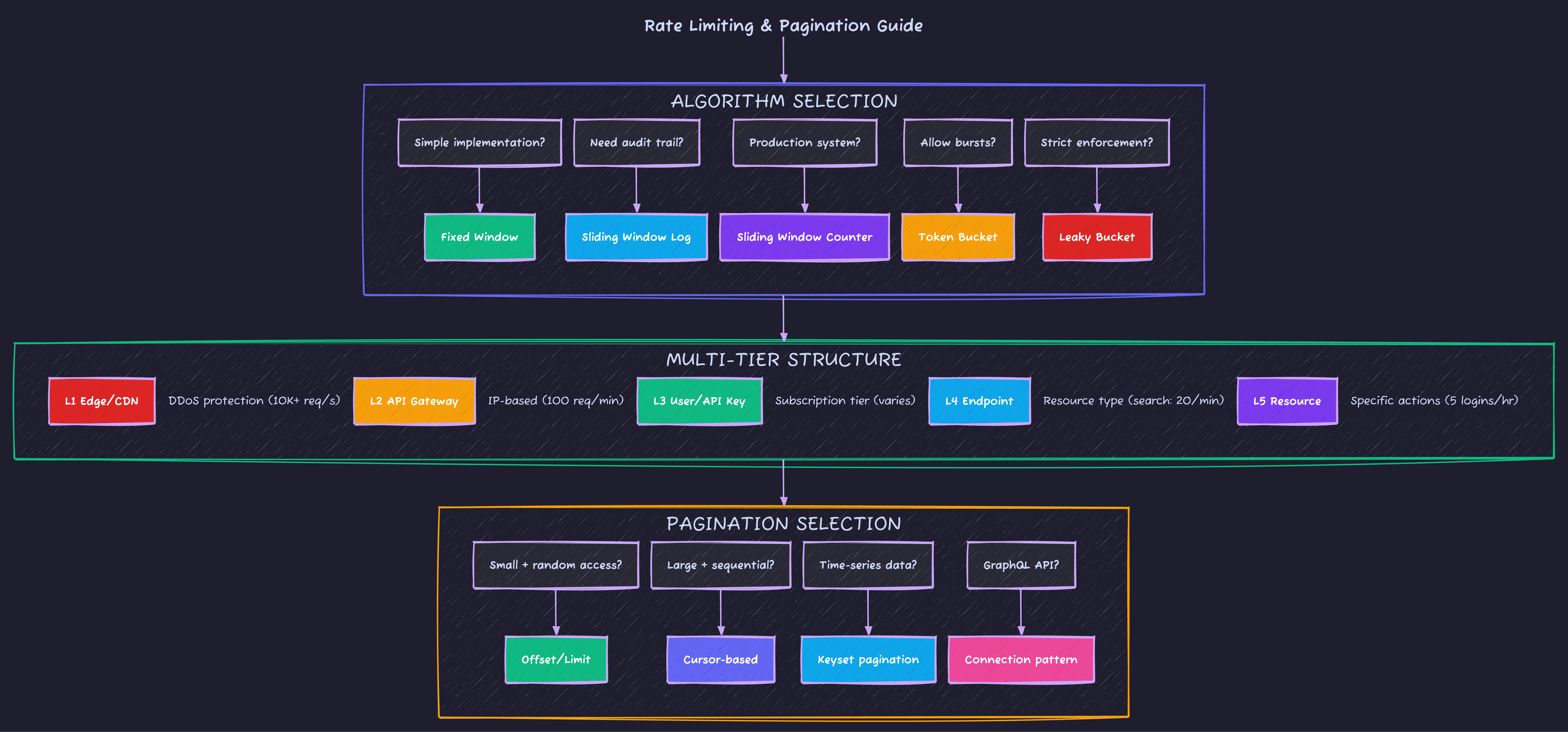
Rate Limiting Quick Reference
What’s Next?
Now that you understand traffic control, Part 4: Versioning & Idempotency covers API evolution strategies and making your endpoints safe for retries.
Advertisement
Moshiour Rahman
Software Architect & AI Engineer
Enterprise software architect with deep expertise in financial systems, distributed architecture, and AI-powered applications. Building large-scale systems at Fortune 500 companies. Specializing in LLM orchestration, multi-agent systems, and cloud-native solutions. I share battle-tested patterns from real enterprise projects.
Related Articles
API Design Part 5: Caching Strategies
Master multi-layer caching architecture, HTTP cache headers, ETags, and cache invalidation patterns. Build fast, scalable APIs with proper caching.
System DesignRedis Caching: Complete Guide to High-Performance Data Caching
Master Redis caching for web applications. Learn cache strategies, data structures, pub/sub, sessions, and build scalable caching solutions.
System DesignAPI Design Part 6: GraphQL & gRPC
Master modern API protocols beyond REST. Learn when to use GraphQL for flexible queries, gRPC for high-performance microservices, and how to implement both in production.
Comments
Comments are powered by GitHub Discussions.
Configure Giscus at giscus.app to enable comments.