FastAPI Tutorial Part 19: OpenAPI and API Documentation
Create professional API documentation with FastAPI. Learn OpenAPI customization, Swagger UI, ReDoc, and documentation best practices.
Moshiour Rahman
Advertisement
FastAPI Auto-Documentation
FastAPI is unique because it uses Python Type Hints to drive everything. The documentation is not an afterthought; it’s a direct result of your code.
How It Works
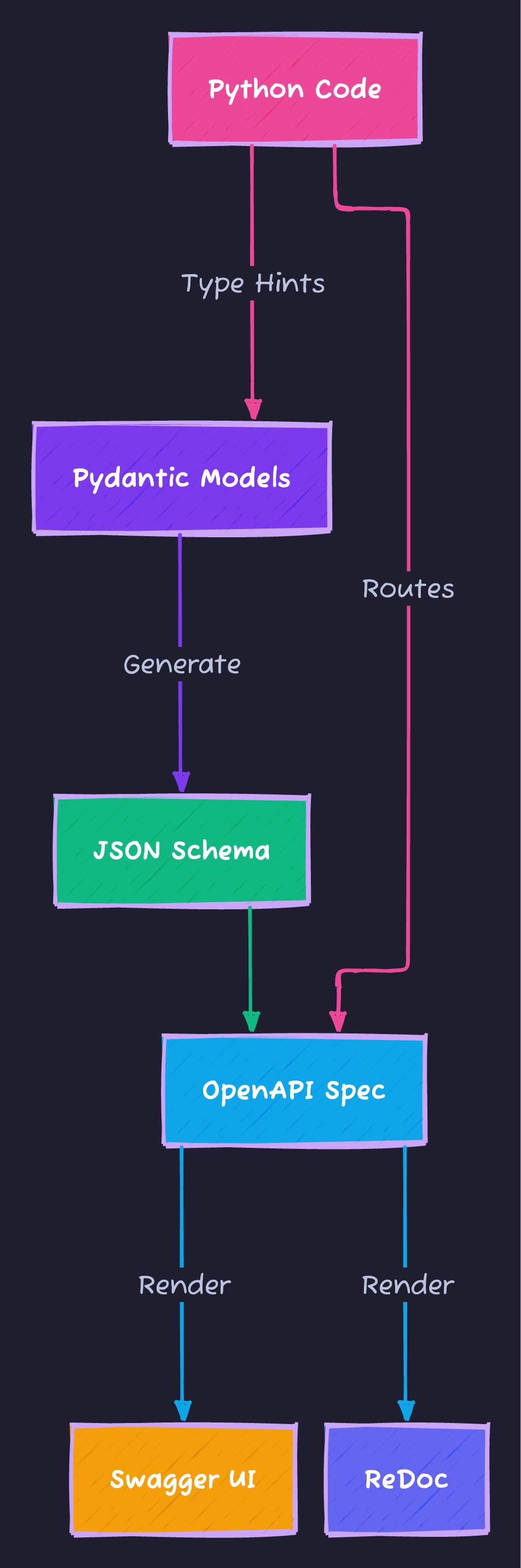
FastAPI automatically generates:
- Swagger UI:
/docs(Interactive explorer) - ReDoc:
/redoc(Static documentation) - OpenAPI JSON:
/openapi.json(Raw schema)
Customizing App Documentation
from fastapi import FastAPI

app = FastAPI(
    title="My API",
    description="""
    ## Overview
    This API provides access to user and product data.

    ## Features
    * User management
    * Product catalog
    * Order processing
    """,
    version="1.0.0",
    terms_of_service="https://example.com/terms",
    contact={
        "name": "API Support",
        "url": "https://example.com/support",
        "email": "support@example.com"
    },
    license_info={
        "name": "MIT",
        "url": "https://opensource.org/licenses/MIT"
    }
)
Endpoint Documentation
from fastapi import FastAPI, Path, Query
from pydantic import BaseModel, Field

class Item(BaseModel):
    name: str = Field(
        example="Widget",
        description="The name of the item"
    )
    price: float = Field(
        gt=0,
        example=29.99,
        description="Price in USD"
    )

    class Config:
        json_schema_extra = {
            "example": {
                "name": "Premium Widget",
                "price": 49.99
            }
        }

@app.post(
    "/items",
    response_model=Item,
    summary="Create an item",
    description="Create a new item with name and price.",
    response_description="The created item",
    tags=["Items"],
    status_code=201
)
def create_item(item: Item):
    """
    Create an item with all the information:

    - **name**: required, unique name
    - **price**: required, must be positive
    """
    return item
Tags and Grouping
tags_metadata = [
    {
        "name": "Users",
        "description": "User management operations"
    },
    {
        "name": "Items",
        "description": "Item CRUD operations"
    }
]

app = FastAPI(openapi_tags=tags_metadata)

@app.get("/users", tags=["Users"])
def list_users():
    pass

@app.get("/items", tags=["Items"])
def list_items():
    pass
Response Examples
@app.get(
    "/items/{item_id}",
    responses={
        200: {
            "description": "Item found",
            "content": {
                "application/json": {
                    "example": {"id": 1, "name": "Widget", "price": 9.99}
                }
            }
        },
        404: {
            "description": "Item not found",
            "content": {
                "application/json": {
                    "example": {"detail": "Item not found"}
                }
            }
        }
    }
)
def get_item(item_id: int):
    pass
Hiding Endpoints
# Hide from documentation
@app.get("/internal", include_in_schema=False)
def internal_endpoint():
    return {"internal": True}

# Disable docs in production
app = FastAPI(
    docs_url=None if PRODUCTION else "/docs",
    redoc_url=None if PRODUCTION else "/redoc"
)
Securing the Documentation
By default, Swagger UI provides an “Authorize” button if you define security schemes.
Adding OAuth2 / JWT Support
To enable the “Authorize” button and test secured endpoints directly from the docs:
from fastapi import FastAPI, Security
from fastapi.security import OAuth2PasswordBearer, APIKeyHeader

app = FastAPI()

# 1. Define Security Scheme
oauth2_scheme = OAuth2PasswordBearer(
    tokenUrl="token",
    description="Enter your JWT token here to access protected endpoints"
)

api_key_scheme = APIKeyHeader(
    name="X-API-Key",
    description="For internal service-to-service auth"
)

@app.get("/items/")
async def read_items(token: str = Security(oauth2_scheme)):
    return {"token": token}
Custom OpenAPI Schema
Sometimes you need to modify the raw schema directly, for example, to add a custom logo or external docs.
from fastapi.openapi.utils import get_openapi

def custom_openapi():
    # Cache the schema
    if app.openapi_schema:
        return app.openapi_schema

    openapi_schema = get_openapi(
        title="Custom API",
        version="1.0.0",
        description="Custom description",
        routes=app.routes
    )

    # Add custom fields (e.g., custom logo)
    openapi_schema["info"]["x-logo"] = {
        "url": "https://example.com/logo.png"
    }

    app.openapi_schema = openapi_schema
    return app.openapi_schema

app.openapi = custom_openapi
Summary
| Feature | Method |
|---|---|
| App metadata | FastAPI() parameters |
| Endpoint docs | Decorator parameters |
| Examples | Pydantic Field() |
| Grouping | Tags |
| Custom schema | Override openapi() |
Next Steps
In Part 20, we’ll build a Complete Production API Project - putting everything together.
Series Navigation:
- Part 1-18: Previous parts
- Part 19: OpenAPI & Documentation (You are here)
- Part 20: Full Production Project
Advertisement
Moshiour Rahman
Software Architect & AI Engineer
Enterprise software architect with deep expertise in financial systems, distributed architecture, and AI-powered applications. Building large-scale systems at Fortune 500 companies. Specializing in LLM orchestration, multi-agent systems, and cloud-native solutions. I share battle-tested patterns from real enterprise projects.
Related Articles
FastAPI Tutorial Part 20: Building a Production-Ready API
Build a complete production-ready FastAPI application. Combine all concepts into a real-world e-commerce API with authentication, database, and deployment.
PythonFastAPI Tutorial Part 16: Docker and Deployment
Deploy FastAPI applications to production. Learn Docker containerization, Docker Compose, cloud deployment, and production best practices.
PythonFastAPI Tutorial Part 18: API Security Best Practices
Secure your FastAPI application against common vulnerabilities. Learn input validation, rate limiting, CORS, and OWASP security patterns.
Comments
Comments are powered by GitHub Discussions.
Configure Giscus at giscus.app to enable comments.