FastAPI Tutorial Part 18: API Security Best Practices
Secure your FastAPI application against common vulnerabilities. Learn input validation, rate limiting, CORS, and OWASP security patterns.
Moshiour Rahman
Advertisement
Introduction
Security is not an afterthought; it’s a fundamental requirement for any production API. In this tutorial, we’ll cover how to harden your FastAPI application using industry-standard practices, effectively mitigating risks like those found in the OWASP Top 10.
We will focus on:
- Input Validation: preventing injection attacks.
- Authentication: securing endpoints with JWT.
- Rate Limiting: preventing DoS attacks.
- CORS & Headers: browser-side security.
Input Validation
FastAPI’s integration with Pydantic offers a powerful first line of defense. By strictly defining schemas, we reject malformed data before it even reaches our business logic.
Pydantic Validation
Here’s how to enforce strict patterns on user input to prevent common injection attacks (SQLi, XSS):
from pydantic import BaseModel, Field, field_validator
import re

class UserInput(BaseModel):
    # Enforce alphanumeric characters only to prevent script injection
    username: str = Field(min_length=3, max_length=50, pattern=r"^[a-zA-Z0-9_]+$")
    email: str = Field(pattern=r"^[\w\.-]+@[\w\.-]+\.\w+$")

    @field_validator("username")
    @classmethod
    def no_sql_injection(cls, v):
        # Additional layer of defense (though parameterized queries are better)
        dangerous = ["'", '"', ";", "--", "/*", "*/"]
        if any(char in v for char in dangerous):
            raise ValueError("Invalid characters detected")
        return v
SQL Injection Prevention
Input validation is good, but parameterized queries are non-negotiable. Never concatenate strings to build SQL queries.
# ❌ VULNERABLE: SQL Injection Risk
# query = f"SELECT * FROM users WHERE name = '{user_input}'"

# ✅ SECURE: Parameterized Query
# The database driver handles escaping automatically
result = db.execute(
    text("SELECT * FROM users WHERE name = :name"),
    {"name": user_input}
)
Rate Limiting
from slowapi import Limiter
from slowapi.util import get_remote_address

limiter = Limiter(key_func=get_remote_address)
app.state.limiter = limiter

@app.get("/api/data")
@limiter.limit("10/minute")
async def get_data(request: Request):
    return {"data": "limited"}
Security Headers
from fastapi.middleware.cors import CORSMiddleware

@app.middleware("http")
async def add_security_headers(request, call_next):
    response = await call_next(request)
    response.headers["X-Content-Type-Options"] = "nosniff"
    response.headers["X-Frame-Options"] = "DENY"
    response.headers["X-XSS-Protection"] = "1; mode=block"
    response.headers["Strict-Transport-Security"] = "max-age=31536000"
    return response
CORS Configuration
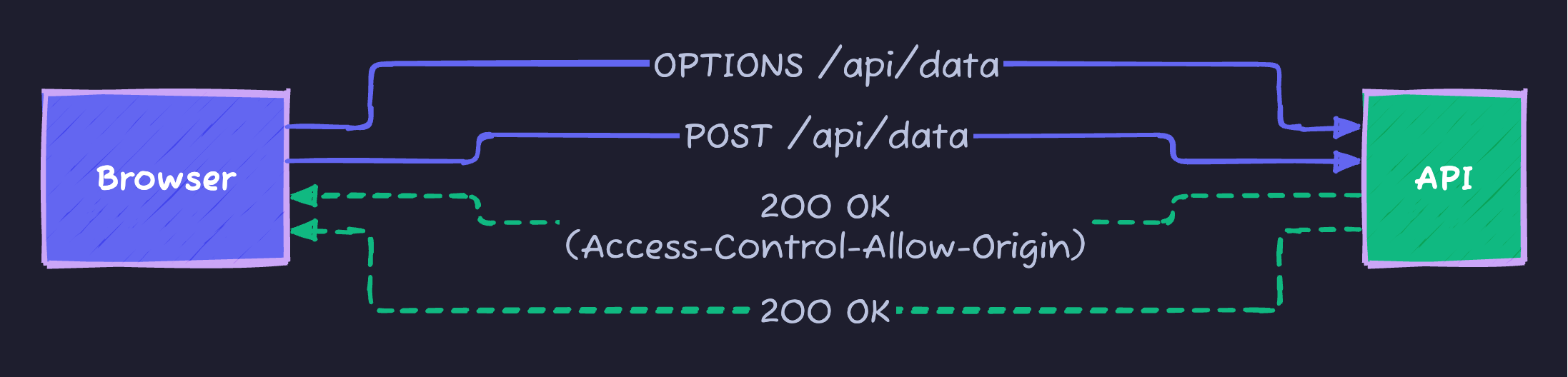
Cross-Origin Resource Sharing (CORS) is a browser security feature. If your frontend (e.g., localhost:3000) talks to your backend (localhost:8000), the browser will block it unless you explicitly allow it.
Browser Preflight Check
Setup
from fastapi.middleware.cors import CORSMiddleware

app.add_middleware(
    CORSMiddleware,
    # ⚠️ Security Risk: Don't use ["*"] in production!
    allow_origins=["https://yourdomain.com", "https://staging.yourdomain.com"],
    allow_credentials=True,
    allow_methods=["GET", "POST", "PUT", "DELETE"],
    allow_headers=["Authorization", "Content-Type"],
)
Secrets Management
from pydantic_settings import BaseSettings

class Settings(BaseSettings):
    secret_key: str  # From environment
    database_url: str
    api_key: str

    class Config:
        env_file = ".env"

# Never hardcode secrets
# Use: export SECRET_KEY="your-secret" or .env file
Authentication Security
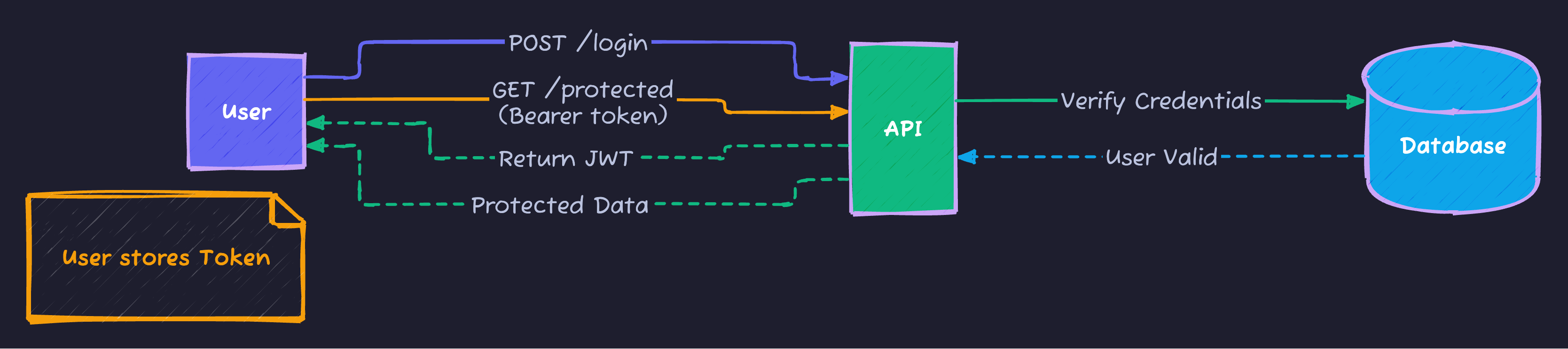
Modern APIs typically use Stateless Authentication via JWTs (JSON Web Tokens). This allows your API to scale horizontally without syncing sessions.
JWT Authentication Flow
Implementation Details
Password hashing is crucial. We use bcrypt because it is slow by design, making brute-force attacks expensive.
from passlib.context import CryptContext

# Configure hashing algorithm
pwd_context = CryptContext(
    schemes=["bcrypt"],
    deprecated="auto",
    bcrypt__rounds=12  # Higher rounds = more secure but slower
)

# Configuration for JWT
ACCESS_TOKEN_EXPIRE_MINUTES = 15  # Short lifespan reduces risk if stolen
REFRESH_TOKEN_EXPIRE_DAYS = 7     # Usage of refresh tokens is recommended for UX
Rate Limiting
Prevent Abuse and Denial-of-Service (DoS) attacks by limiting how often a user can hit your API. We use slowapi, which implements a “Token Bucket” algorithm.
from slowapi import Limiter
from slowapi.util import get_remote_address

# Identify users by IP address (can also use User ID)
limiter = Limiter(key_func=get_remote_address)
app.state.limiter = limiter

@app.get("/api/data")
@limiter.limit("10/minute")  # Allow only 10 requests per minute
async def get_data(request: Request):
    return {"data": "limited", "status": "ok"}
Security Checklist
| Vulnerability | Prevention |
|---|---|
| SQL Injection | Parameterized queries |
| XSS | Input validation, output encoding |
| CSRF | CORS, SameSite cookies |
| Auth bypass | JWT validation, secure sessions |
| Data exposure | Response filtering |
Summary
| Security Layer | Implementation |
|---|---|
| Input | Pydantic validation |
| Transport | HTTPS, security headers |
| Authentication | JWT, bcrypt |
| Rate limiting | slowapi |
Next Steps
In Part 19, we’ll explore OpenAPI and Documentation - creating comprehensive API documentation.
Series Navigation:
- Part 1-17: Previous parts
- Part 18: Security (You are here)
- Part 19: OpenAPI & Documentation
Advertisement
Moshiour Rahman
Software Architect & AI Engineer
Enterprise software architect with deep expertise in financial systems, distributed architecture, and AI-powered applications. Building large-scale systems at Fortune 500 companies. Specializing in LLM orchestration, multi-agent systems, and cloud-native solutions. I share battle-tested patterns from real enterprise projects.
Related Articles
FastAPI Tutorial Part 20: Building a Production-Ready API
Build a complete production-ready FastAPI application. Combine all concepts into a real-world e-commerce API with authentication, database, and deployment.
PythonFastAPI Tutorial Part 10: Role-Based Access Control (RBAC)
Implement RBAC in FastAPI. Learn user roles, permissions, scopes, and granular access control for secure multi-tenant applications.
PythonFastAPI Tutorial Part 9: JWT Authentication - Secure Your API
Implement JWT authentication in FastAPI. Learn token generation, password hashing, OAuth2 flows, refresh tokens, and protecting API endpoints.
Comments
Comments are powered by GitHub Discussions.
Configure Giscus at giscus.app to enable comments.