FastAPI Tutorial Part 16: Docker and Deployment
Deploy FastAPI applications to production. Learn Docker containerization, Docker Compose, cloud deployment, and production best practices.
Moshiour Rahman
Advertisement
Introduction
Moving from localhost to production involves more than just running a script. We need stability, restart capability, and performance.
Production Architecture
We don’t expose FastAPI directly to the internet. Instead, we use a robust architecture:
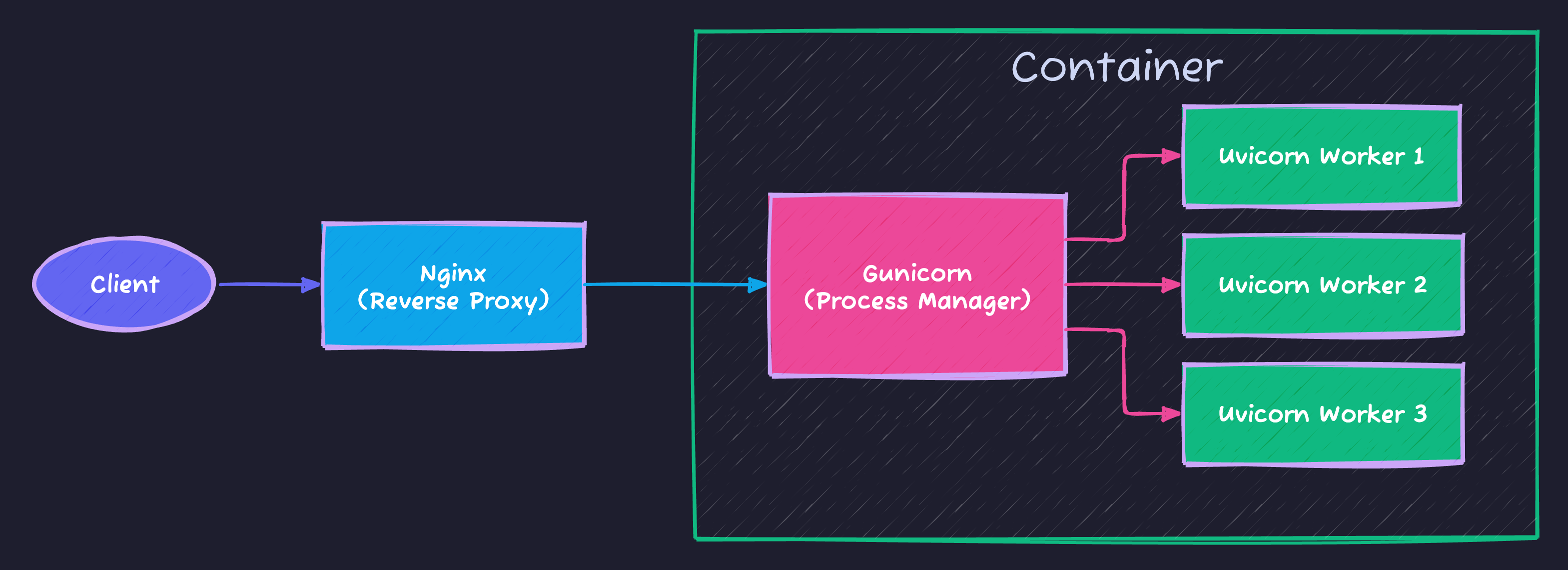
This setup ensures:
- Nginx: Handles SSL, compression, and slow clients.
- Gunicorn: Manages processes (restarts them if they crash).
- Uvicorn: Runs your async FastAPI code at high speed.
Dockerfile
We use Multi-Stage Builds to keep our final image small and secure.
Production Dockerfile
# Stage 1: Builder (Compiles dependencies)
FROM python:3.11-slim as builder

WORKDIR /app
RUN python -m venv /opt/venv
ENV PATH="/opt/venv/bin:$PATH"

COPY requirements.txt .
RUN pip install --no-cache-dir -r requirements.txt

# Stage 2: Runtime (Minimal image)
FROM python:3.11-slim

WORKDIR /app
# Copy virtual env from builder stage
COPY --from=builder /opt/venv /opt/venv
ENV PATH="/opt/venv/bin:$PATH"

COPY ./app ./app

# Security: Don't run as root
RUN adduser --disabled-password --gecos "" appuser
USER appuser

EXPOSE 8000
CMD ["gunicorn", "app.main:app", "-w", "4", "-k", "uvicorn.workers.UvicornWorker", "-b", "0.0.0.0:8000"]
Docker Compose
# docker-compose.yml
version: "3.8"

services:
  api:
    build: .
    ports:
      - "8000:8000"
    environment:
      - DATABASE_URL=postgresql://user:pass@db:5432/app
      - SECRET_KEY=${SECRET_KEY}
    depends_on:
      - db
      - redis

  db:
    image: postgres:15
    environment:
      - POSTGRES_USER=user
      - POSTGRES_PASSWORD=pass
      - POSTGRES_DB=app
    volumes:
      - postgres_data:/var/lib/postgresql/data

  redis:
    image: redis:alpine

  celery:
    build: .
    command: celery -A app.celery_app worker --loglevel=info
    environment:
      - DATABASE_URL=postgresql://user:pass@db:5432/app
    depends_on:
      - redis
      - db

volumes:
  postgres_data:
Deployment Workflow
Automation is key. Here is a typical conceptual pipeline:
graph LR
    Dev[Developer] -->|Push| Git[GitHub]
    Git -->|Trigger| CI[CI/CD Pipeline]

    subgraph CI Process
        CI --> Test[Run Tests]
        Test --> Build[Build Docker Image]
        Build --> Push[Push to Registry]
    end

    Push -->|Deploy| Server[Production Server]
    Server -->|Pull| Pull[Pull New Image]
    Pull -->|Restart| Restart[Restart Containers]

    style CI fill:#f9f,stroke:#333
    style Server fill:#bbf,stroke:#333
Running with Compose
Docker Compose orchestrates your API, Database, and Cache together.
# Build and run
docker-compose up --build

# Run in background
docker-compose up -d

# View logs
docker-compose logs -f api

# Stop
docker-compose down
Environment Configuration
# app/config.py
from pydantic_settings import BaseSettings

class Settings(BaseSettings):
    database_url: str
    secret_key: str
    debug: bool = False
    allowed_hosts: list = ["*"]

    class Config:
        env_file = ".env"

settings = Settings()
Production Checklist
| Item | Action |
|---|---|
| HTTPS | Use reverse proxy (nginx) |
| Secrets | Environment variables |
| Logging | Structured JSON logs |
| Health check | /health endpoint |
| Database | Connection pooling |
| Workers | Multiple Gunicorn workers |
Health Check Endpoint
@app.get("/health")
async def health_check():
    return {
        "status": "healthy",
        "database": await check_db_connection(),
        "redis": await check_redis_connection()
    }
Nginx Configuration
upstream api {
    server api:8000;
}

server {
    listen 80;
    server_name api.example.com;

    location / {
        proxy_pass http://api;
        proxy_set_header Host $host;
        proxy_set_header X-Real-IP $remote_addr;
    }
}
Summary
| Component | Purpose |
|---|---|
| Dockerfile | Container definition |
| docker-compose | Multi-service orchestration |
| Gunicorn | Production WSGI server |
| Nginx | Reverse proxy, SSL |
Next Steps
In Part 17, we’ll explore Performance and Caching - optimizing your FastAPI application.
Series Navigation:
- Part 1-15: Previous parts
- Part 16: Docker & Deployment (You are here)
- Part 17: Performance & Caching
Advertisement
Moshiour Rahman
Software Architect & AI Engineer
Enterprise software architect with deep expertise in financial systems, distributed architecture, and AI-powered applications. Building large-scale systems at Fortune 500 companies. Specializing in LLM orchestration, multi-agent systems, and cloud-native solutions. I share battle-tested patterns from real enterprise projects.
Related Articles
FastAPI Tutorial Part 20: Building a Production-Ready API
Build a complete production-ready FastAPI application. Combine all concepts into a real-world e-commerce API with authentication, database, and deployment.
PythonFastAPI Tutorial Part 19: OpenAPI and API Documentation
Create professional API documentation with FastAPI. Learn OpenAPI customization, Swagger UI, ReDoc, and documentation best practices.
PythonFastAPI Tutorial Part 18: API Security Best Practices
Secure your FastAPI application against common vulnerabilities. Learn input validation, rate limiting, CORS, and OWASP security patterns.
Comments
Comments are powered by GitHub Discussions.
Configure Giscus at giscus.app to enable comments.