Testcontainers: Why Your Integration Tests Have Been Lying to You
Stop using H2 for tests. Learn how Testcontainers eliminates the 'works on my machine' problem by running real databases in Docker during tests.
Moshiour Rahman
Advertisement
The Problem Nobody Talks About
You’ve written beautiful integration tests. They pass locally. They pass in CI. You deploy to production and… the query fails.
Why? Because you tested against H2, but production runs PostgreSQL.
-- Works in H2
SELECT * FROM users WHERE name LIKE '%john%'

-- Fails in PostgreSQL (case-sensitive by default)
-- Returns nothing when data is "John"
I’ve seen this exact bug ship to production three times in my career. Each time, the team had “100% test coverage.”
This is the dirty secret of integration testing: your tests are only as good as the environment they run against.
The Real Cost of Fake Databases
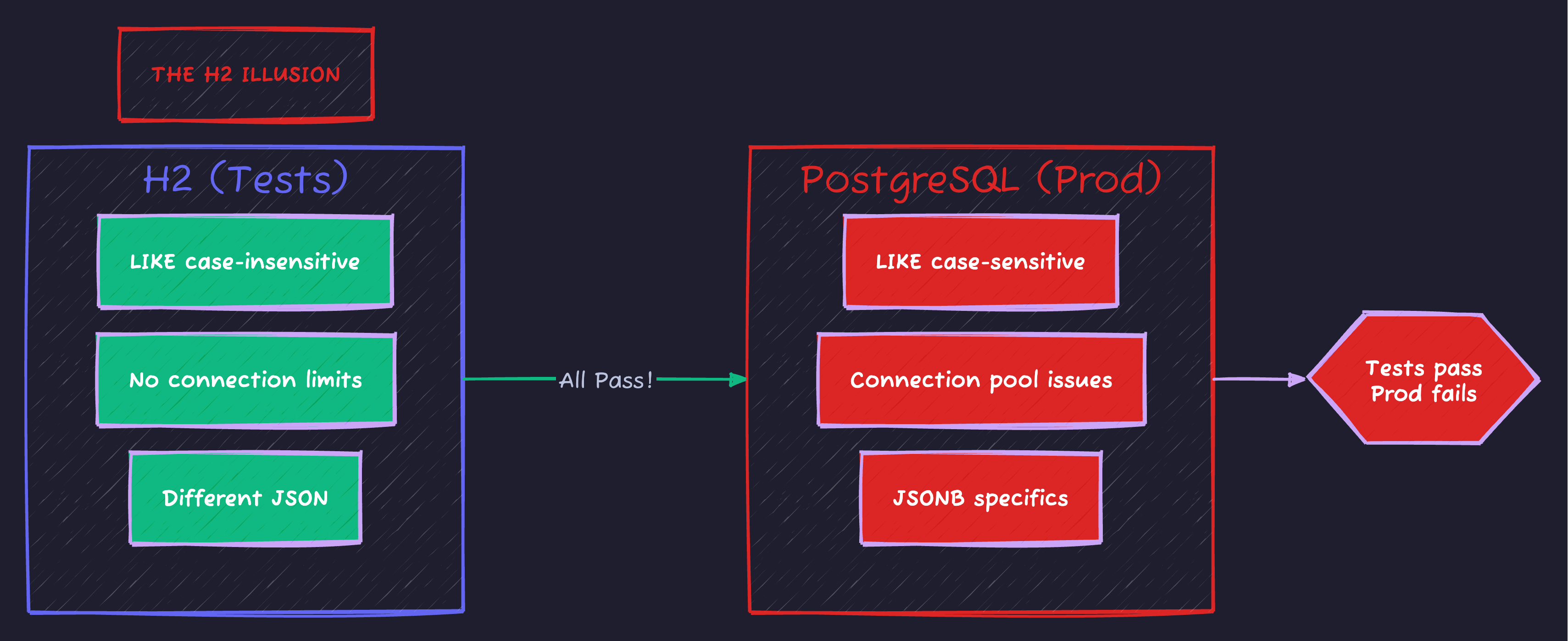
H2 behaves differently than PostgreSQL in subtle ways: case sensitivity, connection handling, type coercion. Tests pass locally, production fails.
Enter Testcontainers: Test Against the Real Thing
Testcontainers spins up actual Docker containers during your tests. Your PostgreSQL test runs against real PostgreSQL. Your Redis test hits real Redis. Your Kafka test uses actual Kafka.
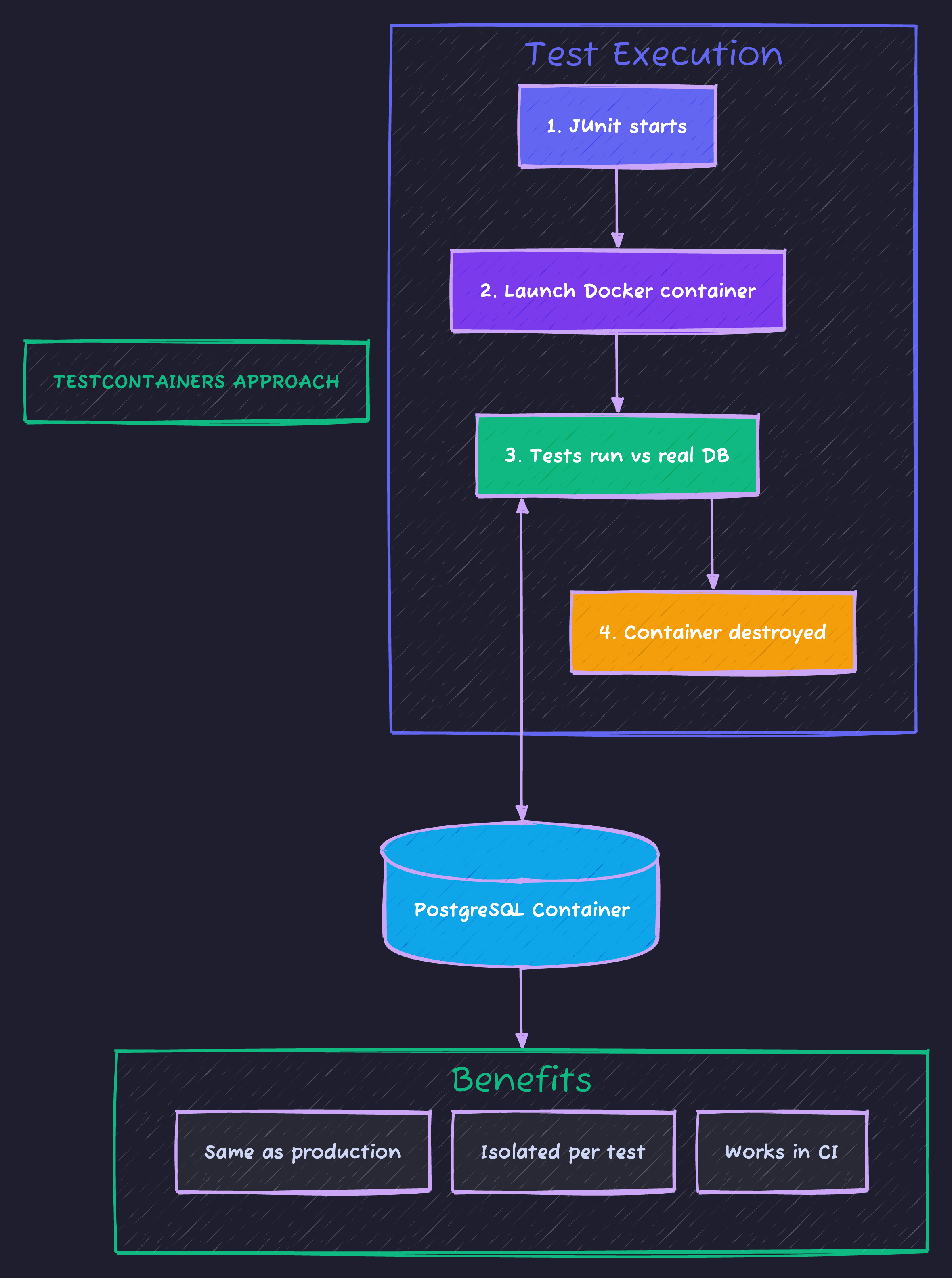
Benefits: identical to production, isolated per test, no manual setup, works in CI without pre-configured database servers.
Setup: Spring Boot 3 + Testcontainers
Dependencies
<dependencies>
    <!-- Spring Boot -->
    <dependency>
        <groupId>org.springframework.boot</groupId>
        <artifactId>spring-boot-starter-data-jpa</artifactId>
    </dependency>
    <dependency>
        <groupId>org.postgresql</groupId>
        <artifactId>postgresql</artifactId>
        <scope>runtime</scope>
    </dependency>

    <!-- Testing -->
    <dependency>
        <groupId>org.springframework.boot</groupId>
        <artifactId>spring-boot-starter-test</artifactId>
        <scope>test</scope>
    </dependency>
    <dependency>
        <groupId>org.springframework.boot</groupId>
        <artifactId>spring-boot-testcontainers</artifactId>
        <scope>test</scope>
    </dependency>
    <dependency>
        <groupId>org.testcontainers</groupId>
        <artifactId>postgresql</artifactId>
        <scope>test</scope>
    </dependency>
    <dependency>
        <groupId>org.testcontainers</groupId>
        <artifactId>junit-jupiter</artifactId>
        <scope>test</scope>
    </dependency>
</dependencies>
The Modern Way: @ServiceConnection (Spring Boot 3.1+)
Spring Boot 3.1 introduced @ServiceConnection - it automatically configures your datasource from the container. No manual property wiring needed.
@SpringBootTest
@Testcontainers
class UserRepositoryTest {

    @Container
    @ServiceConnection  // Magic! Auto-configures spring.datasource.*
    static PostgreSQLContainer<?> postgres = new PostgreSQLContainer<>("postgres:16-alpine");

    @Autowired
    private UserRepository userRepository;

    @Test
    void shouldFindUserByCaseInsensitiveSearch() {
        // This test runs against REAL PostgreSQL
        userRepository.save(new User("John Doe", "john@example.com"));

        // This would pass in H2 but fail in PostgreSQL without proper handling
        List<User> users = userRepository.findByNameContainingIgnoreCase("john");

        assertThat(users).hasSize(1);
    }
}
Real-World Pattern: Testing PostgreSQL-Specific Features
Here’s where Testcontainers shines - testing features that don’t exist in H2.
Testing JSONB Queries
PostgreSQL’s JSONB is powerful, but H2 doesn’t support it. With Testcontainers, test the real thing:
@Entity
@Table(name = "products")
public class Product {
    @Id
    @GeneratedValue(strategy = GenerationType.IDENTITY)
    private Long id;

    private String name;

    @Column(columnDefinition = "jsonb")
    private String metadata;  // {"color": "red", "size": "L", "tags": ["sale", "new"]}
}
public interface ProductRepository extends JpaRepository<Product, Long> {
// PostgreSQL-specific JSONB query
@Query(value = """
SELECT * FROM products
WHERE metadata->>'color' = :color
""", nativeQuery = true)
List<Product> findByColor(@Param("color") String color);
// Query JSONB array
@Query(value = """
SELECT * FROM products
WHERE metadata->'tags' ? :tag
""", nativeQuery = true)
List<Product> findByTag(@Param("tag") String tag);
}@SpringBootTest
@Testcontainers
class ProductRepositoryTest {
@Container
@ServiceConnection
static PostgreSQLContainer<?> postgres = new PostgreSQLContainer<>("postgres:16-alpine");
@Autowired
private ProductRepository productRepository;
@Test
void shouldQueryJsonbColor() {
Product product = new Product();
product.setName("T-Shirt");
product.setMetadata("""
{"color": "red", "size": "L", "tags": ["sale", "new"]}
""");
productRepository.save(product);
List<Product> redProducts = productRepository.findByColor("red");
assertThat(redProducts).hasSize(1);
assertThat(redProducts.get(0).getName()).isEqualTo("T-Shirt");
}
@Test
void shouldQueryJsonbArrayContains() {
// ... setup
List<Product> saleItems = productRepository.findByTag("sale");
assertThat(saleItems).hasSize(1);
}
}This test would be impossible with H2. You’d either skip it or mock it - both leave production bugs undiscovered.
Pattern: Shared Container for Speed
Starting a container per test class is slow (~2-5 seconds per container). For large test suites, share containers:
/**
 * Singleton containers - started once, reused across all tests.
 *
 * Trade-off: Tests must handle data cleanup themselves.
 * Benefit: Suite runs in 30 seconds instead of 5 minutes.
 */
public abstract class AbstractIntegrationTest {

    static final PostgreSQLContainer<?> POSTGRES;
    static final GenericContainer<?> REDIS;

    static {
        POSTGRES = new PostgreSQLContainer<>("postgres:16-alpine")
            .withReuse(true);  // Reuse across test runs (requires ~/.testcontainers.properties)

        REDIS = new GenericContainer<>("redis:7-alpine")
            .withExposedPorts(6379)
            .withReuse(true);

        // Start all containers in parallel
        Startables.deepStart(POSTGRES, REDIS).join();
    }

    @DynamicPropertySource
    static void configureProperties(DynamicPropertyRegistry registry) {
        registry.add("spring.datasource.url", POSTGRES::getJdbcUrl);
        registry.add("spring.datasource.username", POSTGRES::getUsername);
        registry.add("spring.datasource.password", POSTGRES::getPassword);
        registry.add("spring.data.redis.host", REDIS::getHost);
        registry.add("spring.data.redis.port", () -> REDIS.getMappedPort(6379));
    }
}
// All tests extend this - containers shared
class UserServiceTest extends AbstractIntegrationTest {
@AfterEach
void cleanup() {
userRepository.deleteAll(); // Clean your own data
}
}
class OrderServiceTest extends AbstractIntegrationTest {
@AfterEach
void cleanup() {
orderRepository.deleteAll();
}
}Choosing between container per test vs shared singleton impacts both speed and isolation:
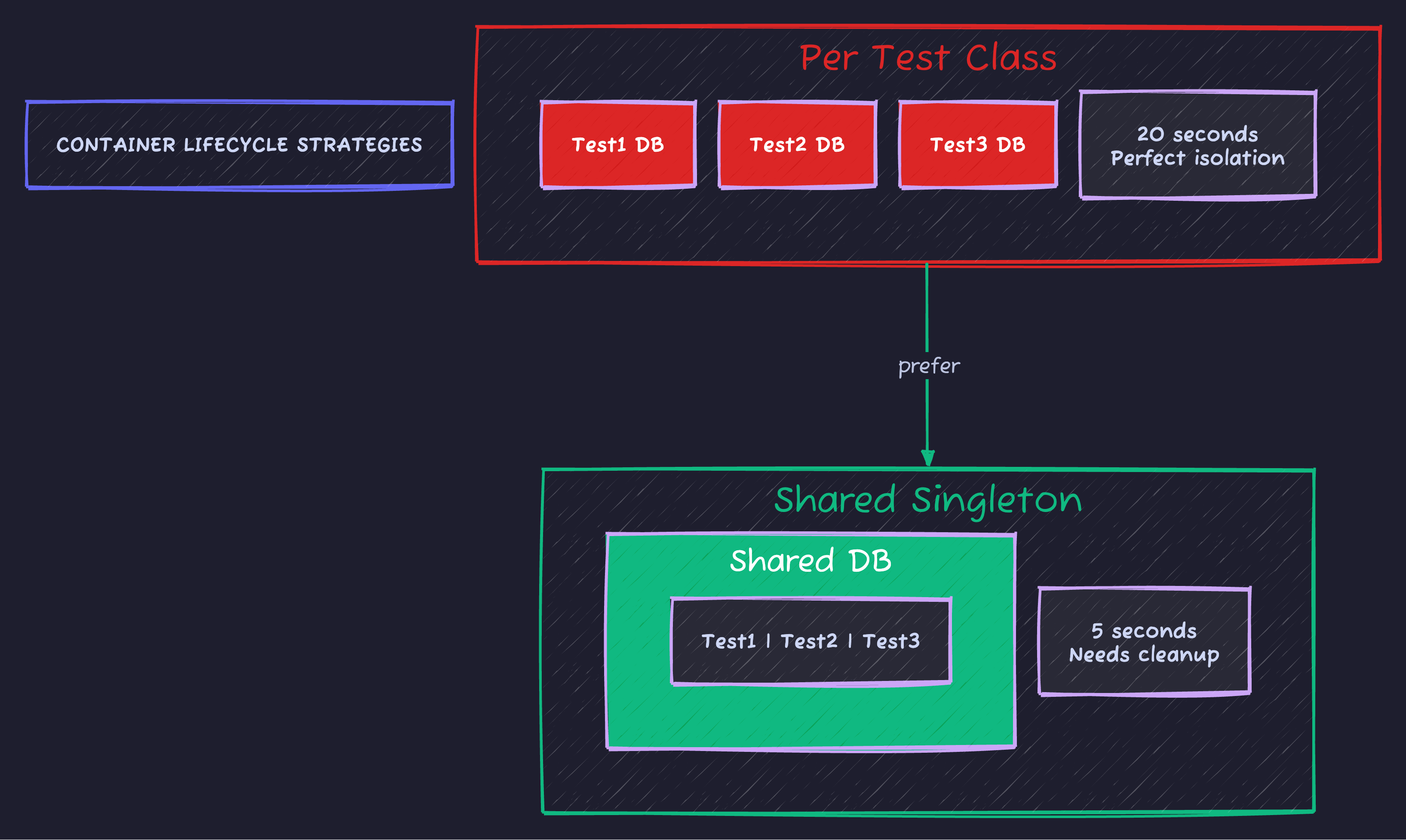
Recommendation: Use container per class for <20 tests, shared singleton for larger suites. In CI, always use shared (time = money).
Testing Multiple Services: The Real Architecture
Modern apps don’t just use a database. They use databases, caches, message queues, and external services.
@SpringBootTest
@Testcontainers
class OrderProcessingIntegrationTest {

    @Container
    @ServiceConnection
    static PostgreSQLContainer<?> postgres = new PostgreSQLContainer<>("postgres:16-alpine");

    @Container
    @ServiceConnection
    static GenericContainer<?> redis = new GenericContainer<>("redis:7-alpine")
        .withExposedPorts(6379);

    @Container
    @ServiceConnection
    static KafkaContainer kafka = new KafkaContainer(
        DockerImageName.parse("confluentinc/cp-kafka:7.5.0")
    );

    @Autowired
    private OrderService orderService;

    @Autowired
    private KafkaTemplate<String, OrderEvent> kafkaTemplate;

    @Autowired
    private StringRedisTemplate redisTemplate;

    @Test
    void shouldProcessOrderEndToEnd() {
        // 1. Create order (stored in PostgreSQL)
        Order order = orderService.createOrder(new CreateOrderRequest(
            "customer-123",
            List.of(new OrderItem("PROD-1", 2))
        ));

        // 2. Verify event published to Kafka
        ConsumerRecord<String, OrderEvent> event = KafkaTestUtils.getSingleRecord(
            consumer, "order-events"
        );
        assertThat(event.value().orderId()).isEqualTo(order.getId());

        // 3. Verify cache populated in Redis
        String cachedOrder = redisTemplate.opsForValue().get("order:" + order.getId());
        assertThat(cachedOrder).isNotNull();
    }
}
Testing Database Migrations
One of the most underrated uses of Testcontainers: verifying your Flyway/Liquibase migrations work against real databases.
@Testcontainers
class DatabaseMigrationTest {

    @Container
    static PostgreSQLContainer<?> postgres = new PostgreSQLContainer<>("postgres:16-alpine");

    @Test
    void shouldApplyAllMigrationsSuccessfully() {
        Flyway flyway = Flyway.configure()
            .dataSource(postgres.getJdbcUrl(), postgres.getUsername(), postgres.getPassword())
            .locations("classpath:db/migration")
            .load();

        // This will fail if any migration has PostgreSQL-specific syntax errors
        flyway.migrate();

        MigrationInfo[] applied = flyway.info().applied();
        assertThat(applied).hasSizeGreaterThan(0);

        // Verify specific migration outcomes
        try (Connection conn = DriverManager.getConnection(
                postgres.getJdbcUrl(), postgres.getUsername(), postgres.getPassword())) {

            // Check that indexes exist
            ResultSet rs = conn.getMetaData().getIndexInfo(null, null, "users", false, false);
            // ... verify expected indexes
        }
    }
}
Wait Strategies: Don’t Race Your Container
Containers take time to become “ready.” The default wait strategy might not be enough.
// Bad: Container started but database not ready
static PostgreSQLContainer<?> postgres = new PostgreSQLContainer<>("postgres:16-alpine");
// Default waits for port, but PostgreSQL might still be initializing

// Good: Wait for specific log message
static PostgreSQLContainer<?> postgres = new PostgreSQLContainer<>("postgres:16-alpine")
    .waitingFor(Wait.forLogMessage(".*database system is ready to accept connections.*\\n", 2));

// Better: Wait for actual database connectivity
static PostgreSQLContainer<?> postgres = new PostgreSQLContainer<>("postgres:16-alpine")
    .waitingFor(Wait.forSuccessfulCommand("pg_isready -U test"));
Choose the right wait strategy for each service:
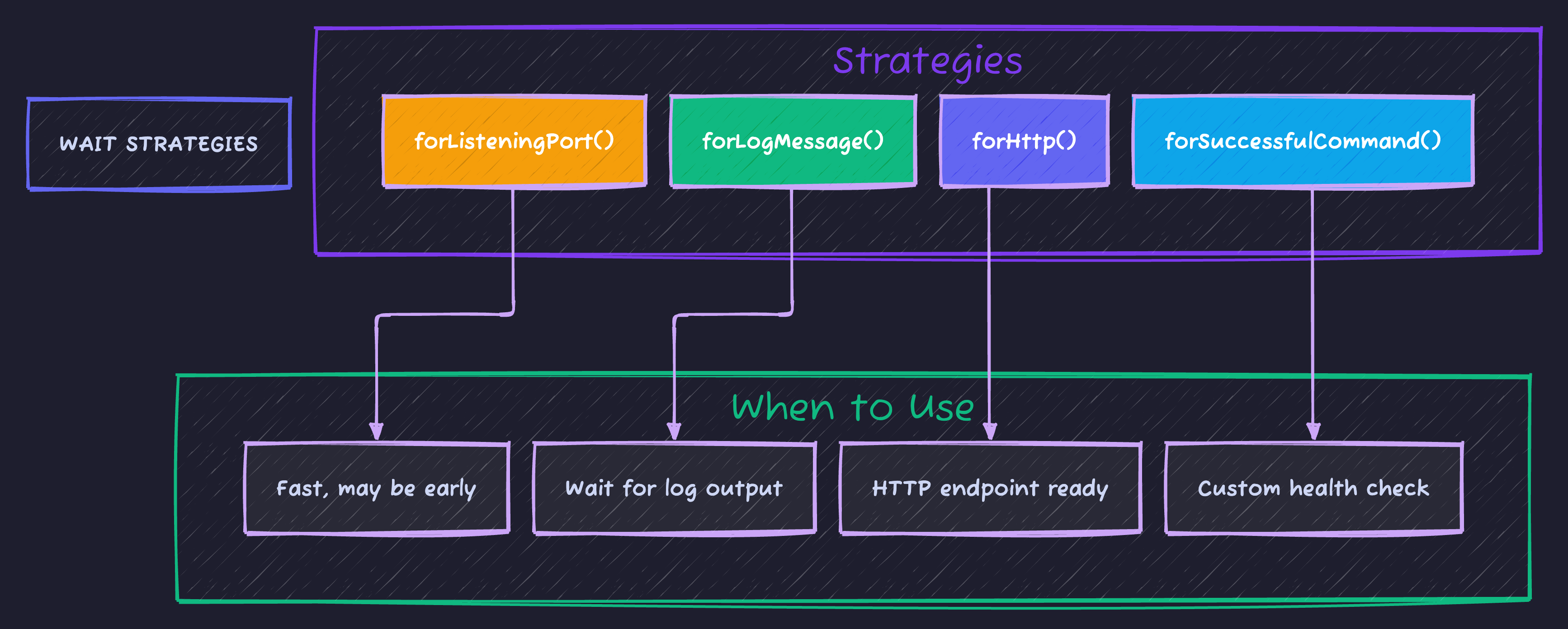
Service recommendations: PostgreSQL uses forLogMessage, Redis uses forListeningPort, Elasticsearch uses forHttp.
CI/CD: Making It Work in GitHub Actions
name: Integration Tests

on: [push, pull_request]

jobs:
  test:
    runs-on: ubuntu-latest

    steps:
      - uses: actions/checkout@v4

      - name: Set up JDK 21
        uses: actions/setup-java@v4
        with:
          java-version: '21'
          distribution: 'temurin'

      # Docker is pre-installed on GitHub runners
      # Testcontainers will use it automatically

      - name: Run tests
        run: ./mvnw verify
        env:
          # Speed up container pulls
          TESTCONTAINERS_RYUK_DISABLED: true  # GitHub cleans up containers anyway
The Debugging Toolkit
See What’s Happening Inside
@Container
static PostgreSQLContainer<?> postgres = new PostgreSQLContainer<>("postgres:16-alpine")
    .withLogConsumer(new Slf4jLogConsumer(LoggerFactory.getLogger("postgres")));
Keep Container Running After Test Failure
// In test class
@Container
static PostgreSQLContainer<?> postgres = new PostgreSQLContainer<>("postgres:16-alpine") {
    @Override
    public void stop() {
        // Don't stop - keep running for debugging
        // Remember to manually stop later!
    }
};
Connect to Container Manually
@Test
void debugTest() {
    System.out.println("JDBC URL: " + postgres.getJdbcUrl());
    System.out.println("Username: " + postgres.getUsername());
    System.out.println("Password: " + postgres.getPassword());

    // Now connect with DBeaver or psql while test is paused
    Thread.sleep(300000); // 5 minutes to debug
}
When NOT to Use Testcontainers
Testcontainers isn’t always the answer:
| Scenario | Better Alternative |
|---|---|
| Unit tests | Plain mocks - no containers needed |
| Simple CRUD tests | @DataJpaTest with H2 (if no DB-specific features) |
| Contract tests | WireMock or Spring Cloud Contract |
| Performance tests | Dedicated test environment |
| Local development | Docker Compose (persistent data) |
The Mental Model
Where does Testcontainers fit in your testing strategy?
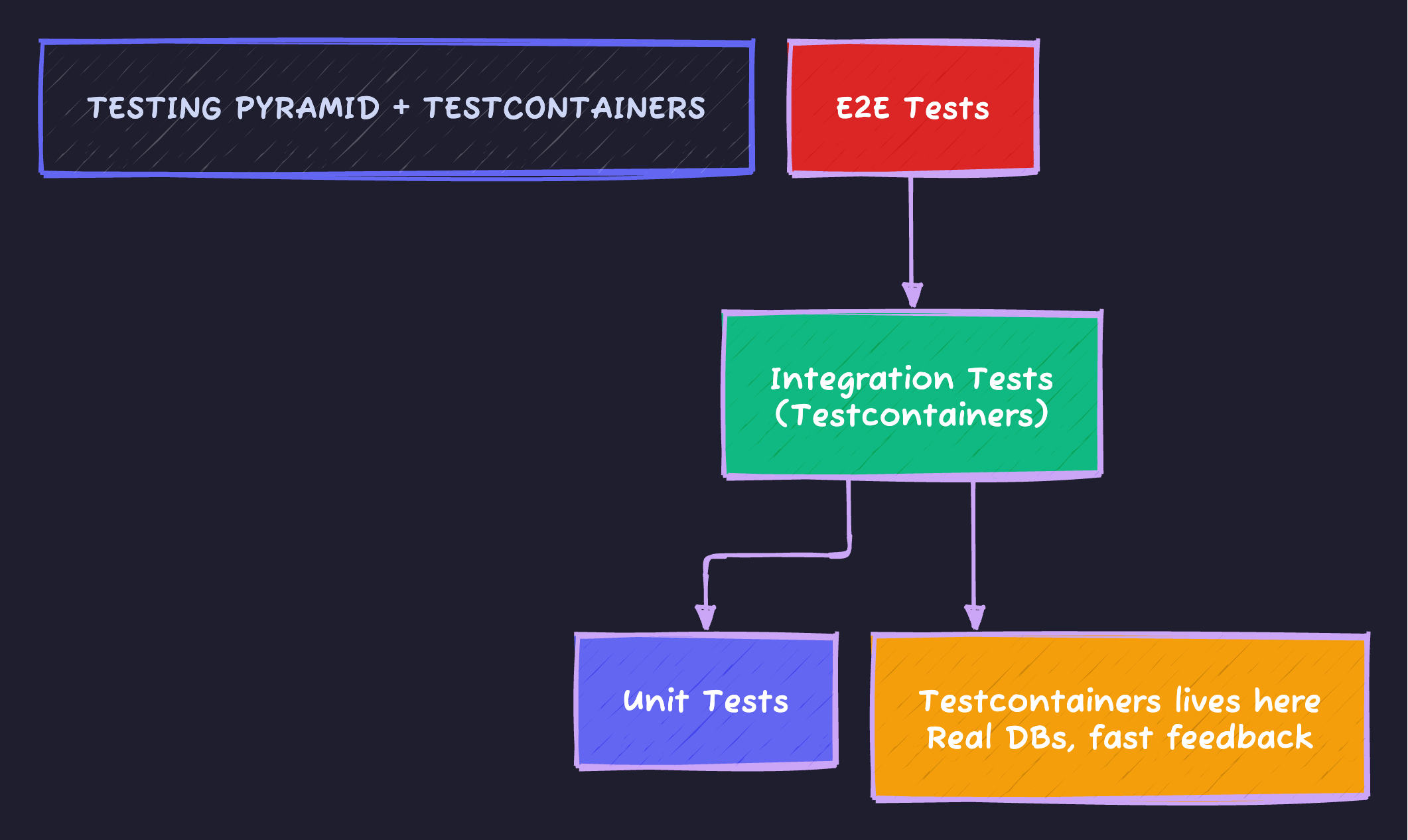
Rule: Use Testcontainers for the integration layer only. Don’t spin up PostgreSQL to test a utility function.
Complete Example: Repository Test
@DataJpaTest
@Testcontainers
@AutoConfigureTestDatabase(replace = AutoConfigureTestDatabase.Replace.NONE)
class UserRepositoryIntegrationTest {

    @Container
    @ServiceConnection
    static PostgreSQLContainer<?> postgres = new PostgreSQLContainer<>("postgres:16-alpine");

    @Autowired
    private UserRepository userRepository;

    @Autowired
    private TestEntityManager entityManager;

    @BeforeEach
    void setUp() {
        userRepository.deleteAll();
    }

    @Test
    void shouldFindUsersByEmailDomain() {
        // Given
        userRepository.saveAll(List.of(
            new User("Alice", "alice@company.com"),
            new User("Bob", "bob@company.com"),
            new User("Charlie", "charlie@gmail.com")
        ));
        entityManager.flush();
        entityManager.clear();

        // When
        List<User> companyUsers = userRepository.findByEmailDomain("company.com");

        // Then
        assertThat(companyUsers)
            .hasSize(2)
            .extracting(User::getName)
            .containsExactlyInAnyOrder("Alice", "Bob");
    }

    @Test
    void shouldHandleNullEmailGracefully() {
        User userWithNullEmail = new User("NoEmail", null);
        userRepository.save(userWithNullEmail);

        // This query behavior might differ between H2 and PostgreSQL
        List<User> result = userRepository.findByEmailDomain("company.com");

        assertThat(result).isEmpty();
    }
}
Code Sample
Full working example: github.com/Moshiour027/techyowls-io-blog-public/testcontainers-guide
Summary
| Before Testcontainers | After Testcontainers |
|---|---|
| ”Works on my machine” | Works everywhere |
| H2 quirks hide bugs | Real database behavior |
| Manual DB setup in CI | Zero infrastructure setup |
| Skip DB-specific tests | Test everything |
| False confidence | Real confidence |
The bottom line: If your production uses PostgreSQL, your tests should too. Testcontainers makes this trivially easy.
Stop letting your tests lie to you.
Advertisement
Moshiour Rahman
Software Architect & AI Engineer
Enterprise software architect with deep expertise in financial systems, distributed architecture, and AI-powered applications. Building large-scale systems at Fortune 500 companies. Specializing in LLM orchestration, multi-agent systems, and cloud-native solutions. I share battle-tested patterns from real enterprise projects.
Related Articles
Flyway Database Migrations: Never Run ALTER TABLE in Production by Hand Again
Version control your database schema. Learn Flyway migration strategies, rollback approaches, and how to handle team collaboration without conflicts.
Spring BootSpring Boot Testing: Unit to Integration Tests That Actually Work
Test Spring Boot apps properly. Unit tests, @WebMvcTest, @DataJpaTest, Testcontainers, and test slices explained with real examples.
Spring BootSpring Boot Microservices: Complete Architecture Guide
Build production-ready microservices with Spring Boot and Spring Cloud. Learn service discovery, API gateway, config server, and inter-service communication.
Comments
Comments are powered by GitHub Discussions.
Configure Giscus at giscus.app to enable comments.