Spring WebFlux: When Threads Are Too Expensive (And When They're Not)
Reactive programming isn't always the answer. Learn when WebFlux actually helps, how it works under the hood, and how to avoid the common pitfalls.
Moshiour Rahman
Advertisement
The Honest Truth About Reactive Programming
Everyone talks about how WebFlux handles millions of requests. Few mention:
- Most apps never need it
- It’s harder to debug
- Blocking code breaks everything
- The learning curve is steep
So why learn it? Because when you DO need it, nothing else works.
When WebFlux Actually Helps
Before diving into code, let’s be clear about when WebFlux is the right choice. This decision framework will save you months of refactoring pain:

The green zone shows where WebFlux shines: high concurrency I/O, streaming, parallel service calls. The red zone is where you’ll regret choosing it: CPU-bound work, blocking dependencies, or simple CRUD apps.
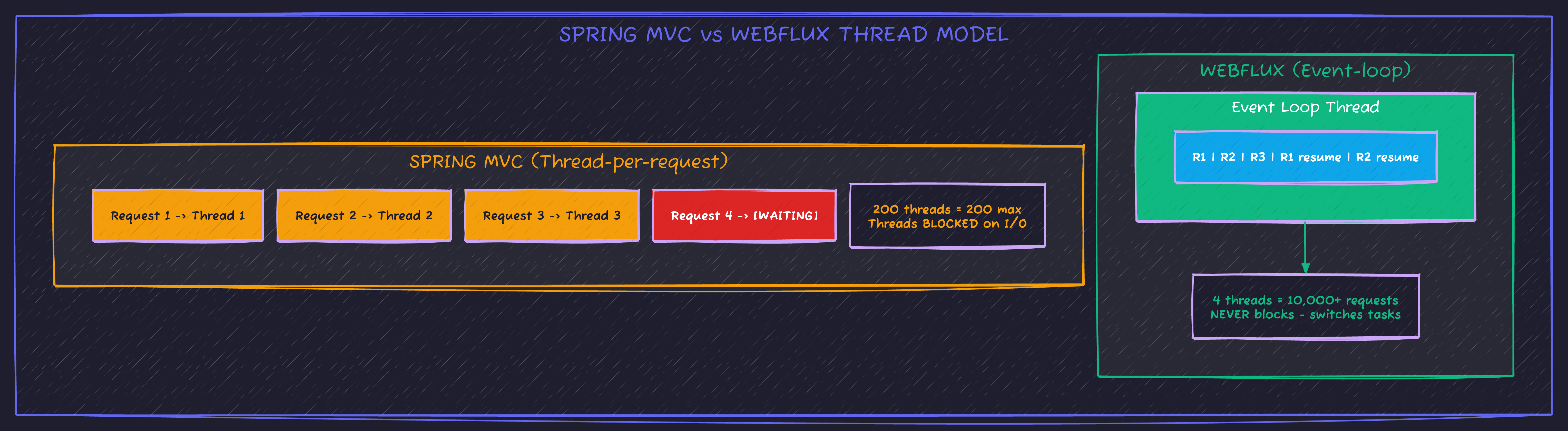
The Thread Model Difference
Setup: Spring Boot + WebFlux
<dependencies>
    <!-- WebFlux instead of spring-boot-starter-web -->
    <dependency>
        <groupId>org.springframework.boot</groupId>
        <artifactId>spring-boot-starter-webflux</artifactId>
    </dependency>

    <!-- Reactive database driver (not JDBC!) -->
    <dependency>
        <groupId>org.springframework.boot</groupId>
        <artifactId>spring-boot-starter-data-r2dbc</artifactId>
    </dependency>
    <dependency>
        <groupId>org.postgresql</groupId>
        <artifactId>r2dbc-postgresql</artifactId>
        <scope>runtime</scope>
    </dependency>

    <!-- Reactive Redis -->
    <dependency>
        <groupId>org.springframework.boot</groupId>
        <artifactId>spring-boot-starter-data-redis-reactive</artifactId>
    </dependency>
</dependencies>
Important: You cannot mix WebFlux with blocking libraries (JDBC, JPA). Use R2DBC for databases.
Mono and Flux: The Building Blocks
Everything in reactive programming flows through two types: Mono for single values, Flux for streams. Understanding their signal lifecycle is essential:
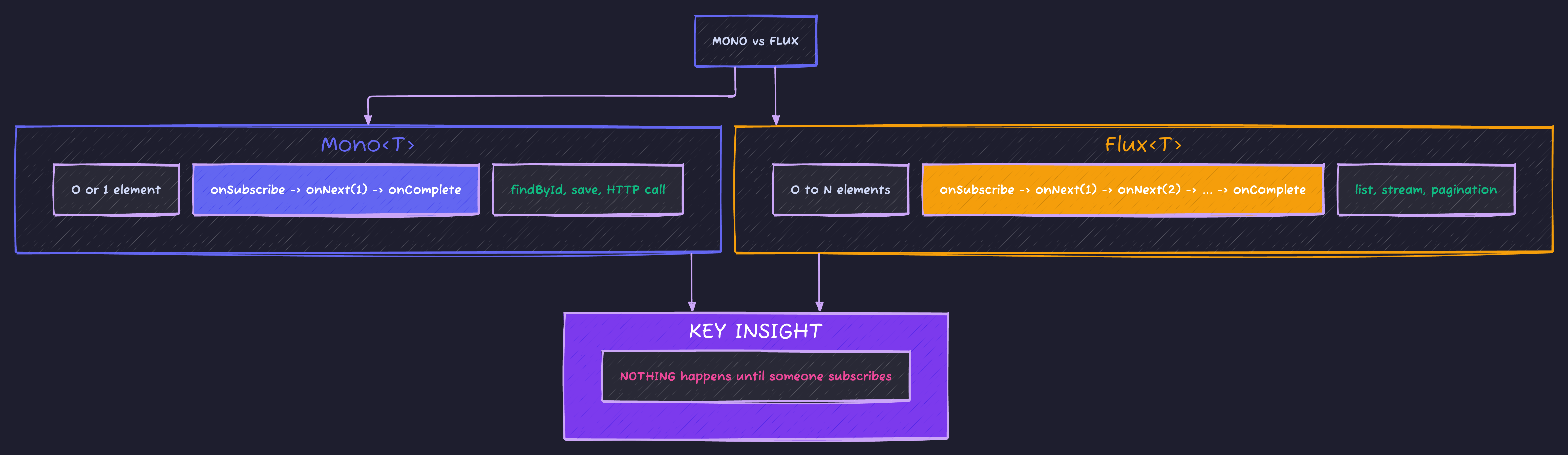
The critical insight at the bottom: reactive streams are lazy. Nothing executes until something subscribes. This catches many developers off-guard.
Basic Controller
@RestController
@RequestMapping("/api/users")
public class UserController {

    private final UserService userService;

    public UserController(UserService userService) {
        this.userService = userService;
    }

    // Return Mono for single result
    @GetMapping("/{id}")
    public Mono<UserResponse> getUser(@PathVariable Long id) {
        return userService.findById(id)
            .map(this::toResponse)
            .switchIfEmpty(Mono.error(new UserNotFoundException(id)));
    }

    // Return Flux for multiple results
    @GetMapping
    public Flux<UserResponse> getAllUsers() {
        return userService.findAll()
            .map(this::toResponse);
    }

    // Request body is also reactive
    @PostMapping
    @ResponseStatus(HttpStatus.CREATED)
    public Mono<UserResponse> createUser(@RequestBody Mono<CreateUserRequest> request) {
        return request
            .flatMap(req -> userService.create(req.email(), req.name()))
            .map(this::toResponse);
    }

    private UserResponse toResponse(User user) {
        return new UserResponse(user.getId(), user.getEmail(), user.getName());
    }
}
Service Layer
@Service
public class UserService {

    private final UserRepository userRepository;
    private final EmailService emailService;

    public Mono<User> findById(Long id) {
        return userRepository.findById(id);
    }

    public Flux<User> findAll() {
        return userRepository.findAll();
    }

    public Mono<User> create(String email, String name) {
        return userRepository.existsByEmail(email)
            .flatMap(exists -> {
                if (exists) {
                    return Mono.error(new EmailAlreadyExistsException(email));
                }
                User user = new User(email, name);
                return userRepository.save(user);
            })
            .flatMap(savedUser ->
                // Send welcome email after save
                emailService.sendWelcome(savedUser.getEmail())
                    .thenReturn(savedUser)  // Return user, not email result
            );
    }
}
Repository with R2DBC
public interface UserRepository extends ReactiveCrudRepository<User, Long> {

    Mono<User> findByEmail(String email);

    Mono<Boolean> existsByEmail(String email);

    @Query("SELECT * FROM users WHERE name ILIKE :pattern")
    Flux<User> searchByName(@Param("pattern") String pattern);

    // Pagination
    Flux<User> findAllBy(Pageable pageable);
}
Real-World Pattern: Parallel Service Calls
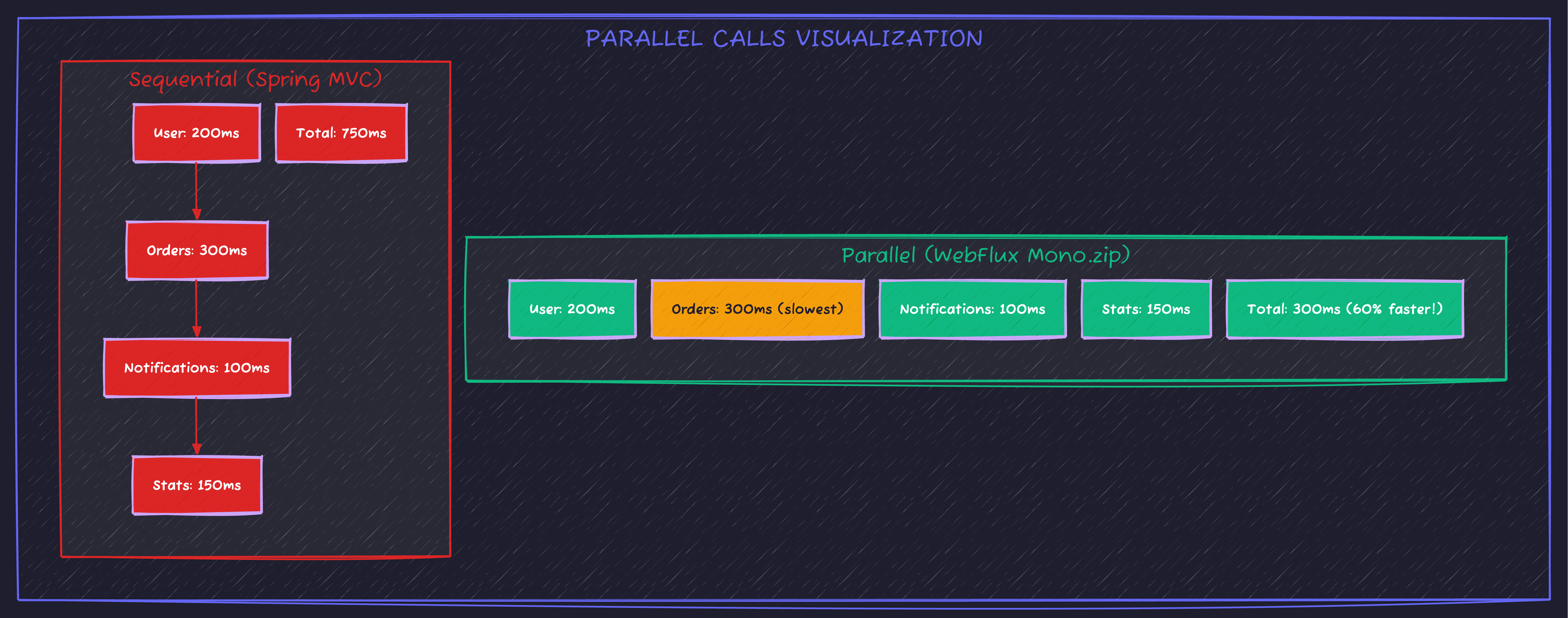
This is where WebFlux shines. Call 5 services in parallel, combine results:
@Service
public class DashboardService {

    private final UserService userService;
    private final OrderService orderService;
    private final NotificationService notificationService;
    private final AnalyticsService analyticsService;

    public Mono<DashboardData> getDashboard(Long userId) {
        // All calls execute in PARALLEL
        Mono<User> userMono = userService.findById(userId);
        Mono<List<Order>> ordersMono = orderService.findRecentByUser(userId).collectList();
        Mono<Long> notificationCountMono = notificationService.countUnread(userId);
        Mono<UserStats> statsMono = analyticsService.getUserStats(userId);

        return Mono.zip(userMono, ordersMono, notificationCountMono, statsMono)
            .map(tuple -> new DashboardData(
                tuple.getT1(),  // user
                tuple.getT2(),  // orders
                tuple.getT3(),  // unreadCount
                tuple.getT4()   // stats
            ));
    }
}
Streaming: Server-Sent Events
@RestController
@RequestMapping("/api/stream")
public class StreamController {

    private final PriceService priceService;

    // Stream prices every second, forever
    @GetMapping(value = "/prices", produces = MediaType.TEXT_EVENT_STREAM_VALUE)
    public Flux<Price> streamPrices() {
        return priceService.getPriceUpdates();  // Infinite stream
    }

    // Alternative: Finite stream with interval
    @GetMapping(value = "/countdown", produces = MediaType.TEXT_EVENT_STREAM_VALUE)
    public Flux<Long> countdown() {
        return Flux.interval(Duration.ofSeconds(1))
            .take(10)
            .map(i -> 10 - i);
    }
}@Service
public class PriceService {
private final Sinks.Many<Price> priceSink = Sinks.many().multicast().onBackpressureBuffer();
// Called when price updates
public void publishPrice(Price price) {
priceSink.tryEmitNext(price);
}
// Consumers subscribe to this
public Flux<Price> getPriceUpdates() {
return priceSink.asFlux();
}
}Error Handling
@Service
public class UserService {

    public Mono<User> findByIdOrThrow(Long id) {
        return userRepository.findById(id)
            .switchIfEmpty(Mono.error(new UserNotFoundException(id)));
    }

    public Mono<User> createWithRetry(String email, String name) {
        return userRepository.save(new User(email, name))
            .retryWhen(Retry.backoff(3, Duration.ofMillis(100))
                .filter(ex -> ex instanceof DataAccessException)
                .onRetryExhaustedThrow((spec, signal) ->
                    new ServiceUnavailableException("Database unavailable after retries")));
    }

    public Mono<User> findWithFallback(Long id) {
        return userRepository.findById(id)
            .onErrorResume(DataAccessException.class, ex -> {
                log.warn("Database error, returning cached user", ex);
                return cacheService.getCachedUser(id);
            });
    }
}
Global Exception Handler
@RestControllerAdvice
public class GlobalExceptionHandler {

    @ExceptionHandler(UserNotFoundException.class)
    @ResponseStatus(HttpStatus.NOT_FOUND)
    public Mono<ErrorResponse> handleNotFound(UserNotFoundException ex) {
        return Mono.just(new ErrorResponse("NOT_FOUND", ex.getMessage()));
    }

    @ExceptionHandler(DataAccessException.class)
    @ResponseStatus(HttpStatus.SERVICE_UNAVAILABLE)
    public Mono<ErrorResponse> handleDatabaseError(DataAccessException ex) {
        return Mono.just(new ErrorResponse("DATABASE_ERROR", "Service temporarily unavailable"));
    }
}
The Blocking Code Trap
This will BREAK your application:
// ❌ NEVER DO THIS IN WEBFLUX
@Service
public class BadUserService {

    public Mono<User> findUser(Long id) {
        // BLOCKING CALL - blocks the event loop thread!
        User user = jdbcTemplate.queryForObject("SELECT * FROM users WHERE id = ?", User.class, id);
        return Mono.just(user);
    }
}
What happens:
- WebFlux uses ~4 event loop threads
- One blocking call blocks one thread
- 4 blocking calls = entire application frozen
- All requests time out
If you MUST use blocking code:
// ✅ Wrap blocking code in dedicated scheduler
@Service
public class LegacyIntegrationService {

    // Dedicated thread pool for blocking calls
    private final Scheduler blockingScheduler = Schedulers.boundedElastic();

    public Mono<LegacyData> callLegacyService(String id) {
        return Mono.fromCallable(() -> {
            // This blocking call runs on boundedElastic, not event loop
            return legacyClient.getData(id);
        }).subscribeOn(blockingScheduler);
    }
}
Choosing the right scheduler is critical. Here’s the breakdown:
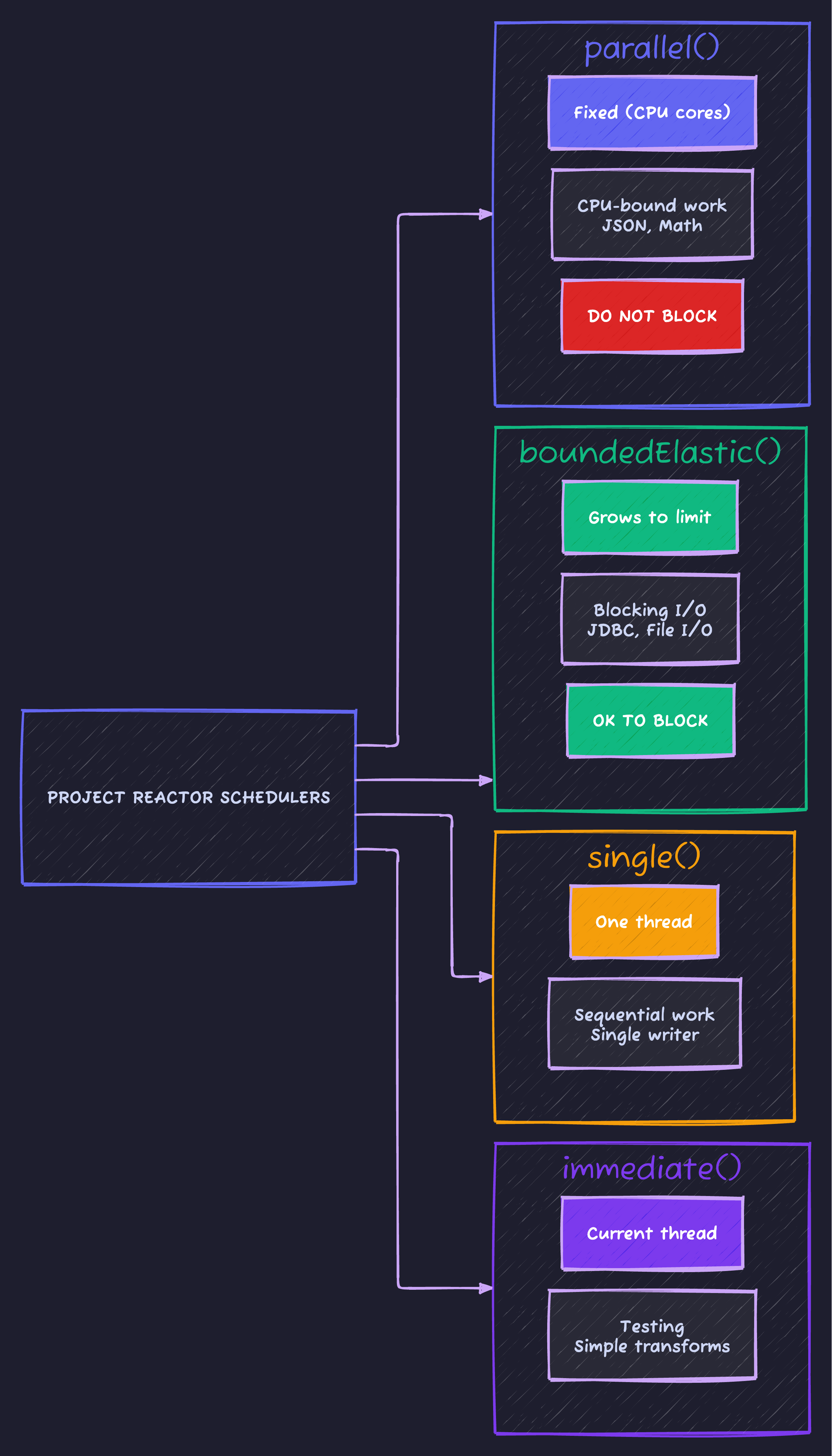
Rule of thumb: Use boundedElastic() for blocking I/O, parallel() for CPU work. Never block on parallel() - you’ll starve the entire application.
Testing WebFlux
@WebFluxTest(UserController.class)
class UserControllerTest {

    @Autowired
    private WebTestClient webClient;

    @MockBean
    private UserService userService;

    @Test
    void shouldReturnUser() {
        User user = new User(1L, "test@example.com", "Test User");
        when(userService.findById(1L)).thenReturn(Mono.just(user));

        webClient.get()
            .uri("/api/users/1")
            .exchange()
            .expectStatus().isOk()
            .expectBody()
            .jsonPath("$.email").isEqualTo("test@example.com");
    }

    @Test
    void shouldReturn404WhenNotFound() {
        when(userService.findById(999L)).thenReturn(Mono.empty());

        webClient.get()
            .uri("/api/users/999")
            .exchange()
            .expectStatus().isNotFound();
    }

    @Test
    void shouldStreamPrices() {
        webClient.get()
            .uri("/api/stream/prices")
            .accept(MediaType.TEXT_EVENT_STREAM)
            .exchange()
            .expectStatus().isOk()
            .expectBodyList(Price.class)
            .hasSize(10);  // If taking first 10
    }
}
Testing Reactive Streams
@Test
void shouldProcessUserStream() {
    Flux<User> users = userService.findAll();

    StepVerifier.create(users)
        .expectNextMatches(u -> u.getEmail().contains("@"))
        .expectNextCount(9)  // 9 more users
        .verifyComplete();
}

@Test
void shouldHandleError() {
    Mono<User> errorMono = userService.findById(-1L);

    StepVerifier.create(errorMono)
        .expectError(UserNotFoundException.class)
        .verify();
}

@Test
void shouldTimeout() {
    Mono<User> slowMono = userService.findById(1L)
        .delayElement(Duration.ofSeconds(5));

    StepVerifier.create(slowMono.timeout(Duration.ofMillis(100)))
        .expectError(TimeoutException.class)
        .verify();
}
WebFlux vs Virtual Threads (Java 21)
Java 21 brought Virtual Threads - a simpler alternative for many use cases:

Enabling Virtual Threads
# application.yml
spring:
  threads:
    virtual:
      enabled: true  # That's it! Spring MVC now uses virtual threads
Code Sample
Full working example: github.com/Moshiour027/techyowls-io-blog-public/spring-webflux-guide
Summary
| Scenario | Recommendation |
|---|---|
| Simple CRUD + moderate traffic | Spring MVC + Virtual Threads |
| High concurrency I/O-bound | WebFlux |
| Streaming/SSE/WebSocket | WebFlux |
| Blocking dependencies (JDBC) | Spring MVC |
| Team new to reactive | Spring MVC first |
The honest answer: Most applications don’t need WebFlux. Virtual Threads solve the thread-per-request problem with zero code changes.
Use WebFlux when streaming or backpressure are requirements, not just for “performance.”
Advertisement
Moshiour Rahman
Software Architect & AI Engineer
Enterprise software architect with deep expertise in financial systems, distributed architecture, and AI-powered applications. Building large-scale systems at Fortune 500 companies. Specializing in LLM orchestration, multi-agent systems, and cloud-native solutions. I share battle-tested patterns from real enterprise projects.
Related Articles
Spring Boot 3 Virtual Threads: Complete Guide to Java 21 Concurrency
Master virtual threads in Spring Boot 3. Learn configuration, performance benchmarks, when to use them, common pitfalls, and production-ready patterns for high-throughput applications.
Spring BootRedis Caching with Spring Boot: Complete Implementation Guide
Master Redis caching in Spring Boot applications. Learn cache configuration, annotations, TTL management, and performance optimization techniques.
Spring BootRedis Caching Patterns: The Difference Between 200ms and 2ms Response Times
Beyond @Cacheable - learn cache-aside, write-through, read-through patterns, cache invalidation strategies, and how to avoid the thundering herd problem.
Comments
Comments are powered by GitHub Discussions.
Configure Giscus at giscus.app to enable comments.