Java Streams API: From Basics to Advanced Patterns
Master Java Streams for clean, efficient data processing. Map, filter, reduce, collectors, parallel streams, and real-world patterns.
Moshiour Rahman
Advertisement
The Problem: Loops Are Cluttering Your Code
You need to filter active users, map to DTOs, and collect to a list:
// Before Streams - imperative, verbose
List<UserDto> activeUsers = new ArrayList<>();
for (User user : users) {
    if (user.isActive()) {
        UserDto dto = new UserDto(user.getId(), user.getName());
        activeUsers.add(dto);
    }
}
// With Streams - declarative, clean
List<UserDto> activeUsers = users.stream()
.filter(User::isActive)
.map(u -> new UserDto(u.getId(), u.getName()))
.toList();Streams make data transformations readable and maintainable.
Quick Answer (TL;DR)
// Filter + Map + Collect
List<String> names = users.stream()
    .filter(u -> u.getAge() > 18)
    .map(User::getName)
    .toList();

// Group by
Map<Department, List<User>> byDept = users.stream()
    .collect(Collectors.groupingBy(User::getDepartment));

// Reduce
int totalAge = users.stream()
    .mapToInt(User::getAge)
    .sum();

// Find
Optional<User> admin = users.stream()
    .filter(u -> u.getRole() == Role.ADMIN)
    .findFirst();
Stream Pipeline
Every stream follows the same three-stage pattern: source, intermediate operations, and a terminal operation that triggers execution.
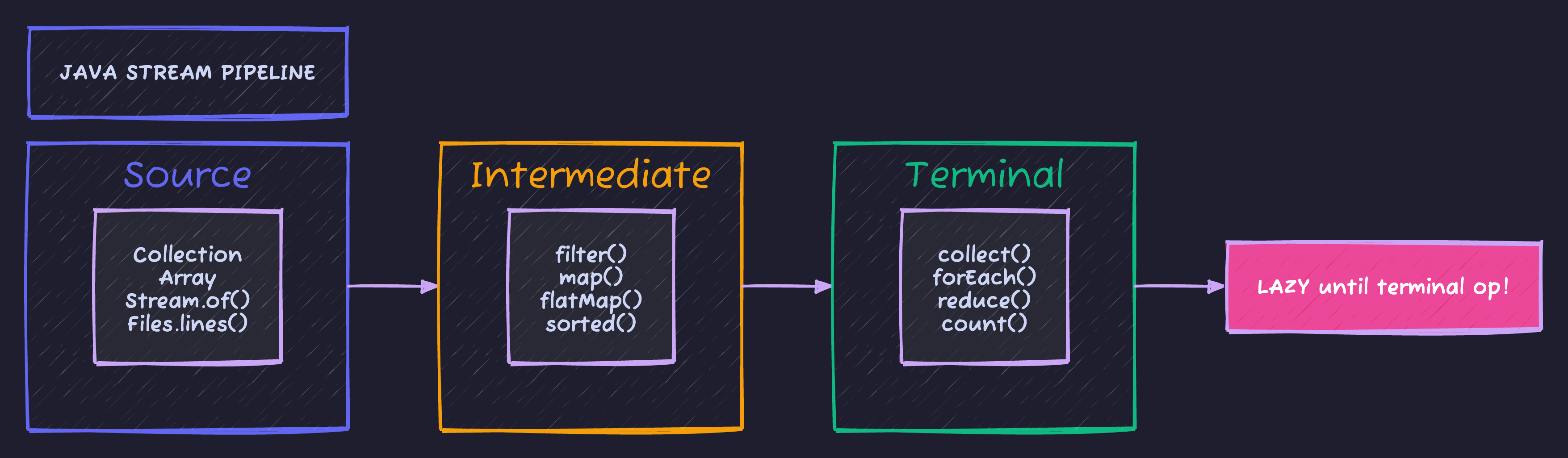
Key insight: Streams are lazy - intermediate operations like filter() and map() don’t execute until a terminal operation (collect(), forEach()) triggers the pipeline.
Core Operations
filter() - Keep Matching Elements
// Keep active users over 18
List<User> result = users.stream()
    .filter(User::isActive)
    .filter(u -> u.getAge() >= 18)
    .toList();

// Multiple conditions in one filter
List<User> result = users.stream()
    .filter(u -> u.isActive() && u.getAge() >= 18)
    .toList();
map() - Transform Elements
// Extract names
List<String> names = users.stream()
    .map(User::getName)
    .toList();

// Transform to DTO
List<UserDto> dtos = users.stream()
    .map(u -> new UserDto(u.getId(), u.getName(), u.getEmail()))
    .toList();

// Chain maps
List<String> upperNames = users.stream()
    .map(User::getName)
    .map(String::toUpperCase)
    .toList();
flatMap() - Flatten Nested Collections
// Users have List<Order> orders
// Get all orders from all users
List<Order> allOrders = users.stream()
    .flatMap(u -> u.getOrders().stream())
    .toList();

// Get all unique products ordered
Set<String> products = users.stream()
    .flatMap(u -> u.getOrders().stream())
    .flatMap(o -> o.getItems().stream())
    .map(Item::getProductId)
    .collect(Collectors.toSet());
sorted() - Order Elements
// Natural order
List<String> sorted = names.stream()
    .sorted()
    .toList();

// Custom comparator
List<User> byAge = users.stream()
    .sorted(Comparator.comparingInt(User::getAge))
    .toList();

// Multiple fields
List<User> sorted = users.stream()
    .sorted(Comparator
        .comparing(User::getDepartment)
        .thenComparing(User::getName)
        .thenComparingInt(User::getAge).reversed())
    .toList();
distinct() - Remove Duplicates
// Unique names
List<String> uniqueNames = users.stream()
    .map(User::getDepartment)
    .distinct()
    .toList();
limit() and skip() - Pagination
// First 10
List<User> firstPage = users.stream()
    .limit(10)
    .toList();

// Skip first 10, take next 10 (page 2)
List<User> secondPage = users.stream()
    .skip(10)
    .limit(10)
    .toList();
Collectors - Gathering Results
toList(), toSet(), toMap()
List<String> list = stream.collect(Collectors.toList());
List<String> list = stream.toList();  // Java 16+ immutable

Set<String> set = stream.collect(Collectors.toSet());

Map<Long, User> byId = users.stream()
    .collect(Collectors.toMap(User::getId, Function.identity()));

// Handle duplicate keys
Map<String, User> byEmail = users.stream()
    .collect(Collectors.toMap(
        User::getEmail,
        Function.identity(),
        (existing, replacement) -> existing  // Keep first
    ));
groupingBy() - Group Elements
// Group by department
Map<Department, List<User>> byDept = users.stream()
    .collect(Collectors.groupingBy(User::getDepartment));

// Group and count
Map<Department, Long> countByDept = users.stream()
    .collect(Collectors.groupingBy(
        User::getDepartment,
        Collectors.counting()
    ));

// Group and sum
Map<Department, Integer> salaryByDept = users.stream()
    .collect(Collectors.groupingBy(
        User::getDepartment,
        Collectors.summingInt(User::getSalary)
    ));

// Group and map values
Map<Department, List<String>> namesByDept = users.stream()
    .collect(Collectors.groupingBy(
        User::getDepartment,
        Collectors.mapping(User::getName, Collectors.toList())
    ));

// Nested grouping
Map<Department, Map<Role, List<User>>> nested = users.stream()
    .collect(Collectors.groupingBy(
        User::getDepartment,
        Collectors.groupingBy(User::getRole)
    ));
partitioningBy() - Split into Two Groups
// Active vs inactive
Map<Boolean, List<User>> partitioned = users.stream()
    .collect(Collectors.partitioningBy(User::isActive));

List<User> active = partitioned.get(true);
List<User> inactive = partitioned.get(false);
joining() - Concatenate Strings
String names = users.stream()
    .map(User::getName)
    .collect(Collectors.joining(", "));
// "Alice, Bob, Charlie"

String csv = users.stream()
    .map(User::getName)
    .collect(Collectors.joining(",", "[", "]"));
// "[Alice,Bob,Charlie]"
Statistics
IntSummaryStatistics stats = users.stream()
    .collect(Collectors.summarizingInt(User::getAge));

stats.getCount();    // 100
stats.getSum();      // 3500
stats.getMin();      // 18
stats.getMax();      // 65
stats.getAverage(); // 35.0
Terminal Operations
reduce() - Combine Elements
// Sum
int total = numbers.stream()
    .reduce(0, Integer::sum);

// Max
Optional<Integer> max = numbers.stream()
    .reduce(Integer::max);

// Custom reduction
String combined = strings.stream()
    .reduce("", (a, b) -> a + b);
findFirst() and findAny()
// First matching
Optional<User> firstAdmin = users.stream()
    .filter(u -> u.getRole() == Role.ADMIN)
    .findFirst();

// Any matching (better for parallel)
Optional<User> anyAdmin = users.parallelStream()
    .filter(u -> u.getRole() == Role.ADMIN)
    .findAny();
anyMatch(), allMatch(), noneMatch()
boolean hasAdmin = users.stream()
    .anyMatch(u -> u.getRole() == Role.ADMIN);

boolean allActive = users.stream()
    .allMatch(User::isActive);

boolean noMinors = users.stream()
    .noneMatch(u -> u.getAge() < 18);
count(), min(), max()
long count = users.stream()
    .filter(User::isActive)
    .count();

Optional<User> oldest = users.stream()
    .max(Comparator.comparingInt(User::getAge));

Optional<User> youngest = users.stream()
    .min(Comparator.comparingInt(User::getAge));
Primitive Streams
// IntStream, LongStream, DoubleStream - avoid boxing
int sum = users.stream()
    .mapToInt(User::getAge)
    .sum();

double avg = users.stream()
    .mapToInt(User::getSalary)
    .average()
    .orElse(0);

// Range
IntStream.range(0, 10).forEach(System.out::println);      // 0-9
IntStream.rangeClosed(1, 10).forEach(System.out::println); // 1-10

// Generate
IntStream.generate(() -> random.nextInt(100))
    .limit(10)
    .toArray();
Real-World Patterns
DTO Transformation
public List<OrderSummaryDto> getOrderSummaries(Long userId) {
    return orderRepository.findByUserId(userId).stream()
        .filter(o -> o.getStatus() != OrderStatus.CANCELLED)
        .sorted(Comparator.comparing(Order::getCreatedAt).reversed())
        .map(o -> new OrderSummaryDto(
            o.getId(),
            o.getTotalAmount(),
            o.getStatus(),
            o.getCreatedAt()
        ))
        .toList();
}
Aggregation Report
public DepartmentReport generateReport() {
    Map<Department, DoubleSummaryStatistics> salaryStats = employees.stream()
        .collect(Collectors.groupingBy(
            Employee::getDepartment,
            Collectors.summarizingDouble(Employee::getSalary)
        ));

    return salaryStats.entrySet().stream()
        .map(e -> new DeptStats(
            e.getKey(),
            e.getValue().getCount(),
            e.getValue().getAverage(),
            e.getValue().getSum()
        ))
        .sorted(Comparator.comparing(DeptStats::totalSalary).reversed())
        .toList();
}
Null-Safe Processing
// Filter nulls
List<String> names = users.stream()
    .map(User::getName)
    .filter(Objects::nonNull)
    .toList();

// Optional chain
Optional<String> managerName = Optional.ofNullable(employee)
    .map(Employee::getDepartment)
    .map(Department::getManager)
    .map(Manager::getName);
Batching
public <T> List<List<T>> batch(List<T> items, int batchSize) {
    return IntStream.range(0, (items.size() + batchSize - 1) / batchSize)
        .mapToObj(i -> items.subList(
            i * batchSize,
            Math.min((i + 1) * batchSize, items.size())
        ))
        .toList();
}
Parallel Streams
// Parallel processing
long count = users.parallelStream()
    .filter(this::expensiveCheck)
    .count();

// When to use parallel:
// ✓ Large datasets (>10,000 elements)
// ✓ CPU-intensive operations
// ✓ No shared mutable state
// ✗ Small datasets (overhead > benefit)
// ✗ I/O operations (use virtual threads instead)
// ✗ Order matters (unless you sort after)
Common Pitfalls
| Pitfall | Problem | Fix |
|---|---|---|
| Reusing streams | IllegalStateException | Create new stream |
| Side effects in map | Unpredictable | Use forEach for side effects |
| Null in stream | NullPointerException | Filter nulls first |
| Parallel + order | Results scrambled | Use sequential or sort after |
| Infinite streams | OOM | Always use limit() |
// BAD - reusing stream
var stream = users.stream();
stream.filter(User::isActive).count();
stream.map(User::getName).toList();  // IllegalStateException!

// BAD - side effect in map
List<User> processed = new ArrayList<>();
users.stream()
    .map(u -> { processed.add(u); return u; })  // Don't!
    .toList();

// GOOD - use forEach for side effects
users.stream()
    .filter(User::isActive)
    .forEach(processed::add);
Code Repository
Complete stream examples:
GitHub: techyowls/techyowls-io-blog-public/java-streams-guide
Further Reading
- Java 21 Virtual Threads - For I/O parallelism
- Spring Boot Testing - Test stream operations
- Java Stream API Docs
Write clean data transformations. Follow TechyOwls for more practical guides.
Advertisement
Moshiour Rahman
Software Architect & AI Engineer
Enterprise software architect with deep expertise in financial systems, distributed architecture, and AI-powered applications. Building large-scale systems at Fortune 500 companies. Specializing in LLM orchestration, multi-agent systems, and cloud-native solutions. I share battle-tested patterns from real enterprise projects.
Related Articles
Spring Boot 3 Virtual Threads: Complete Guide to Java 21 Concurrency
Master virtual threads in Spring Boot 3. Learn configuration, performance benchmarks, when to use them, common pitfalls, and production-ready patterns for high-throughput applications.
Spring BootSpring AI + MCP: Build AI Agents That Actually Do Things
Connect your Spring Boot app to external tools, databases, and APIs using Model Context Protocol. Complete guide with working code.
Spring BootSpring AI Structured Output: Parse LLM Responses into Java Objects
Convert unpredictable LLM text into type-safe Java objects. BeanOutputConverter, ListOutputConverter, and custom converters explained.
Comments
Comments are powered by GitHub Discussions.
Configure Giscus at giscus.app to enable comments.