Spring AI + MCP: Build AI Agents That Actually Do Things
Connect your Spring Boot app to external tools, databases, and APIs using Model Context Protocol. Complete guide with working code.
Moshiour Rahman
Advertisement
The Problem: LLMs Are Stuck in a Bubble
You’ve built a chatbot with Spring AI. It answers questions. But here’s what it cannot do:
- Search the web for current information
- Read files from your filesystem
- Query your database
- Call your internal APIs
- Execute any real action
Your LLM is a brain in a jar - smart, but disconnected from the world.
Model Context Protocol (MCP) solves this. It’s how you give your AI hands.
Quick Answer (TL;DR)
// 1. Add MCP client dependency
// 2. Configure MCP servers in application.yaml
// 3. Inject tools into ChatClient

@Bean
ChatClient chatClient(ChatModel model, SyncMcpToolCallbackProvider tools) {
    return ChatClient.builder(model)
        .defaultToolCallbacks(tools.getToolCallbacks())
        .build();
}

// Now your chatbot can search the web, read files, call your APIs
Full working code: github.com/techyowls/techyowls-io-blog-public/spring-ai-mcp-guide
What is MCP?
MCP (Model Context Protocol) is Anthropic’s open standard for connecting AI models to external tools. Think of it as USB for AI - a universal way to plug capabilities into your LLM.
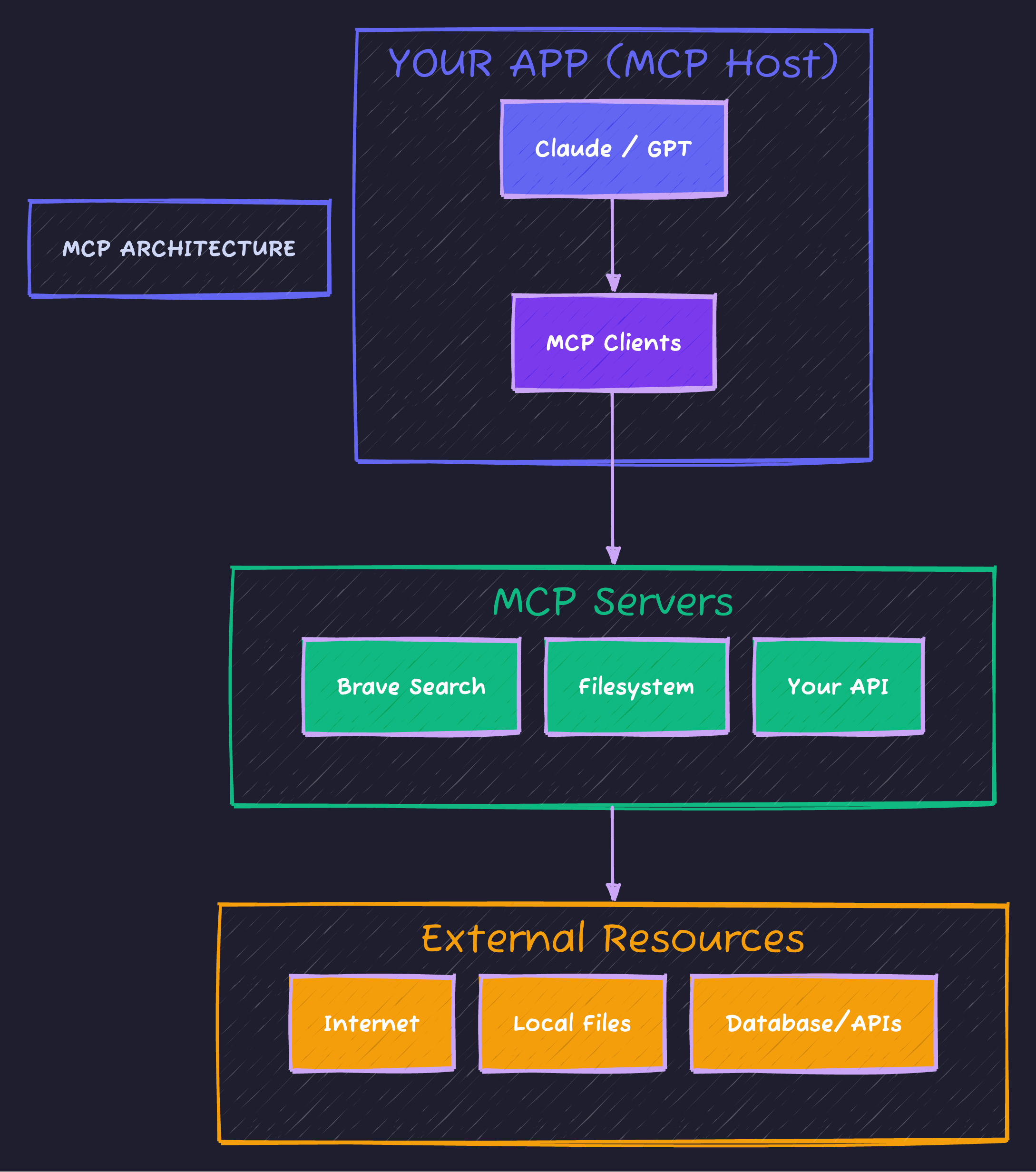
Your app (the MCP Host) connects to multiple MCP Servers, each exposing different tools the LLM can call.
Key Concepts
| Component | What It Does |
|---|---|
| MCP Host | Your app - orchestrates everything |
| MCP Client | Maintains 1:1 connection to a server |
| MCP Server | Exposes tools (functions the LLM can call) |
| Tools | Actual capabilities: search, read, write, query |
Transport Types
| Type | Use Case | How It Works |
|---|---|---|
| stdio | Local processes | stdin/stdout streams |
| SSE | Remote services | HTTP + Server-Sent Events |
Step-by-Step Implementation
Prerequisites
- Java 21+
- Maven or Gradle
- Node.js (for pre-built MCP servers)
- API keys: Anthropic, Brave Search (optional)
Step 1: Dependencies
<dependencyManagement>
    <dependencies>
        <dependency>
            <groupId>org.springframework.ai</groupId>
            <artifactId>spring-ai-bom</artifactId>
            <version>1.0.1</version>
            <type>pom</type>
            <scope>import</scope>
        </dependency>
    </dependencies>
</dependencyManagement>

<dependencies>
    <!-- Chat model (pick one) -->
    <dependency>
        <groupId>org.springframework.ai</groupId>
        <artifactId>spring-ai-starter-model-anthropic</artifactId>
    </dependency>

    <!-- MCP client support -->
    <dependency>
        <groupId>org.springframework.ai</groupId>
        <artifactId>spring-ai-starter-mcp-client</artifactId>
    </dependency>

    <!-- Web support -->
    <dependency>
        <groupId>org.springframework.boot</groupId>
        <artifactId>spring-boot-starter-web</artifactId>
    </dependency>
</dependencies>
Step 2: Configure MCP Servers
Create application.yaml:
spring:
  ai:
    # LLM Configuration
    anthropic:
      api-key: ${ANTHROPIC_API_KEY}
      chat:
        options:
          model: claude-sonnet-4-20250514

    # MCP Servers Configuration
    mcp:
      client:
        # Local servers (stdio transport)
        stdio:
          connections:
            # Web search capability
            brave-search:
              command: npx
              args:
                - "-y"
                - "@modelcontextprotocol/server-brave-search"
              env:
                BRAVE_API_KEY: ${BRAVE_API_KEY}

            # Filesystem access
            filesystem:
              command: npx
              args:
                - "-y"
                - "@modelcontextprotocol/server-filesystem"
                - "./data"  # Restrict to ./data directory

        # Remote servers (SSE transport)
        sse:
          connections:
            # Your custom server
            custom-tools:
              url: http://localhost:8081
Step 3: Build the Chatbot Service
@Configuration
public class ChatConfig {

    @Bean
    ChatClient chatClient(
            ChatModel chatModel,
            SyncMcpToolCallbackProvider toolProvider) {

        return ChatClient.builder(chatModel)
            .defaultSystem("""
                You are a helpful assistant with access to external tools.
                Use tools when needed to provide accurate, up-to-date information.
                Always cite sources when using web search.
                """)
            .defaultToolCallbacks(toolProvider.getToolCallbacks())
            .build();
    }
}@Service
public class ChatbotService {
private final ChatClient chatClient;
public ChatbotService(ChatClient chatClient) {
this.chatClient = chatClient;
}
public String chat(String question) {
return chatClient
.prompt()
.user(question)
.call()
.content();
}
// Streaming response (better UX)
public Flux<String> chatStream(String question) {
return chatClient
.prompt()
.user(question)
.stream()
.content();
}
}Step 4: REST Controller
@RestController
@RequestMapping("/api/chat")
public class ChatController {

    private final ChatbotService chatbot;

    public ChatController(ChatbotService chatbot) {
        this.chatbot = chatbot;
    }

    @PostMapping
    public ChatResponse chat(@RequestBody ChatRequest request) {
        String answer = chatbot.chat(request.question());
        return new ChatResponse(answer);
    }

    @PostMapping(value = "/stream", produces = MediaType.TEXT_EVENT_STREAM_VALUE)
    public Flux<String> chatStream(@RequestBody ChatRequest request) {
        return chatbot.chatStream(request.question());
    }

    public record ChatRequest(String question) {}
    public record ChatResponse(String answer) {}
}
Creating Your Own MCP Server
Pre-built servers are great, but the real power is exposing your own business logic.
Step 1: New Spring Boot App
<dependency>
    <groupId>org.springframework.ai</groupId>
    <artifactId>spring-ai-starter-mcp-server-webmvc</artifactId>
</dependency>
Step 2: Define Tools
public class ProductTools {

    private final ProductRepository productRepo;

    public ProductTools(ProductRepository productRepo) {
        this.productRepo = productRepo;
    }

    @Tool(description = "Search products by name or category. Returns matching products with prices.")
    public List<Product> searchProducts(
            @ToolParam(description = "Search query") String query,
            @ToolParam(description = "Max results to return") int limit) {
        return productRepo.search(query, limit);
    }

    @Tool(description = "Get current inventory level for a product")
    public InventoryStatus checkInventory(
            @ToolParam(description = "Product SKU") String sku) {
        return productRepo.getInventory(sku);
    }

    @Tool(description = "Place an order for a product")
    public OrderResult placeOrder(
            @ToolParam(description = "Product SKU") String sku,
            @ToolParam(description = "Quantity to order") int quantity,
            @ToolParam(description = "Customer email") String email) {
        return orderService.create(sku, quantity, email);
    }
}
Step 3: Register Tools
@Configuration
public class McpServerConfig {

    @Bean
    ToolCallbackProvider productTools(ProductRepository repo) {
        return MethodToolCallbackProvider.builder()
            .toolObjects(new ProductTools(repo))
            .build();
    }
}
Step 4: Configure Server
server:
  port: 8081

spring:
  ai:
    mcp:
      server:
        name: product-tools
        version: 1.0.0
Now your chatbot can answer: “Do you have the blue widget in stock? Order 5 for me.”
Architecture: Putting It Together
Here’s how all the components connect in a production Spring Boot + MCP setup:
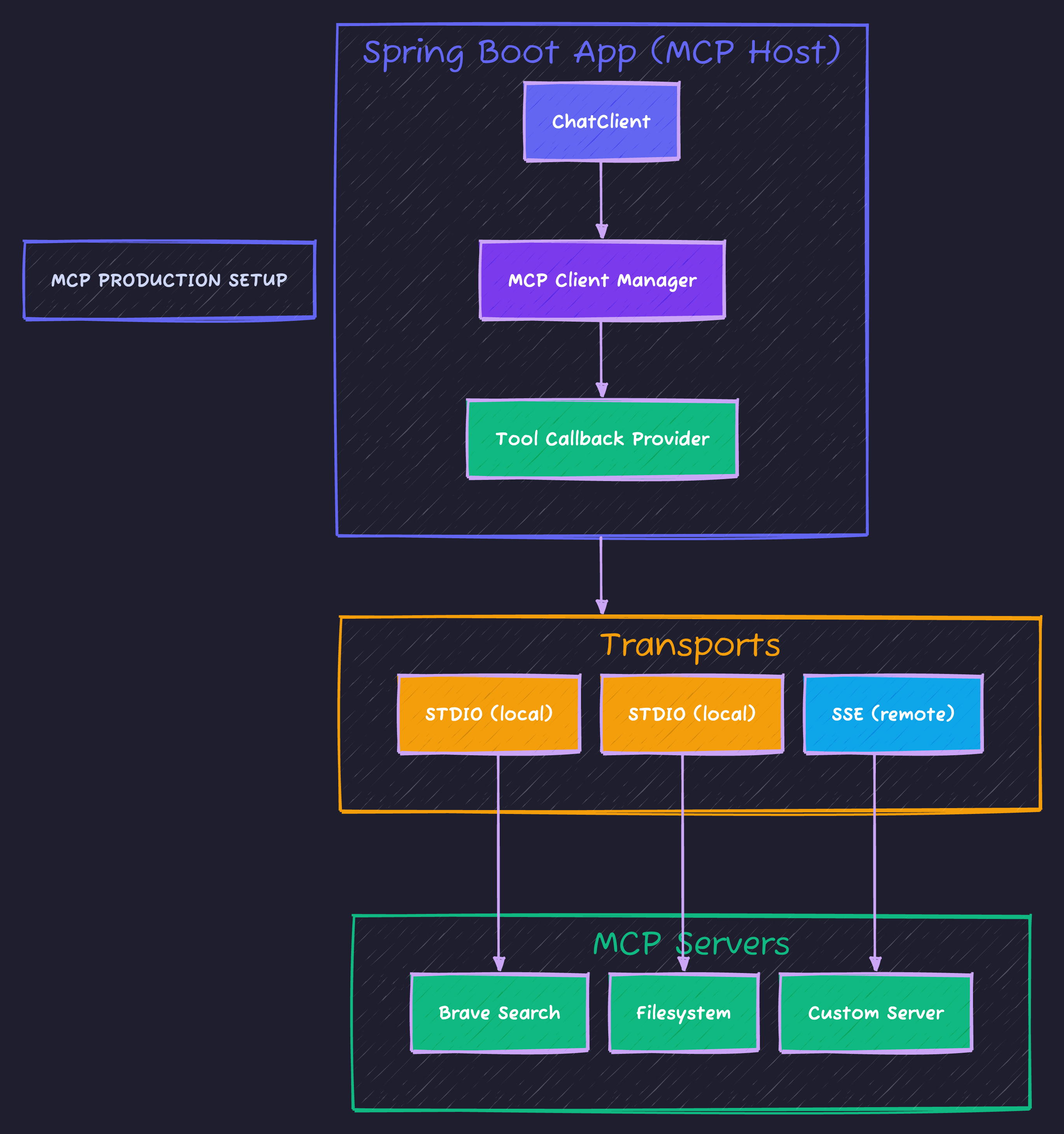
The Spring Boot host connects to multiple MCP servers via STDIO (local processes) or SSE (remote services), each exposing different tools like search, file access, or custom business logic.
Common Pitfalls
| Mistake | Why It Happens | Fix |
|---|---|---|
| Tools not discovered | MCP server not running | Start server before host app |
npx command fails | Node.js not installed | Install Node.js 18+ |
| Connection refused | Wrong port/URL | Check application.yaml |
| Tool never called | Vague description | Write specific @Tool descriptions |
| Timeout errors | Slow tool execution | Increase timeout in config |
Debugging MCP Connections
@Bean
ApplicationRunner mcpDebugger(SyncMcpToolCallbackProvider provider) {
    return args -> {
        var tools = provider.getToolCallbacks();
        System.out.println("Registered MCP Tools:");
        tools.forEach(t -> System.out.println("  - " + t.getName()));
    };
}
Production Considerations
Security
spring:
  ai:
    mcp:
      client:
        stdio:
          connections:
            filesystem:
              args:
                - "-y"
                - "@modelcontextprotocol/server-filesystem"
                - "/app/safe-directory"  # NEVER use "/" or "~"
Performance
- Cache tool results when appropriate
- Use SSE for remote servers (more reliable than stdio for production)
- Implement rate limiting on your custom tools
Monitoring
@Tool(description = "...")
public Result myTool(String input) {
    var timer = meterRegistry.timer("mcp.tool.myTool");
    return timer.record(() -> doWork(input));
}
Testing
@SpringBootTest
class ChatbotServiceTest {

    @Autowired
    ChatbotService chatbot;

    @Test
    void shouldUseWebSearch() {
        String answer = chatbot.chat("What's the weather in Tokyo right now?");

        assertThat(answer)
            .containsAnyOf("Tokyo", "weather", "temperature");
    }

    @Test
    void shouldUseFilesystem() {
        String answer = chatbot.chat("List files in the data directory");

        assertThat(answer).contains("file");
    }
}
Code Repository
Complete working example with:
- MCP Host (main chatbot app)
- Custom MCP Server (product tools)
- Docker Compose setup
- Integration tests
GitHub: techyowls/techyowls-io-blog-public/spring-ai-mcp-guide
git clone https://github.com/techyowls/techyowls-io-blog-public.git
cd techyowls-io-blog-public/spring-ai-mcp-guide

# Start everything
docker-compose up -d

# Run the host
./mvnw spring-boot:run -pl mcp-host

# Test it
curl -X POST http://localhost:8080/api/chat \
  -H "Content-Type: application/json" \
  -d '{"question": "Search for the latest Java news"}'
Further Reading
- Model Context Protocol Specification
- Spring AI Documentation
- Build MCP Server in Python
- LangChain4j Guide
Ship AI features that actually work. Follow TechyOwls for more practical guides.
Advertisement
Moshiour Rahman
Software Architect & AI Engineer
Enterprise software architect with deep expertise in financial systems, distributed architecture, and AI-powered applications. Building large-scale systems at Fortune 500 companies. Specializing in LLM orchestration, multi-agent systems, and cloud-native solutions. I share battle-tested patterns from real enterprise projects.
Related Articles
Spring AI Structured Output: Parse LLM Responses into Java Objects
Convert unpredictable LLM text into type-safe Java objects. BeanOutputConverter, ListOutputConverter, and custom converters explained.
Spring BootLangChain4j: Build AI Apps in Java Without Python
Complete guide to LangChain4j - RAG, memory, agents, and tools for Java developers. Stop rewriting Python code.
Spring BootSpring Boot 3 Virtual Threads: Complete Guide to Java 21 Concurrency
Master virtual threads in Spring Boot 3. Learn configuration, performance benchmarks, when to use them, common pitfalls, and production-ready patterns for high-throughput applications.
Comments
Comments are powered by GitHub Discussions.
Configure Giscus at giscus.app to enable comments.