Docker Compose for Spring Boot: Local Dev to Production
Containerize Spring Boot apps with Docker Compose. Multi-service setup, health checks, volumes, and production deployment patterns.
Moshiour Rahman
Advertisement
The Problem: “It Works on My Machine”
Your Spring Boot app runs perfectly locally. Then:
- Teammate can’t run it - wrong Java version
- QA environment has different Postgres version
- Production Redis config doesn’t match dev
- New developer takes 2 days to set up environment
Docker Compose solves this. One command, identical environment everywhere.
Quick Answer (TL;DR)
# docker-compose.yml
services:
  app:
    build: .
    ports:
      - "8080:8080"
    depends_on:
      postgres:
        condition: service_healthy
    environment:
      - SPRING_DATASOURCE_URL=jdbc:postgresql://postgres:5432/mydb

  postgres:
    image: postgres:16
    environment:
      POSTGRES_DB: mydb
      POSTGRES_PASSWORD: secret
    healthcheck:
      test: ["CMD-SHELL", "pg_isready -U postgres"]
      interval: 5s
      timeout: 5s
      retries: 5
docker compose up # Everything starts, connected, healthyUnderstanding Docker Compose
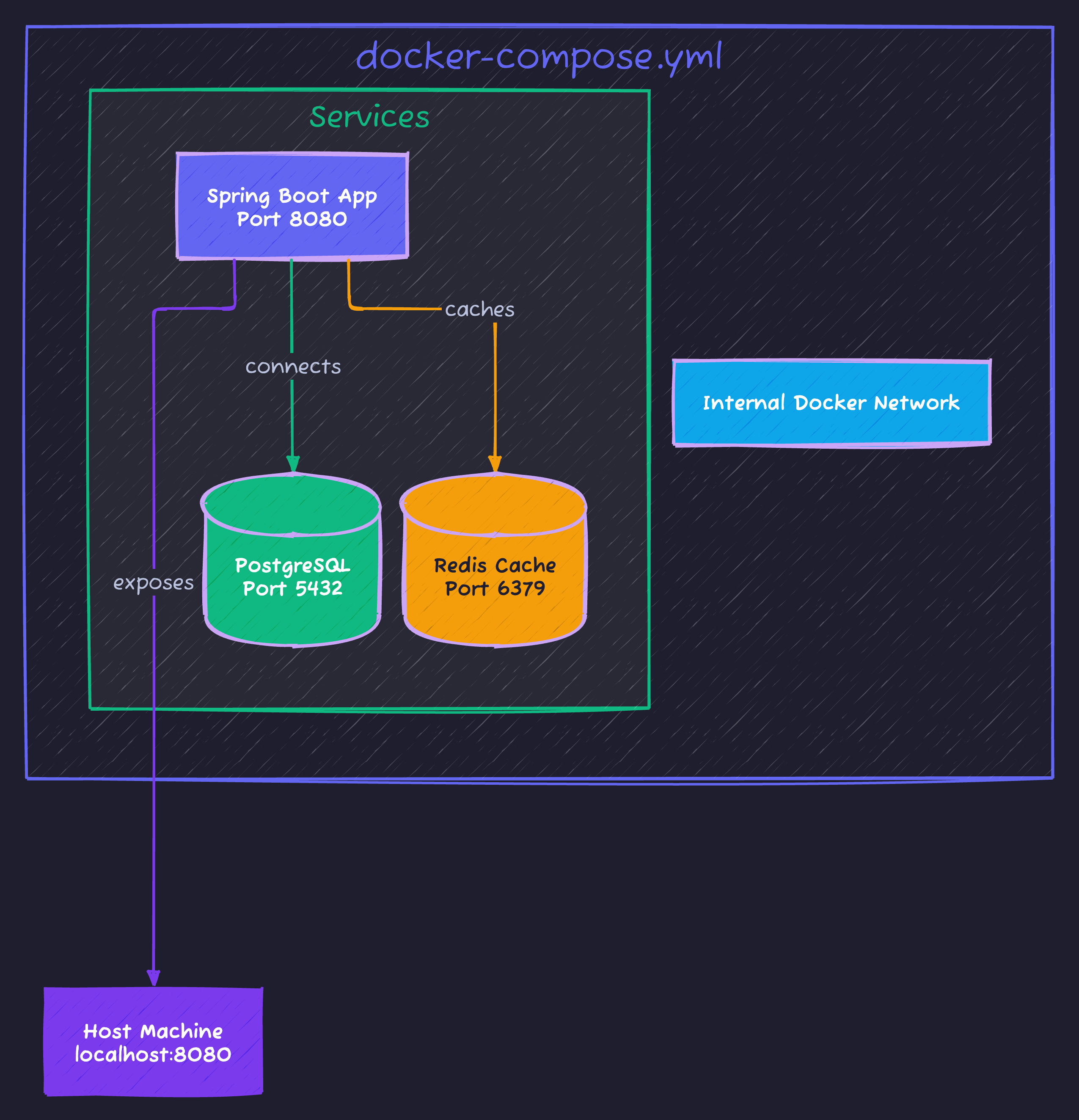
Key Concepts
| Concept | What It Does |
|---|---|
| Service | A container definition (app, database, cache) |
| Network | Services communicate by service name |
| Volume | Persist data beyond container lifecycle |
| Health check | Wait for service to be ready before starting dependents |
Step-by-Step Setup
Step 1: Dockerfile for Spring Boot
# Dockerfile
FROM eclipse-temurin:21-jdk-alpine AS builder
WORKDIR /app
COPY . .
RUN ./mvnw package -DskipTests

FROM eclipse-temurin:21-jre-alpine
WORKDIR /app
COPY --from=builder /app/target/*.jar app.jar

# Non-root user for security
RUN addgroup -S spring && adduser -S spring -G spring
USER spring

EXPOSE 8080
ENTRYPOINT ["java", "-jar", "app.jar"]
Step 2: Basic docker-compose.yml
version: '3.8'

services:
  app:
    build:
      context: .
      dockerfile: Dockerfile
    ports:
      - "8080:8080"
    environment:
      - SPRING_PROFILES_ACTIVE=docker
      - SPRING_DATASOURCE_URL=jdbc:postgresql://postgres:5432/appdb
      - SPRING_DATASOURCE_USERNAME=postgres
      - SPRING_DATASOURCE_PASSWORD=secret
      - SPRING_DATA_REDIS_HOST=redis
    depends_on:
      postgres:
        condition: service_healthy
      redis:
        condition: service_started
    restart: unless-stopped

  postgres:
    image: postgres:16-alpine
    environment:
      POSTGRES_DB: appdb
      POSTGRES_USER: postgres
      POSTGRES_PASSWORD: secret
    volumes:
      - postgres_data:/var/lib/postgresql/data
    healthcheck:
      test: ["CMD-SHELL", "pg_isready -U postgres"]
      interval: 5s
      timeout: 5s
      retries: 5

  redis:
    image: redis:7-alpine
    volumes:
      - redis_data:/data

volumes:
  postgres_data:
  redis_data:
Step 3: Spring Profile for Docker
# application-docker.yml
spring:
  datasource:
    url: ${SPRING_DATASOURCE_URL}
    username: ${SPRING_DATASOURCE_USERNAME}
    password: ${SPRING_DATASOURCE_PASSWORD}
  data:
    redis:
      host: ${SPRING_DATA_REDIS_HOST:localhost}
Production-Ready Configuration
Multi-Stage Build (Smaller Images)
# Dockerfile.production
FROM eclipse-temurin:21-jdk-alpine AS builder
WORKDIR /app
COPY pom.xml .
COPY src ./src

# Cache dependencies
RUN --mount=type=cache,target=/root/.m2 \
    ./mvnw dependency:go-offline

RUN --mount=type=cache,target=/root/.m2 \
    ./mvnw package -DskipTests

# Extract layers for better caching
FROM eclipse-temurin:21-jdk-alpine AS extractor
WORKDIR /app
COPY --from=builder /app/target/*.jar app.jar
RUN java -Djarmode=layertools -jar app.jar extract

# Final image
FROM eclipse-temurin:21-jre-alpine
WORKDIR /app

# Add non-root user
RUN addgroup -S spring && adduser -S spring -G spring
USER spring

# Copy layers (changes less frequently → cached better)
COPY --from=extractor /app/dependencies/ ./
COPY --from=extractor /app/spring-boot-loader/ ./
COPY --from=extractor /app/snapshot-dependencies/ ./
COPY --from=extractor /app/application/ ./

EXPOSE 8080
ENTRYPOINT ["java", "org.springframework.boot.loader.launch.JarLauncher"]
Production docker-compose.yml
version: '3.8'

services:
  app:
    build:
      context: .
      dockerfile: Dockerfile.production
    ports:
      - "8080:8080"
    environment:
      - SPRING_PROFILES_ACTIVE=production
      - JAVA_OPTS=-XX:+UseG1GC -XX:MaxRAMPercentage=75
    deploy:
      resources:
        limits:
          memory: 512M
          cpus: '1'
        reservations:
          memory: 256M
    healthcheck:
      test: ["CMD", "wget", "-qO-", "http://localhost:8080/actuator/health"]
      interval: 30s
      timeout: 10s
      retries: 3
      start_period: 60s
    depends_on:
      postgres:
        condition: service_healthy
    restart: unless-stopped
    logging:
      driver: "json-file"
      options:
        max-size: "10m"
        max-file: "3"

  postgres:
    image: postgres:16-alpine
    environment:
      POSTGRES_DB: ${DB_NAME}
      POSTGRES_USER: ${DB_USER}
      POSTGRES_PASSWORD: ${DB_PASSWORD}
    volumes:
      - postgres_data:/var/lib/postgresql/data
      - ./init.sql:/docker-entrypoint-initdb.d/init.sql:ro
    healthcheck:
      test: ["CMD-SHELL", "pg_isready -U ${DB_USER}"]
      interval: 10s
      timeout: 5s
      retries: 5
    deploy:
      resources:
        limits:
          memory: 256M

  redis:
    image: redis:7-alpine
    command: redis-server --appendonly yes --maxmemory 100mb --maxmemory-policy allkeys-lru
    volumes:
      - redis_data:/data
    deploy:
      resources:
        limits:
          memory: 128M

volumes:
  postgres_data:
  redis_data:

networks:
  default:
    driver: bridge
Common Patterns
Hot Reload for Development
# docker-compose.dev.yml
services:
  app:
    build:
      context: .
      target: builder  # Stop at builder stage
    volumes:
      - ./src:/app/src:ro
      - ./pom.xml:/app/pom.xml:ro
    command: ./mvnw spring-boot:run -Dspring-boot.run.jvmArguments="-agentlib:jdwp=transport=dt_socket,server=y,suspend=n,address=*:5005"
    ports:
      - "8080:8080"
      - "5005:5005"  # Debug port
docker compose -f docker-compose.yml -f docker-compose.dev.yml upDatabase Migrations with Flyway
services:
  app:
    depends_on:
      flyway:
        condition: service_completed_successfully

  flyway:
    image: flyway/flyway:10
    command: migrate
    volumes:
      - ./src/main/resources/db/migration:/flyway/sql:ro
    environment:
      - FLYWAY_URL=jdbc:postgresql://postgres:5432/appdb
      - FLYWAY_USER=postgres
      - FLYWAY_PASSWORD=secret
    depends_on:
      postgres:
        condition: service_healthy
Multiple Environments
# Directory structure
├── docker-compose.yml          # Base config
├── docker-compose.dev.yml      # Dev overrides
├── docker-compose.prod.yml     # Prod overrides
└── .env.example                # Environment template
# Development
docker compose -f docker-compose.yml -f docker-compose.dev.yml up
# Production
docker compose -f docker-compose.yml -f docker-compose.prod.yml up -dHealth Checks Deep Dive
services:
  app:
    healthcheck:
      # Spring Boot Actuator health endpoint
      test: ["CMD", "wget", "-qO-", "http://localhost:8080/actuator/health"]
      interval: 30s      # Check every 30s
      timeout: 10s       # Fail if no response in 10s
      retries: 3         # Unhealthy after 3 failures
      start_period: 60s  # Grace period for startup

  postgres:
    healthcheck:
      test: ["CMD-SHELL", "pg_isready -U postgres -d appdb"]
      interval: 5s
      timeout: 5s
      retries: 5

  redis:
    healthcheck:
      test: ["CMD", "redis-cli", "ping"]
      interval: 5s
      timeout: 3s
      retries: 3

  elasticsearch:
    healthcheck:
      test: ["CMD-SHELL", "curl -s http://localhost:9200/_cluster/health | grep -q '\"status\":\"green\"\\|\"status\":\"yellow\"'"]
      interval: 30s
      timeout: 10s
      retries: 5
Spring Boot Actuator Setup
# application.yml
management:
  endpoints:
    web:
      exposure:
        include: health,info,metrics
  endpoint:
    health:
      show-details: when_authorized
      probes:
        enabled: true
  health:
    db:
      enabled: true
    redis:
      enabled: true
Networking Patterns
Service Discovery (by name)
// In Spring Boot, use service name as hostname
@Value("${spring.datasource.url}")
private String dbUrl;  // jdbc:postgresql://postgres:5432/appdb
                       //                   ^^^^^^^^ service name
External Services
services:
  app:
    extra_hosts:
      - "host.docker.internal:host-gateway"
    environment:
      # Connect to service running on host machine
      - EXTERNAL_API_URL=http://host.docker.internal:3000
Isolated Networks
services:
  app:
    networks:
      - frontend
      - backend

  postgres:
    networks:
      - backend  # Not accessible from frontend

  nginx:
    networks:
      - frontend

networks:
  frontend:
  backend:
Volume Patterns
Named Volumes (Recommended)
volumes:
  postgres_data:  # Docker manages location
  redis_data:

services:
  postgres:
    volumes:
      - postgres_data:/var/lib/postgresql/data
Bind Mounts (Development)
services:
  app:
    volumes:
      - ./src:/app/src:ro              # Read-only source
      - ./config:/app/config:ro        # Config files
      - ./logs:/app/logs               # Writable logs
Backup Strategy
# Backup postgres volume
docker run --rm \
  -v postgres_data:/data:ro \
  -v $(pwd)/backups:/backup \
  alpine tar czf /backup/postgres-$(date +%Y%m%d).tar.gz -C /data .
Commands Cheatsheet
| Command | Purpose |
|---|---|
docker compose up | Start all services |
docker compose up -d | Start detached |
docker compose up --build | Rebuild images |
docker compose down | Stop and remove |
docker compose down -v | Also remove volumes |
docker compose logs -f app | Follow app logs |
docker compose exec app sh | Shell into container |
docker compose ps | List running services |
docker compose pull | Pull latest images |
Common Pitfalls
| Pitfall | Symptom | Fix |
|---|---|---|
| No health check wait | App crashes on startup | Use depends_on: condition: service_healthy |
| Hardcoded localhost | Connection refused | Use service names (postgres, redis) |
| No volume for data | Data lost on restart | Add named volumes |
| Large images | Slow deployments | Use multi-stage builds, Alpine base |
| Root user | Security risk | Add non-root user in Dockerfile |
Code Repository
Complete examples with multiple configurations:
GitHub: techyowls/techyowls-io-blog-public/docker-compose-spring-boot
git clone https://github.com/techyowls/techyowls-io-blog-public.git
cd techyowls-io-blog-public/docker-compose-spring-boot

# Development
docker compose -f docker-compose.yml -f docker-compose.dev.yml up

# Production simulation
docker compose -f docker-compose.yml -f docker-compose.prod.yml up -d
Further Reading
- Java 21 Virtual Threads - Scale your containerized apps
- Spring AI MCP Guide - AI services in containers
- Docker Documentation
Ship consistent environments everywhere. Follow TechyOwls for more practical guides.
Advertisement
Moshiour Rahman
Software Architect & AI Engineer
Enterprise software architect with deep expertise in financial systems, distributed architecture, and AI-powered applications. Building large-scale systems at Fortune 500 companies. Specializing in LLM orchestration, multi-agent systems, and cloud-native solutions. I share battle-tested patterns from real enterprise projects.
Related Articles
Docker Best Practices for Production: Complete Guide
Master Docker best practices for production deployments. Learn image optimization, security hardening, multi-stage builds, and container orchestration.
DevOpsKubernetes for Beginners: Complete Guide to Container Orchestration
Learn Kubernetes from scratch. Understand pods, deployments, services, and how to deploy your first application to a Kubernetes cluster with practical examples.
DevOpsDocker Compose Tutorial: Building Multi-Container Applications
Master Docker Compose for multi-container applications. Learn to define, configure, and run complex application stacks with practical examples including web apps with databases.
Comments
Comments are powered by GitHub Discussions.
Configure Giscus at giscus.app to enable comments.