Kubernetes for Beginners: Complete Guide to Container Orchestration
Learn Kubernetes from scratch. Understand pods, deployments, services, and how to deploy your first application to a Kubernetes cluster with practical examples.
Moshiour Rahman
Advertisement
What is Kubernetes?
I’ll be honest: Kubernetes felt overwhelming when I first started. YAML files everywhere, abstract concepts like “pods” and “services,” and error messages that made no sense. But after deploying a few real applications, it clicked. Now I can’t imagine managing production containers without it.
Kubernetes (K8s) is an open-source container orchestration platform that automates deploying, scaling, and managing containerized applications. Originally developed by Google, it’s now maintained by the Cloud Native Computing Foundation (CNCF).
Why Kubernetes?
| Challenge | How Kubernetes Solves It |
|---|---|
| Manual scaling | Auto-scaling based on load |
| Single point of failure | Self-healing and redundancy |
| Complex deployments | Declarative configuration |
| Service discovery | Built-in DNS and load balancing |
| Rolling updates | Zero-downtime deployments |
Architecture Overview
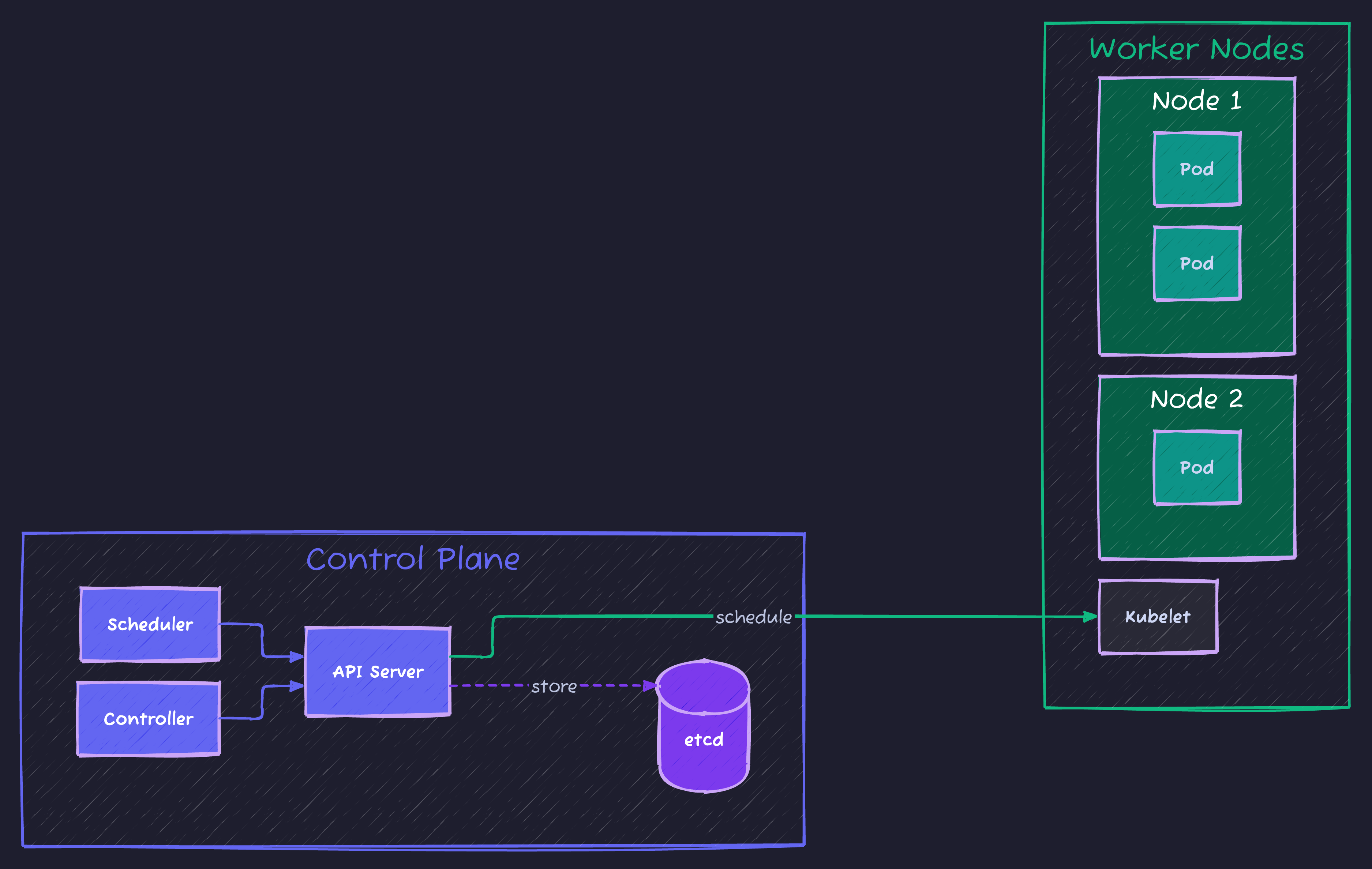
Core Kubernetes Concepts
1. Pods
A Pod is the smallest deployable unit in Kubernetes. It can contain one or more containers that share storage and network.
# simple-pod.yaml
apiVersion: v1
kind: Pod
metadata:
  name: my-app-pod
  labels:
    app: my-app
spec:
  containers:
  - name: my-app-container
    image: nginx:latest
    ports:
    - containerPort: 80
    resources:
      requests:
        memory: "64Mi"
        cpu: "250m"
      limits:
        memory: "128Mi"
        cpu: "500m"
Create the pod:
kubectl apply -f simple-pod.yaml
kubectl get pods
kubectl describe pod my-app-pod
2. Deployments
Deployments manage ReplicaSets and provide declarative updates for Pods.
# deployment.yaml
apiVersion: apps/v1
kind: Deployment
metadata:
  name: my-app-deployment
  labels:
    app: my-app
spec:
  replicas: 3
  selector:
    matchLabels:
      app: my-app
  template:
    metadata:
      labels:
        app: my-app
    spec:
      containers:
      - name: my-app
        image: nginx:1.21
        ports:
        - containerPort: 80
        readinessProbe:
          httpGet:
            path: /
            port: 80
          initialDelaySeconds: 5
          periodSeconds: 10
        livenessProbe:
          httpGet:
            path: /
            port: 80
          initialDelaySeconds: 15
          periodSeconds: 20
# Apply deployment
kubectl apply -f deployment.yaml
# Check status
kubectl get deployments
kubectl rollout status deployment/my-app-deployment
# Scale deployment
kubectl scale deployment my-app-deployment --replicas=53. Services
Services expose your application to network traffic.
# service.yaml
apiVersion: v1
kind: Service
metadata:
  name: my-app-service
spec:
  type: LoadBalancer
  selector:
    app: my-app
  ports:
  - protocol: TCP
    port: 80
    targetPort: 80
Service Types:
| Type | Description | Use Case |
|---|---|---|
| ClusterIP | Internal cluster IP | Service-to-service communication |
| NodePort | Exposes on each node’s IP | Development/testing |
| LoadBalancer | External load balancer | Production cloud deployments |
| ExternalName | Maps to external DNS | External service integration |
4. ConfigMaps and Secrets
Store configuration separately from your container images.
# configmap.yaml
apiVersion: v1
kind: ConfigMap
metadata:
  name: app-config
data:
  DATABASE_HOST: "postgres.default.svc.cluster.local"
  LOG_LEVEL: "info"
  CACHE_TTL: "3600"
# secret.yaml
apiVersion: v1
kind: Secret
metadata:
name: app-secrets
type: Opaque
data:
# Base64 encoded values
DB_PASSWORD: cGFzc3dvcmQxMjM=
API_KEY: c2VjcmV0LWFwaS1rZXk=Using them in a deployment:
apiVersion: apps/v1
kind: Deployment
metadata:
  name: my-app
spec:
  replicas: 2
  selector:
    matchLabels:
      app: my-app
  template:
    metadata:
      labels:
        app: my-app
    spec:
      containers:
      - name: my-app
        image: my-app:latest
        envFrom:
        - configMapRef:
            name: app-config
        env:
        - name: DB_PASSWORD
          valueFrom:
            secretKeyRef:
              name: app-secrets
              key: DB_PASSWORD
Setting Up a Local Kubernetes Cluster
Option 1: Minikube
# Install Minikube (macOS)
brew install minikube

# Start cluster
minikube start --driver=docker --memory=4096 --cpus=2

# Verify
kubectl cluster-info
kubectl get nodes

# Access dashboard
minikube dashboard
Option 2: Kind (Kubernetes in Docker)
# Install Kind
brew install kind

# Create cluster
kind create cluster --name my-cluster

# Create multi-node cluster
cat <<EOF | kind create cluster --config=-
kind: Cluster
apiVersion: kind.x-k8s.io/v1alpha4
nodes:
- role: control-plane
- role: worker
- role: worker
EOF
Deploying a Complete Application
Let’s deploy a Node.js application with MongoDB:
1. MongoDB StatefulSet
# mongodb.yaml
apiVersion: v1
kind: Service
metadata:
  name: mongodb
spec:
  ports:
  - port: 27017
  clusterIP: None
  selector:
    app: mongodb
---
apiVersion: apps/v1
kind: StatefulSet
metadata:
  name: mongodb
spec:
  serviceName: "mongodb"
  replicas: 1
  selector:
    matchLabels:
      app: mongodb
  template:
    metadata:
      labels:
        app: mongodb
    spec:
      containers:
      - name: mongodb
        image: mongo:6
        ports:
        - containerPort: 27017
        volumeMounts:
        - name: mongo-data
          mountPath: /data/db
        env:
        - name: MONGO_INITDB_ROOT_USERNAME
          value: admin
        - name: MONGO_INITDB_ROOT_PASSWORD
          valueFrom:
            secretKeyRef:
              name: mongodb-secret
              key: password
  volumeClaimTemplates:
  - metadata:
      name: mongo-data
    spec:
      accessModes: ["ReadWriteOnce"]
      resources:
        requests:
          storage: 1Gi
2. Application Deployment
# app-deployment.yaml
apiVersion: apps/v1
kind: Deployment
metadata:
  name: node-app
spec:
  replicas: 3
  selector:
    matchLabels:
      app: node-app
  template:
    metadata:
      labels:
        app: node-app
    spec:
      containers:
      - name: node-app
        image: my-node-app:latest
        ports:
        - containerPort: 3000
        env:
        - name: MONGODB_URI
          value: "mongodb://admin:$(MONGO_PASSWORD)@mongodb:27017"
        - name: MONGO_PASSWORD
          valueFrom:
            secretKeyRef:
              name: mongodb-secret
              key: password
        resources:
          requests:
            cpu: "100m"
            memory: "128Mi"
          limits:
            cpu: "500m"
            memory: "512Mi"
---
apiVersion: v1
kind: Service
metadata:
  name: node-app-service
spec:
  type: LoadBalancer
  selector:
    app: node-app
  ports:
  - port: 80
    targetPort: 3000
3. Horizontal Pod Autoscaler
# hpa.yaml
apiVersion: autoscaling/v2
kind: HorizontalPodAutoscaler
metadata:
  name: node-app-hpa
spec:
  scaleTargetRef:
    apiVersion: apps/v1
    kind: Deployment
    name: node-app
  minReplicas: 2
  maxReplicas: 10
  metrics:
  - type: Resource
    resource:
      name: cpu
      target:
        type: Utilization
        averageUtilization: 70
  - type: Resource
    resource:
      name: memory
      target:
        type: Utilization
        averageUtilization: 80
Essential kubectl Commands
# Cluster info
kubectl cluster-info
kubectl get nodes -o wide

# Working with pods
kubectl get pods --all-namespaces
kubectl logs <pod-name> -f
kubectl exec -it <pod-name> -- /bin/bash
kubectl port-forward <pod-name> 8080:80

# Deployments
kubectl get deployments
kubectl rollout history deployment/<name>
kubectl rollout undo deployment/<name>
kubectl set image deployment/<name> container=image:tag

# Debugging
kubectl describe pod <pod-name>
kubectl get events --sort-by=.metadata.creationTimestamp
kubectl top pods
kubectl top nodes

# Namespaces
kubectl create namespace production
kubectl get pods -n production
kubectl config set-context --current --namespace=production
Kubernetes Best Practices
1. Resource Management
Always set resource requests and limits:
resources:
  requests:
    memory: "128Mi"
    cpu: "100m"
  limits:
    memory: "256Mi"
    cpu: "500m"
2. Health Checks
Use both liveness and readiness probes:
livenessProbe:
  httpGet:
    path: /health
    port: 8080
  initialDelaySeconds: 30
  periodSeconds: 10

readinessProbe:
  httpGet:
    path: /ready
    port: 8080
  initialDelaySeconds: 5
  periodSeconds: 5
3. Security
securityContext:
  runAsNonRoot: true
  runAsUser: 1000
  readOnlyRootFilesystem: true
  allowPrivilegeEscalation: false
4. Use Namespaces
Organize resources by environment or team:
kubectl create namespace development
kubectl create namespace staging
kubectl create namespace production
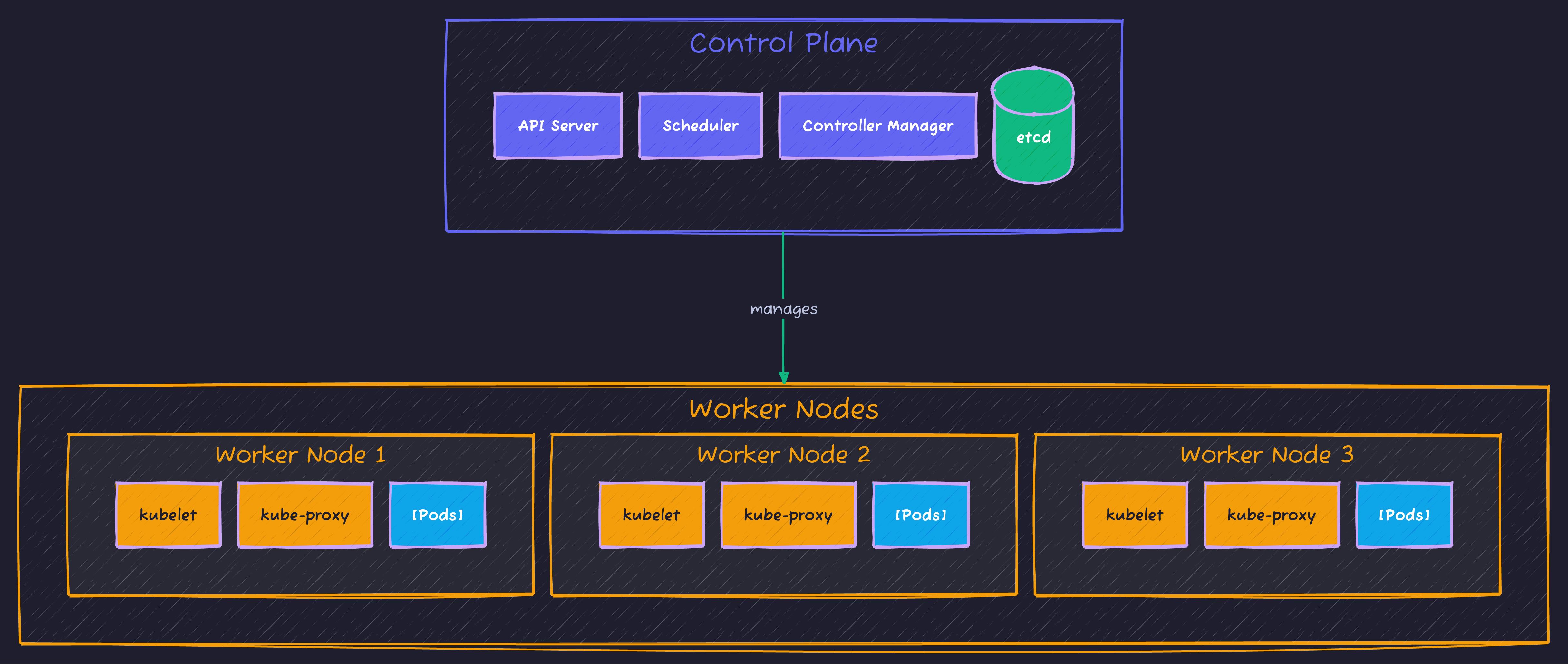
Kubernetes Architecture
Summary
| Concept | Purpose |
|---|---|
| Pod | Smallest deployable unit |
| Deployment | Manages replicas and updates |
| Service | Network exposure |
| ConfigMap | Non-sensitive configuration |
| Secret | Sensitive data |
| StatefulSet | Stateful applications |
| HPA | Auto-scaling |
What’s Next?
- Learn Helm for package management
- Explore Kubernetes networking (Ingress, Network Policies)
- Set up CI/CD with Kubernetes
- Study for CKA certification
Kubernetes has a steep learning curve, but mastering it opens doors to modern cloud-native development. Start small, experiment with Minikube, and gradually tackle more complex scenarios.
Advertisement
Moshiour Rahman
Software Architect & AI Engineer
Enterprise software architect with deep expertise in financial systems, distributed architecture, and AI-powered applications. Building large-scale systems at Fortune 500 companies. Specializing in LLM orchestration, multi-agent systems, and cloud-native solutions. I share battle-tested patterns from real enterprise projects.
Related Articles
Kubernetes Helm Charts: Package and Deploy Applications
Master Helm for Kubernetes deployments. Learn chart creation, templates, values, dependencies, and best practices for production applications.
DevOpsDocker Best Practices for Production: Complete Guide
Master Docker best practices for production deployments. Learn image optimization, security hardening, multi-stage builds, and container orchestration.
DevOpsDocker Compose Tutorial: Building Multi-Container Applications
Master Docker Compose for multi-container applications. Learn to define, configure, and run complex application stacks with practical examples including web apps with databases.
Comments
Comments are powered by GitHub Discussions.
Configure Giscus at giscus.app to enable comments.