Docker Compose for Microservices: Complete Development Guide
Master Docker Compose for local microservices development. Learn multi-container orchestration, networking, volumes, and production-ready configurations.
Moshiour Rahman
Advertisement
What is Docker Compose?
Before Docker Compose, I used to maintain shell scripts with 20+ docker run commands just to start a local development environment. One forgotten flag and everything broke. Compose changed that—now my entire stack starts with one command, and new team members can be productive in minutes instead of hours.
Docker Compose is a tool for defining and running multi-container Docker applications. It uses YAML files to configure services, networks, and volumes, making it perfect for microservices development.
Why Docker Compose?
| Without Compose | With Compose |
|---|---|
| Multiple docker run commands | Single docker compose up |
| Manual network setup | Automatic networking |
| Complex dependency management | Declarative dependencies |
| Hard to reproduce | Version-controlled configs |
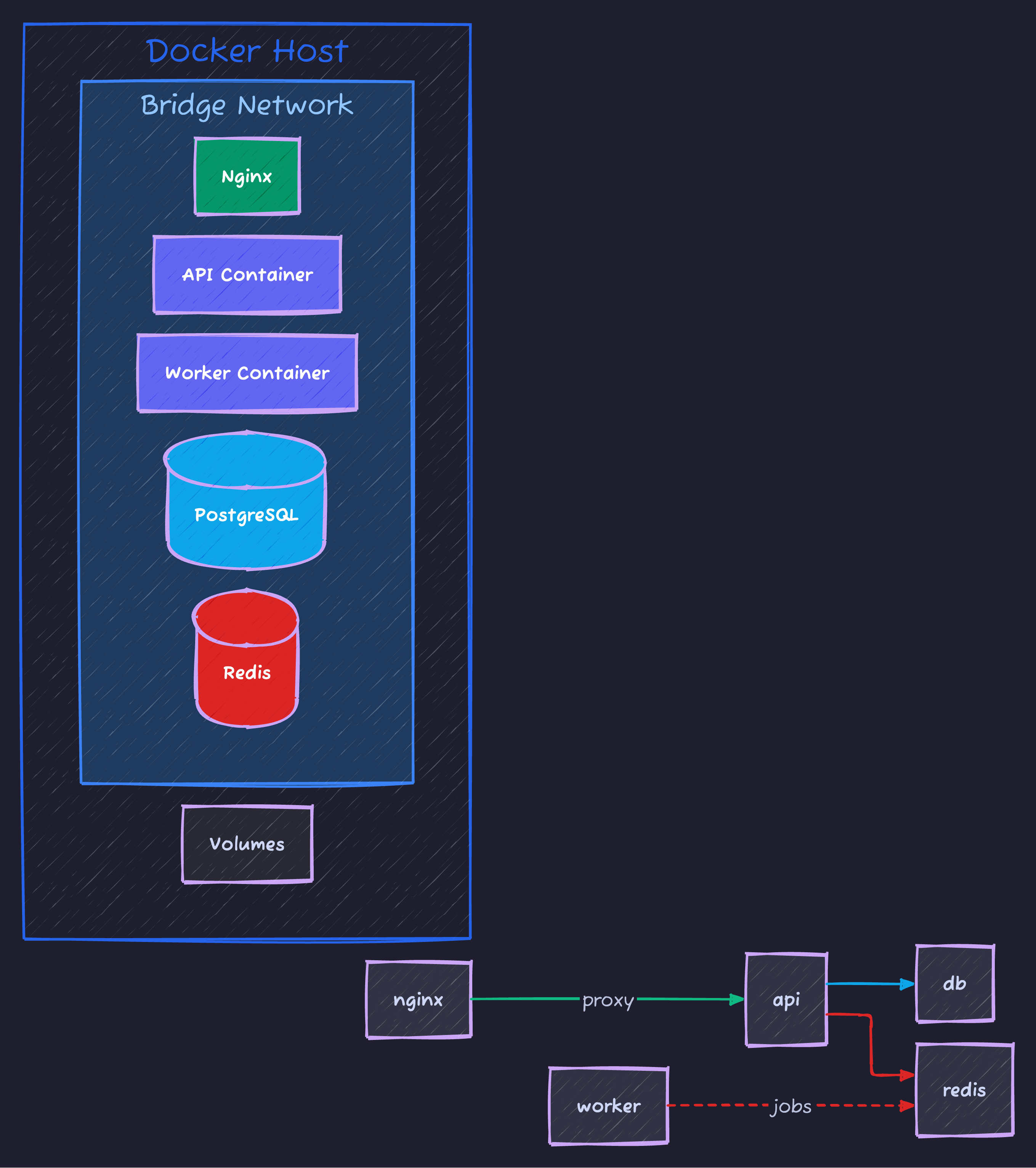
Here’s a typical microservices architecture with Docker Compose:
Getting Started
Basic docker-compose.yml
version: '3.8'

services:
  web:
    build: ./web
    ports:
      - "3000:3000"
    environment:
      - NODE_ENV=development
    depends_on:
      - api
      - db

  api:
    build: ./api
    ports:
      - "8080:8080"
    environment:
      - DATABASE_URL=postgres://user:pass@db:5432/myapp
    depends_on:
      - db

  db:
    image: postgres:15
    volumes:
      - postgres_data:/var/lib/postgresql/data
    environment:
      - POSTGRES_USER=user
      - POSTGRES_PASSWORD=pass
      - POSTGRES_DB=myapp

volumes:
  postgres_data:
Essential Commands
# Start services
docker compose up

# Start in background
docker compose up -d

# Build and start
docker compose up --build

# Stop services
docker compose down

# Stop and remove volumes
docker compose down -v

# View logs
docker compose logs -f

# View specific service logs
docker compose logs -f api

# List running services
docker compose ps

# Execute command in service
docker compose exec api sh
Service Configuration
Build Options
services:
  api:
    build:
      context: ./api
      dockerfile: Dockerfile.dev
      args:
        - NODE_VERSION=18
        - BUILD_ENV=development
      target: development
      cache_from:
        - myapp/api:latest
    image: myapp/api:dev
Port Mapping
services:
  web:
    ports:
      # HOST:CONTAINER
      - "3000:3000"
      # Random host port
      - "3000"
      # Specific interface
      - "127.0.0.1:3000:3000"
      # Port range
      - "3000-3005:3000-3005"
Environment Variables
services:
  api:
    # Inline variables
    environment:
      - NODE_ENV=development
      - DEBUG=true
      - API_KEY=${API_KEY}  # From host environment

    # From file
    env_file:
      - .env
      - .env.local

    # Multiple files with precedence
    env_file:
      - .env.defaults
      - .env.${ENVIRONMENT:-development}
Volume Mounts
services:
  api:
    volumes:
      # Named volume
      - api_data:/app/data

      # Bind mount (host path)
      - ./src:/app/src

      # Read-only mount
      - ./config:/app/config:ro

      # Anonymous volume (preserves container data)
      - /app/node_modules

volumes:
  api_data:
    driver: local
Networking
Default Network
# All services automatically connect to default network
services:
  web:
    # Can reach api at http://api:8080
    depends_on:
      - api

  api:
    # Can reach db at postgres://db:5432
    depends_on:
      - db

  db:
    image: postgres:15
Custom Networks
services:
  web:
    networks:
      - frontend

  api:
    networks:
      - frontend
      - backend

  db:
    networks:
      - backend

networks:
  frontend:
    driver: bridge
  backend:
    driver: bridge
    internal: true  # No external access
Network Aliases
services:
  api:
    networks:
      backend:
        aliases:
          - api-service
          - user-api

networks:
  backend:
Dependencies and Health Checks
Service Dependencies
services:
  web:
    depends_on:
      api:
        condition: service_healthy
      db:
        condition: service_healthy
      redis:
        condition: service_started

  api:
    healthcheck:
      test: ["CMD", "curl", "-f", "http://localhost:8080/health"]
      interval: 30s
      timeout: 10s
      retries: 3
      start_period: 40s
    depends_on:
      db:
        condition: service_healthy

  db:
    image: postgres:15
    healthcheck:
      test: ["CMD-SHELL", "pg_isready -U user -d myapp"]
      interval: 10s
      timeout: 5s
      retries: 5
Microservices Example
Complete Stack
version: '3.8'

services:
  # Frontend
  frontend:
    build:
      context: ./frontend
      dockerfile: Dockerfile.dev
    ports:
      - "3000:3000"
    volumes:
      - ./frontend/src:/app/src
      - /app/node_modules
    environment:
      - REACT_APP_API_URL=http://localhost:8080
    depends_on:
      - api-gateway

  # API Gateway
  api-gateway:
    build: ./gateway
    ports:
      - "8080:8080"
    environment:
      - USER_SERVICE_URL=http://user-service:8081
      - ORDER_SERVICE_URL=http://order-service:8082
      - PRODUCT_SERVICE_URL=http://product-service:8083
    depends_on:
      - user-service
      - order-service
      - product-service

  # User Service
  user-service:
    build: ./services/user
    environment:
      - DATABASE_URL=postgres://user:pass@user-db:5432/users
      - REDIS_URL=redis://redis:6379
    depends_on:
      - user-db
      - redis

  user-db:
    image: postgres:15
    volumes:
      - user_data:/var/lib/postgresql/data
    environment:
      - POSTGRES_USER=user
      - POSTGRES_PASSWORD=pass
      - POSTGRES_DB=users

  # Order Service
  order-service:
    build: ./services/order
    environment:
      - DATABASE_URL=postgres://user:pass@order-db:5432/orders
      - KAFKA_BROKERS=kafka:9092
    depends_on:
      - order-db
      - kafka

  order-db:
    image: postgres:15
    volumes:
      - order_data:/var/lib/postgresql/data
    environment:
      - POSTGRES_USER=user
      - POSTGRES_PASSWORD=pass
      - POSTGRES_DB=orders

  # Product Service
  product-service:
    build: ./services/product
    environment:
      - MONGO_URL=mongodb://mongo:27017/products
    depends_on:
      - mongo

  mongo:
    image: mongo:6
    volumes:
      - mongo_data:/data/db

  # Shared Services
  redis:
    image: redis:7-alpine
    volumes:
      - redis_data:/data

  kafka:
    image: confluentinc/cp-kafka:7.4.0
    environment:
      - KAFKA_ZOOKEEPER_CONNECT=zookeeper:2181
      - KAFKA_ADVERTISED_LISTENERS=PLAINTEXT://kafka:9092
      - KAFKA_OFFSETS_TOPIC_REPLICATION_FACTOR=1
    depends_on:
      - zookeeper

  zookeeper:
    image: confluentinc/cp-zookeeper:7.4.0
    environment:
      - ZOOKEEPER_CLIENT_PORT=2181

volumes:
  user_data:
  order_data:
  mongo_data:
  redis_data:
Development Workflow
Hot Reload Setup
services:
  api:
    build:
      context: ./api
      target: development
    volumes:
      # Mount source code
      - ./api/src:/app/src
      # Preserve node_modules from container
      - /app/node_modules
    command: npm run dev
    environment:
      - NODE_ENV=development
Multi-Stage Dockerfile
# Base stage
FROM node:18-alpine AS base
WORKDIR /app
COPY package*.json ./

# Development stage
FROM base AS development
RUN npm install
COPY . .
CMD ["npm", "run", "dev"]

# Production build
FROM base AS builder
RUN npm ci
COPY . .
RUN npm run build

# Production stage
FROM node:18-alpine AS production
WORKDIR /app
COPY --from=builder /app/dist ./dist
COPY --from=builder /app/node_modules ./node_modules
CMD ["node", "dist/index.js"]
Override Files
# docker-compose.yml (base)
services:
  api:
    build: ./api
    environment:
      - NODE_ENV=production

# docker-compose.override.yml (auto-loaded in dev)
services:
  api:
    build:
      context: ./api
      target: development
    volumes:
      - ./api/src:/app/src
    environment:
      - NODE_ENV=development
      - DEBUG=true
    ports:
      - "9229:9229"  # Debug port

# docker-compose.prod.yml
services:
  api:
    image: myapp/api:latest
    deploy:
      replicas: 3
# Development (uses override automatically)
docker compose up
# Production
docker compose -f docker-compose.yml -f docker-compose.prod.yml upResource Management
Resource Limits
services:
  api:
    deploy:
      resources:
        limits:
          cpus: '0.5'
          memory: 512M
        reservations:
          cpus: '0.25'
          memory: 256M
Restart Policies
services:
  api:
    restart: unless-stopped
    # Options: no, always, on-failure, unless-stopped

  worker:
    restart: on-failure
    deploy:
      restart_policy:
        condition: on-failure
        delay: 5s
        max_attempts: 3
        window: 120s
Profiles
Service Profiles
services:
  web:
    # Always starts

  api:
    # Always starts

  db:
    # Always starts

  debug:
    image: busybox
    profiles:
      - debug

  monitoring:
    image: grafana/grafana
    profiles:
      - monitoring

  test-db:
    image: postgres:15
    profiles:
      - testing
# Start default services
docker compose up
# Start with monitoring
docker compose --profile monitoring up
# Start multiple profiles
docker compose --profile monitoring --profile debug upSecrets and Configs
Docker Secrets
services:
  api:
    secrets:
      - db_password
      - api_key
    environment:
      - DB_PASSWORD_FILE=/run/secrets/db_password

secrets:
  db_password:
    file: ./secrets/db_password.txt
  api_key:
    external: true  # Pre-created secret
Config Files
services:
  nginx:
    image: nginx:alpine
    configs:
      - source: nginx_config
        target: /etc/nginx/nginx.conf

configs:
  nginx_config:
    file: ./nginx/nginx.conf
Logging
Log Configuration
services:
  api:
    logging:
      driver: json-file
      options:
        max-size: "10m"
        max-file: "3"

  worker:
    logging:
      driver: "fluentd"
      options:
        fluentd-address: "localhost:24224"
        tag: "docker.{{.Name}}"
Best Practices
1. Use .env Files
# .env
POSTGRES_USER=myuser
POSTGRES_PASSWORD=secretpass
POSTGRES_DB=myapp
API_PORT=8080services:
db:
environment:
- POSTGRES_USER=${POSTGRES_USER}
- POSTGRES_PASSWORD=${POSTGRES_PASSWORD}
- POSTGRES_DB=${POSTGRES_DB}
api:
ports:
- "${API_PORT}:8080"2. Use Named Volumes
volumes:
  postgres_data:
    name: myapp_postgres_data
  redis_data:
    name: myapp_redis_data
3. Health Checks
services:
  api:
    healthcheck:
      test: ["CMD", "wget", "-q", "--spider", "http://localhost:8080/health"]
      interval: 30s
      timeout: 10s
      retries: 3
Summary
| Feature | Command/Config |
|---|---|
| Start services | docker compose up -d |
| Stop services | docker compose down |
| View logs | docker compose logs -f |
| Rebuild | docker compose up --build |
| Scale service | docker compose up --scale api=3 |
| Run one-off | docker compose run api npm test |
Docker Compose simplifies multi-container development with declarative, version-controlled configurations.
Advertisement
Moshiour Rahman
Software Architect & AI Engineer
Enterprise software architect with deep expertise in financial systems, distributed architecture, and AI-powered applications. Building large-scale systems at Fortune 500 companies. Specializing in LLM orchestration, multi-agent systems, and cloud-native solutions. I share battle-tested patterns from real enterprise projects.
Related Articles
Docker Compose Tutorial: Building Multi-Container Applications
Master Docker Compose for multi-container applications. Learn to define, configure, and run complex application stacks with practical examples including web apps with databases.
DevOpsDocker Best Practices for Production: Complete Guide
Master Docker best practices for production deployments. Learn image optimization, security hardening, multi-stage builds, and container orchestration.
DevOpsKubernetes for Beginners: Complete Guide to Container Orchestration
Learn Kubernetes from scratch. Understand pods, deployments, services, and how to deploy your first application to a Kubernetes cluster with practical examples.
Comments
Comments are powered by GitHub Discussions.
Configure Giscus at giscus.app to enable comments.