AI Coding Assistants in 2025: GitHub Copilot vs Cursor vs Claude Code
Compare the top AI coding assistants of 2025. Learn which tool fits your workflow - GitHub Copilot, Cursor, or Claude Code - with real benchmarks and use cases.
Moshiour Rahman
Advertisement
The AI Coding Revolution
AI coding assistants have transformed how developers write code in 2025. What started as simple autocomplete has evolved into intelligent agents that understand entire codebases, reason about architecture, and execute multi-step tasks autonomously.
Market Overview
| Tool | Launch | Users | Primary Model |
|---|---|---|---|
| GitHub Copilot | 2021 | 1.5M+ paid | GPT-4, Claude 3.5 |
| Cursor | 2023 | 500K+ | GPT-4, Claude 3.5 |
| Claude Code | 2025 | Growing | Claude Sonnet/Opus |
GitHub Copilot
GitHub Copilot remains the most widely adopted AI coding assistant, backed by Microsoft and OpenAI.
Key Features
// Copilot generates contextual completions
function calculateDiscount(price: number, tier: string): number {
  // Type a comment, Copilot suggests the implementation
  // "Apply 20% for gold, 10% for silver, 5% for bronze"
  const discounts: Record<string, number> = {
    gold: 0.20,
    silver: 0.10,
    bronze: 0.05
  };
  return price * (discounts[tier] || 0);
}
Strengths
- Broad IDE Support: VS Code, Visual Studio, JetBrains, Neovim, Vim
- Enterprise Ready: SOC 2 compliance, self-hosted options
- 55% Productivity Gain: According to GitHub’s research
- Multi-Model: GPT-4o, Claude 3.5 Sonnet, Gemini 2.0 Flash
Copilot Chat Example
// Ask Copilot: "Add input validation and error handling"

function calculateDiscount(price: number, tier: string): number {
  if (typeof price !== 'number' || price < 0) {
    throw new Error('Price must be a positive number');
  }

  const validTiers = ['gold', 'silver', 'bronze'];
  if (!validTiers.includes(tier.toLowerCase())) {
    throw new Error(`Invalid tier. Must be one of: ${validTiers.join(', ')}`);
  }

  const discounts: Record<string, number> = {
    gold: 0.20,
    silver: 0.10,
    bronze: 0.05
  };

  return price * discounts[tier.toLowerCase()];
}
Pricing
| Plan | Price | Features |
|---|---|---|
| Individual | $10/month | Basic completions, chat |
| Pro | $19/month | Advanced models, agent mode |
| Pro+ | $39/month | Premium models, unlimited usage |
| Enterprise | Custom | Security, compliance, admin |
Cursor
Cursor is a standalone AI-native IDE built on VS Code, designed with AI at its core rather than as an afterthought.
Key Features
// Cursor understands your entire codebase
// Use Cmd+K to generate code from natural language

// Prompt: "Create a rate limiter middleware for Express"
import { Request, Response, NextFunction } from 'express';

interface RateLimitStore {
  [ip: string]: {
    count: number;
    resetTime: number;
  };
}

const store: RateLimitStore = {};

export function rateLimiter(
  maxRequests: number = 100,
  windowMs: number = 60000
) {
  return (req: Request, res: Response, next: NextFunction) => {
    const ip = req.ip || req.connection.remoteAddress || 'unknown';
    const now = Date.now();

    if (!store[ip] || now > store[ip].resetTime) {
      store[ip] = {
        count: 1,
        resetTime: now + windowMs
      };
      return next();
    }

    if (store[ip].count >= maxRequests) {
      return res.status(429).json({
        error: 'Too many requests',
        retryAfter: Math.ceil((store[ip].resetTime - now) / 1000)
      });
    }

    store[ip].count++;
    next();
  };
}
Multi-File Editing
Cursor excels at understanding project context and making changes across multiple files:
// Prompt: "Add TypeScript types for the API response"

// types/api.ts (created)
export interface User {
  id: string;
  email: string;
  name: string;
  createdAt: string;
}

export interface ApiResponse<T> {
  data: T;
  success: boolean;
  message?: string;
}

export interface PaginatedResponse<T> extends ApiResponse<T[]> {
  page: number;
  totalPages: number;
  totalItems: number;
}

// services/userService.ts (modified)
import { User, ApiResponse, PaginatedResponse } from '../types/api';

export async function getUser(id: string): Promise<ApiResponse<User>> {
  const response = await fetch(`/api/users/${id}`);
  return response.json();
}

export async function listUsers(page: number): Promise<PaginatedResponse<User>> {
  const response = await fetch(`/api/users?page=${page}`);
  return response.json();
}
Composer Mode
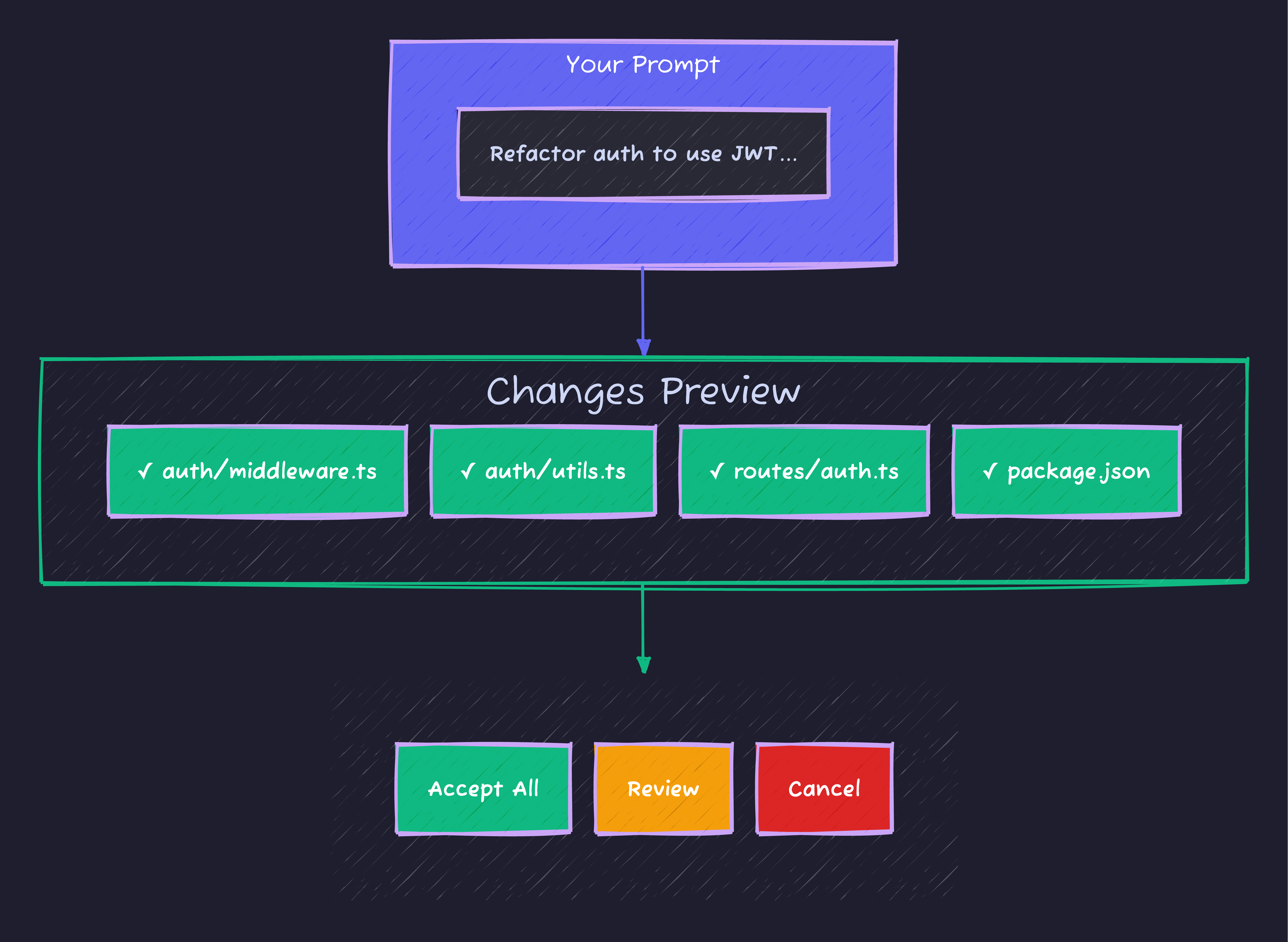
Cursor’s Composer mode shows a preview of all file changes before applying them, letting you review, accept, or cancel the modifications.
Pricing
| Plan | Price | Features |
|---|---|---|
| Hobby | Free | 2000 completions/month |
| Pro | $20/month | Unlimited completions, premium models |
| Business | $40/month | Team features, admin controls |
Claude Code
Claude Code is Anthropic’s terminal-first AI coding assistant that brings agentic capabilities to the command line.
Key Features
# Install Claude Code
npm install -g @anthropic-ai/claude-code

# Initialize in your project
cd your-project
claude

# Claude Code understands your entire codebase
> What's the architecture of this project?

Claude Code scans your project structure and provides:
- Directory layout analysis
- Key dependency identification
- Entry points and main modules
- Testing setup and patterns
Agentic Workflows
# Multi-step task execution
> Add comprehensive error handling to the API routes,
  write tests for the new error cases, and update the docs

Claude Code executes:
1. Analyzes existing error patterns in codebase
2. Identifies API routes needing updates
3. Implements consistent error handling
4. Generates test cases
5. Updates documentation
Code Generation
> Create a webhook handler for Stripe payments

# Claude Code generates:
// webhooks/stripe.ts
import Stripe from 'stripe';
import { Request, Response } from 'express';
const stripe = new Stripe(process.env.STRIPE_SECRET_KEY!);
const webhookSecret = process.env.STRIPE_WEBHOOK_SECRET!;
interface WebhookHandlers {
[event: string]: (data: Stripe.Event.Data) => Promise<void>;
}
const handlers: WebhookHandlers = {
'checkout.session.completed': async (data) => {
const session = data.object as Stripe.Checkout.Session;
await handleSuccessfulPayment(session);
},
'customer.subscription.updated': async (data) => {
const subscription = data.object as Stripe.Subscription;
await updateSubscriptionStatus(subscription);
},
'invoice.payment_failed': async (data) => {
const invoice = data.object as Stripe.Invoice;
await handleFailedPayment(invoice);
}
};
export async function handleStripeWebhook(req: Request, res: Response) {
const sig = req.headers['stripe-signature'] as string;
let event: Stripe.Event;
try {
event = stripe.webhooks.constructEvent(req.body, sig, webhookSecret);
} catch (err) {
console.error('Webhook signature verification failed:', err);
return res.status(400).send(`Webhook Error: ${err.message}`);
}
const handler = handlers[event.type];
if (handler) {
try {
await handler(event.data);
console.log(`Successfully handled ${event.type}`);
} catch (err) {
console.error(`Error handling ${event.type}:`, err);
return res.status(500).send('Webhook handler error');
}
} else {
console.log(`Unhandled event type: ${event.type}`);
}
res.json({ received: true });
}
async function handleSuccessfulPayment(session: Stripe.Checkout.Session) {
// Implementation
}
async function updateSubscriptionStatus(subscription: Stripe.Subscription) {
// Implementation
}
async function handleFailedPayment(invoice: Stripe.Invoice) {
// Implementation
}Context Window Advantage
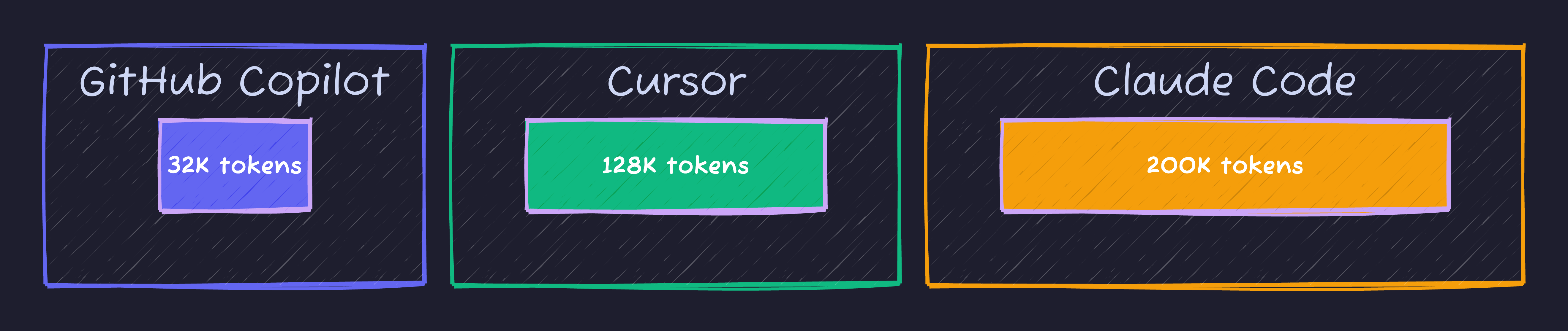
Claude Code leads with 200K tokens, allowing it to understand larger codebases. Cursor offers 128K tokens, while GitHub Copilot supports around 32K tokens.
Pricing
| Plan | Price | Features |
|---|---|---|
| Claude Pro | $20/month | Full Claude access + Claude Code |
| Team | $30/user/month | Collaboration features |
| Enterprise | Custom | Security, compliance, SSO |
Feature Comparison
| Feature | Copilot | Cursor | Claude Code |
|---|---|---|---|
| Code Completion | Excellent | Excellent | Good |
| Multi-file Editing | Good | Excellent | Excellent |
| Codebase Understanding | Good | Excellent | Excellent |
| Terminal Integration | Limited | Good | Excellent |
| Agent Capabilities | Basic | Advanced | Advanced |
| Context Window | 32K | 128K | 200K |
| IDE Support | Many | VS Code Fork | Terminal |
| Offline Mode | No | No | No |
Performance Benchmarks
Response Time
Code Completion Speed (smaller is better):

Cursor      ████░░░░░░░░░░░░░  320ms
Copilot     ████████████░░░░░  890ms
Claude Code ██████████░░░░░░░  650ms
SWE-Bench Scores
Software Engineering Benchmark (higher is better):

Claude Opus 4    ████████████████████  72.5%
Claude Sonnet 4  ████████████████████  72.7%
GPT-4            ██████████████░░░░░░  64.0%
Choosing the Right Tool
Choose GitHub Copilot If
- You work in enterprise environments with strict security requirements
- You need support across multiple IDEs (VS Code, JetBrains, Vim)
- You want the most mature and battle-tested solution
- Your team is already in the GitHub ecosystem
Choose Cursor If
- You prioritize cutting-edge AI features
- You do frequent multi-file refactoring
- You want the fastest code completions
- You’re comfortable with a VS Code-based IDE
Choose Claude Code If
- You prefer terminal-based workflows
- You work with large codebases needing deep understanding
- You want autonomous agent capabilities
- You need to process extensive code contexts
Practical Workflow Integration
Combined Approach
Many developers use multiple tools:
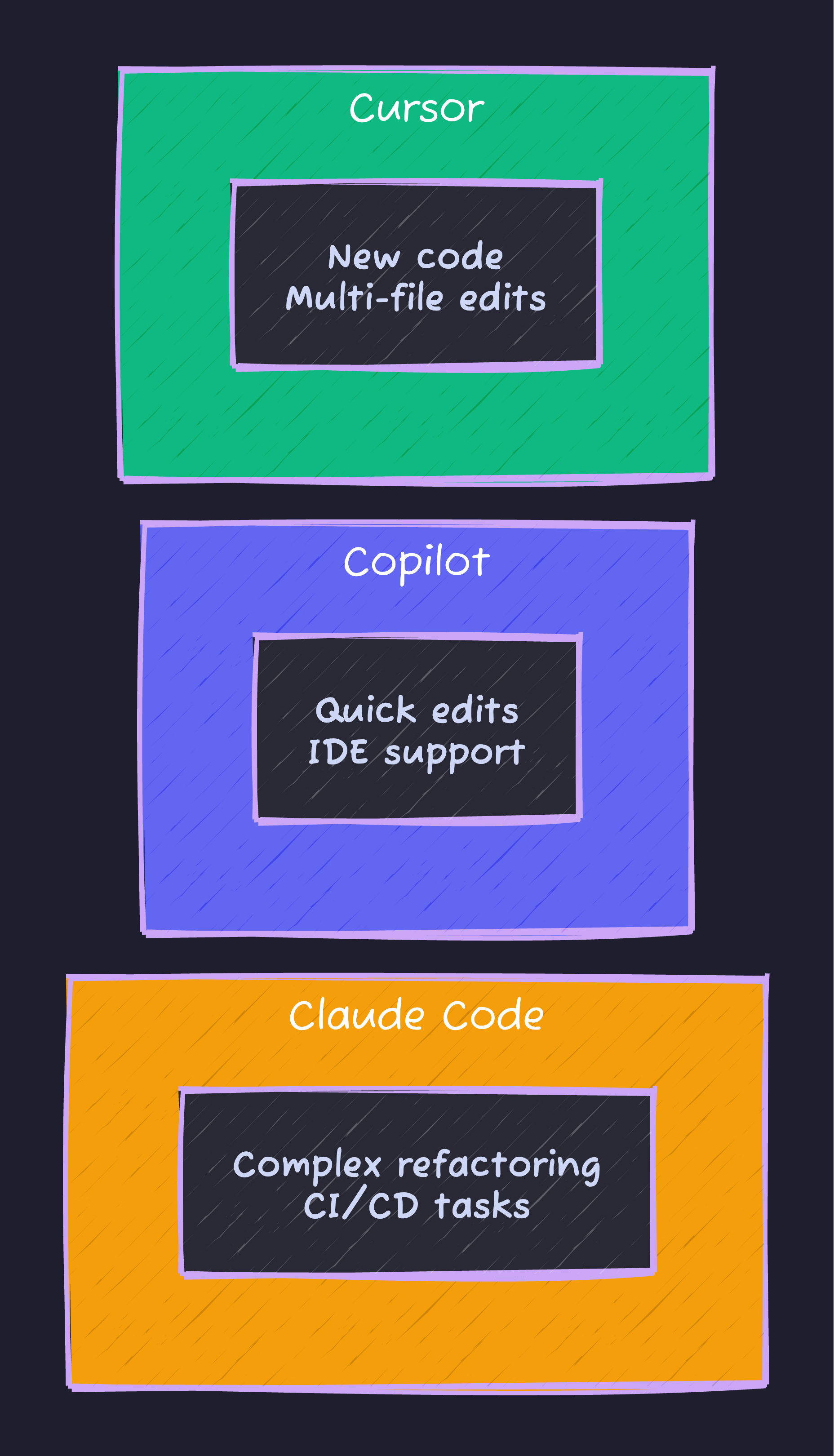
Use Cursor for writing new code and multi-file work, Copilot for quick edits with broad IDE support, and Claude Code for complex refactoring and CI/CD tasks.
Setting Up Your Environment
# Install all three for maximum flexibility

# GitHub Copilot (VS Code extension)
code --install-extension GitHub.copilot

# Cursor (download from cursor.sh)
brew install --cask cursor

# Claude Code
npm install -g @anthropic-ai/claude-code
Cost Analysis
Monthly Cost Comparison
| Usage Level | Copilot | Cursor | Claude Code |
|---|---|---|---|
| Light | $10 | Free | $20 |
| Regular | $19 | $20 | $20 |
| Heavy | $39 | $20 | $20 |
| Team (5 users) | $95 | $200 | $150 |
ROI Calculation
Developer Productivity Gains:

Average hourly rate:     $75/hour
Hours saved per week:    5-8 hours
Weekly value:            $375-600
Monthly tool cost:       $20-40
Monthly ROI:             ~$1,500-2,400
Future Trends
What’s Coming in 2025
| Trend | Impact |
|---|---|
| Larger Context Windows | Better codebase understanding |
| Multi-Agent Systems | Coordinated AI workflows |
| Local Model Support | Privacy-focused options |
| IDE Integration | Deeper tool integration |
| Voice Coding | Natural language programming |
Summary
| Tool | Best For | Price |
|---|---|---|
| GitHub Copilot | Enterprise, multi-IDE | $10-39/mo |
| Cursor | Power users, rapid development | $0-40/mo |
| Claude Code | Terminal workflows, complex tasks | $20/mo |
AI coding assistants have become essential developer tools in 2025. The best choice depends on your workflow preferences, team requirements, and the complexity of your projects. Many developers find value in combining multiple tools to leverage each one’s strengths.
Advertisement
Moshiour Rahman
Software Architect & AI Engineer
Enterprise software architect with deep expertise in financial systems, distributed architecture, and AI-powered applications. Building large-scale systems at Fortune 500 companies. Specializing in LLM orchestration, multi-agent systems, and cloud-native solutions. I share battle-tested patterns from real enterprise projects.
Related Articles
Cursor vs Claude Code: The Ultimate AI Coding Tools Comparison (2025)
In-depth comparison of Cursor and Claude Code for AI-assisted development. Features, pricing, workflows, and which one wins for different use cases.
JavaScriptTurborepo Advanced Patterns: Production-Ready Monorepo Architecture in 2025
Master production Turborepo patterns with real-world examples. Migration guide, CI/CD pipelines, remote caching, testing strategies, and framework-specific configs.
JavaScriptBuild a Dynamic OG Image Generator for Your Blog (Next.js + Screenshot API)
Stop manually creating social preview images. Learn how to automatically generate unique Open Graph images for every blog post using Next.js and a screenshot API.
Comments
Comments are powered by GitHub Discussions.
Configure Giscus at giscus.app to enable comments.