LangGraph Deep Dive: Build AI Agents as State Machines
Master LangGraph for building production AI agents. Learn state graphs, conditional routing, cycles, and persistence patterns with hands-on examples.
Moshiour Rahman
Advertisement
AI Agents Mastery Series
This is Part 2 of our comprehensive AI Agents series.
| Part | Topic | Level |
|---|---|---|
| 1 | Fundamentals - Build from Scratch | Beginner |
| 2 | LangGraph Deep Dive | Intermediate |
| 3 | Local LLMs with Ollama | Intermediate |
| 4 | Tool-Using Agents | Intermediate |
| 5 | Multi-Agent Systems | Advanced |
| 6 | Production Deployment | Advanced |
Why LangGraph?
In Part 1, we built an agent from scratch. It worked, but had limitations:
| Our Custom Agent | LangGraph |
|---|---|
| Manual state management | Built-in state persistence |
| No checkpointing | Automatic checkpoints |
| Hard to debug | Visual graph inspection |
| Difficult to scale | Production-ready patterns |
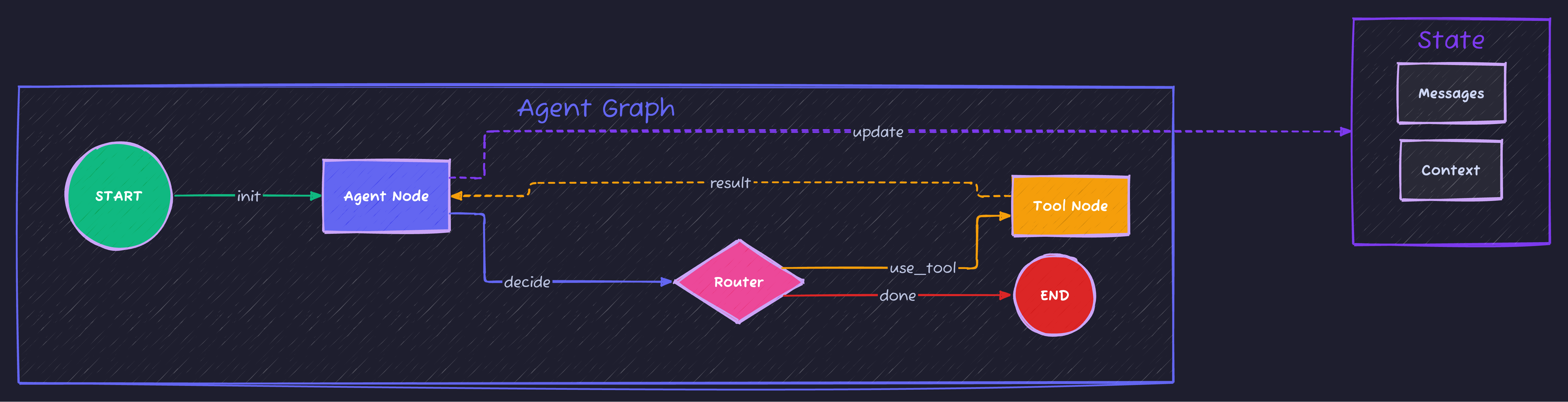
LangGraph treats agents as state machines—graphs where nodes are computation steps and edges are transitions. This makes complex workflows manageable.
What is LangGraph?
LangGraph is a framework by LangChain for building stateful, multi-actor applications with LLMs. Key concepts:
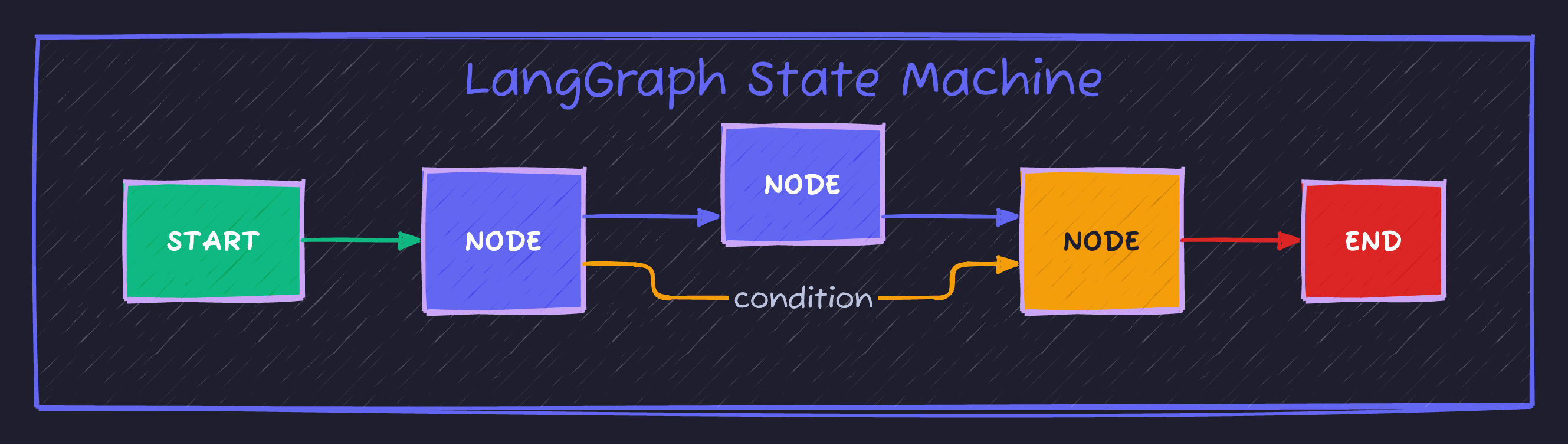
| Component | Description | Example |
|---|---|---|
| State | Data passed between nodes | {"messages": [], "context": {}} |
| Node | Function that transforms state | call_llm, execute_tool |
| Edge | Connection between nodes | START -> agent |
| Conditional Edge | Dynamic routing based on state | if tool_call -> execute else -> end |
Setup
pip install langgraph langchain-openai python-dotenvCreate .env:
OPENAI_API_KEY=your-key-hereYour First LangGraph Agent
Let’s build a simple conversational agent:
# basic_langgraph.py
import os
from dotenv import load_dotenv
from typing import Annotated, TypedDict
from langgraph.graph import StateGraph, START, END
from langgraph.graph.message import add_messages
from langchain_openai import ChatOpenAI

load_dotenv()

# 1. Define the state
class State(TypedDict):
    messages: Annotated[list, add_messages]

# 2. Create the LLM
llm = ChatOpenAI(model="gpt-4o-mini")

# 3. Define the node function
def chatbot(state: State) -> State:
    """Process messages and generate response."""
    response = llm.invoke(state["messages"])
    return {"messages": [response]}

# 4. Build the graph
graph_builder = StateGraph(State)

# Add nodes
graph_builder.add_node("chatbot", chatbot)

# Add edges
graph_builder.add_edge(START, "chatbot")
graph_builder.add_edge("chatbot", END)

# Compile the graph
graph = graph_builder.compile()

# 5. Run it
def chat(user_input: str):
    result = graph.invoke({"messages": [{"role": "user", "content": user_input}]})
    return result["messages"][-1].content

if __name__ == "__main__":
    print(chat("What is LangGraph?"))
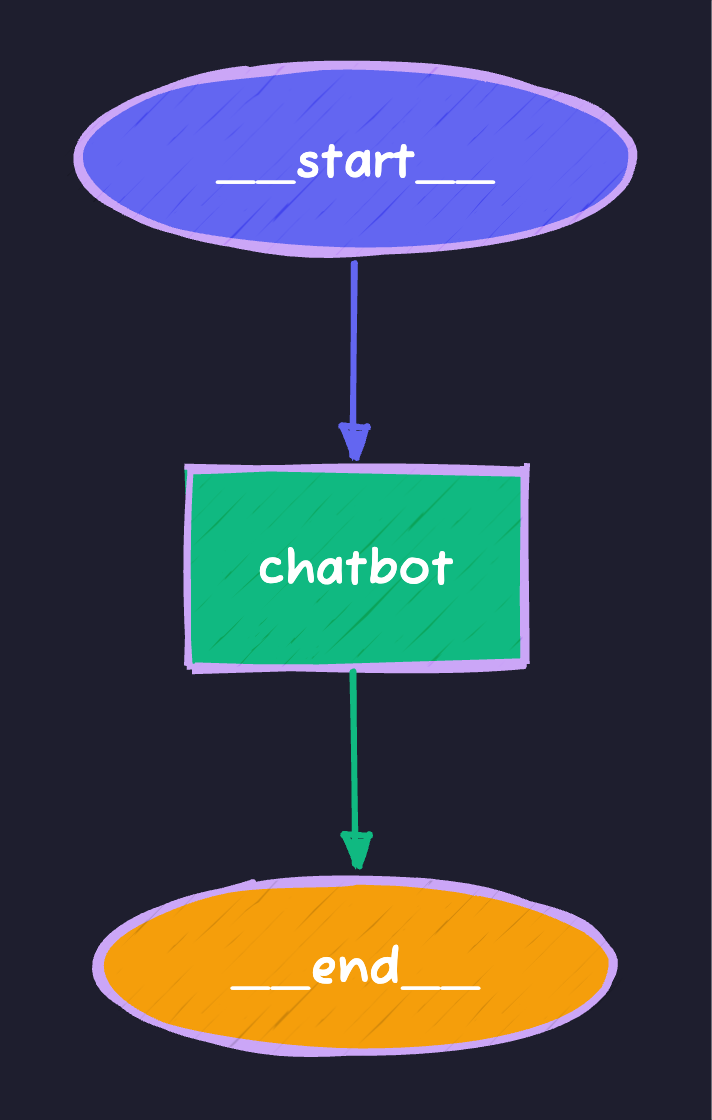
Visualizing the Graph
# Visualize with Mermaid
print(graph.get_graph().draw_mermaid())
Output:
Adding Tools: The Agent Pattern
Real agents need tools. LangGraph has built-in support:
# tool_agent.py
import os
from dotenv import load_dotenv
from typing import Annotated, TypedDict, Literal
from langgraph.graph import StateGraph, START, END
from langgraph.graph.message import add_messages
from langgraph.prebuilt import ToolNode, tools_condition
from langchain_openai import ChatOpenAI
from langchain_core.tools import tool

load_dotenv()

# Define tools
@tool
def get_weather(city: str) -> str:
    """Get the current weather for a city."""
    # Simulated weather data
    weather_data = {
        "tokyo": "72°F, Partly Cloudy",
        "london": "55°F, Rainy",
        "new york": "65°F, Sunny",
        "paris": "60°F, Overcast"
    }
    return weather_data.get(city.lower(), f"Weather data not available for {city}")

@tool
def calculate(expression: str) -> str:
    """Evaluate a mathematical expression."""
    try:
        # Safe evaluation of math expressions
        allowed = set('0123456789+-*/.() ')
        if all(c in allowed for c in expression):
            return str(eval(expression))
        return "Invalid expression"
    except Exception as e:
        return f"Error: {str(e)}"

@tool
def search_web(query: str) -> str:
    """Search the web for information."""
    # Simulated search results
    return f"Search results for '{query}': [Simulated results - integrate real search API]"

tools = [get_weather, calculate, search_web]

# State definition
class State(TypedDict):
    messages: Annotated[list, add_messages]

# Create LLM with tools
llm = ChatOpenAI(model="gpt-4o-mini")
llm_with_tools = llm.bind_tools(tools)

# Agent node - decides what to do
def agent(state: State) -> State:
    """The agent node that reasons and decides."""
    response = llm_with_tools.invoke(state["messages"])
    return {"messages": [response]}

# Build the graph
graph_builder = StateGraph(State)

# Add nodes
graph_builder.add_node("agent", agent)
graph_builder.add_node("tools", ToolNode(tools=tools))

# Add edges
graph_builder.add_edge(START, "agent")

# Conditional edge: if tool call, go to tools; else end
graph_builder.add_conditional_edges(
    "agent",
    tools_condition,  # Built-in function that checks for tool calls
)

# After tools execute, go back to agent
graph_builder.add_edge("tools", "agent")

# Compile
graph = graph_builder.compile()

def run_agent(query: str):
    """Run the agent with a query."""
    print(f"\n{'='*60}")
    print(f"Query: {query}")
    print('='*60)

    result = graph.invoke({
        "messages": [{"role": "user", "content": query}]
    })

    # Print the conversation
    for msg in result["messages"]:
        role = msg.type if hasattr(msg, 'type') else 'unknown'
        content = msg.content if hasattr(msg, 'content') else str(msg)
        if content:
            print(f"\n[{role.upper()}]: {content[:500]}")

    return result["messages"][-1].content

if __name__ == "__main__":
    # Test queries
    run_agent("What's the weather in Tokyo?")
    run_agent("Calculate 15% of 850")
    run_agent("What's the weather in London and what is 100 * 1.15?")
The Graph Structure
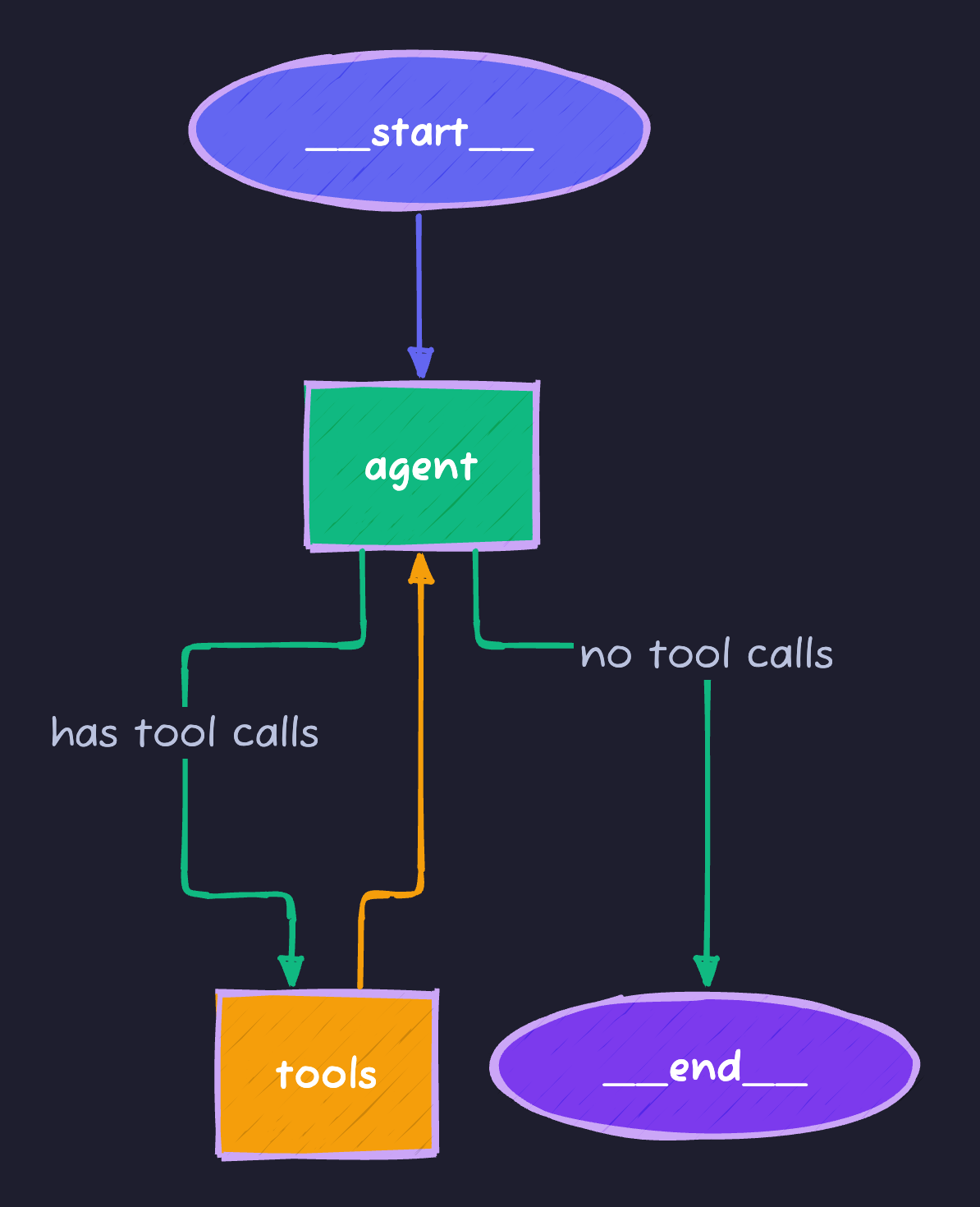
This creates a cycle—the agent can call tools multiple times until it’s done.
State Management Deep Dive
State is the heart of LangGraph. Let’s explore advanced patterns:
Custom State with Multiple Fields
from typing import Annotated, TypedDict, Optional
from langgraph.graph.message import add_messages
from operator import add

class AdvancedState(TypedDict):
    # Messages with automatic aggregation
    messages: Annotated[list, add_messages]

    # Simple values (overwritten each time)
    current_step: str
    iteration_count: int

    # List that accumulates (using add operator)
    tool_calls_made: Annotated[list[str], add]

    # Optional context
    user_context: Optional[dict]
State Reducers
Reducers define how state updates are merged:
| Reducer | Behavior | Use Case |
|---|---|---|
add_messages | Appends messages intelligently | Chat history |
add (operator) | Concatenates lists | Accumulating results |
| Default (None) | Overwrites value | Simple values |
from operator import add
from typing import Annotated

class State(TypedDict):
    # Each return value is appended to the list
    results: Annotated[list[str], add]

    # Each return value overwrites the previous
    status: str
Conditional Routing
Real agents need to make decisions. Here’s how to route dynamically:
# conditional_routing.py
from typing import Literal
from langgraph.graph import StateGraph, START, END

class State(TypedDict):
    query: str
    category: str
    response: str

def categorize(state: State) -> State:
    """Categorize the query."""
    query = state["query"].lower()

    if any(word in query for word in ["weather", "temperature", "forecast"]):
        category = "weather"
    elif any(word in query for word in ["calculate", "math", "compute", "+", "-", "*", "/"]):
        category = "math"
    else:
        category = "general"

    return {"category": category}

def handle_weather(state: State) -> State:
    return {"response": f"Weather handler: Processing '{state['query']}'"}

def handle_math(state: State) -> State:
    return {"response": f"Math handler: Processing '{state['query']}'"}

def handle_general(state: State) -> State:
    return {"response": f"General handler: Processing '{state['query']}'"}

# Router function
def route_query(state: State) -> Literal["weather", "math", "general"]:
    """Route to the appropriate handler based on category."""
    return state["category"]

# Build graph
builder = StateGraph(State)

builder.add_node("categorize", categorize)
builder.add_node("weather", handle_weather)
builder.add_node("math", handle_math)
builder.add_node("general", handle_general)

builder.add_edge(START, "categorize")

# Conditional routing based on category
builder.add_conditional_edges(
    "categorize",
    route_query,
    {
        "weather": "weather",
        "math": "math",
        "general": "general"
    }
)

# All handlers go to END
builder.add_edge("weather", END)
builder.add_edge("math", END)
builder.add_edge("general", END)

graph = builder.compile()

# Test
print(graph.invoke({"query": "What's the weather?", "category": "", "response": ""}))
print(graph.invoke({"query": "Calculate 5 + 3", "category": "", "response": ""}))
Persistence and Checkpointing
LangGraph can save state between runs—critical for long-running agents:
# persistent_agent.py
from langgraph.checkpoint.memory import MemorySaver
from langgraph.graph import StateGraph, START, END
from typing import Annotated, TypedDict
from langgraph.graph.message import add_messages
from langchain_openai import ChatOpenAI

class State(TypedDict):
    messages: Annotated[list, add_messages]

llm = ChatOpenAI(model="gpt-4o-mini")

def chatbot(state: State) -> State:
    response = llm.invoke(state["messages"])
    return {"messages": [response]}

# Build graph
builder = StateGraph(State)
builder.add_node("chatbot", chatbot)
builder.add_edge(START, "chatbot")
builder.add_edge("chatbot", END)

# Add memory checkpointer
memory = MemorySaver()
graph = builder.compile(checkpointer=memory)

def chat_with_memory(user_input: str, thread_id: str = "default"):
    """Chat with persistent memory across calls."""
    config = {"configurable": {"thread_id": thread_id}}

    result = graph.invoke(
        {"messages": [{"role": "user", "content": user_input}]},
        config=config
    )

    return result["messages"][-1].content

# Test persistence
if __name__ == "__main__":
    # Conversation 1
    print(chat_with_memory("My name is Alice", thread_id="user-123"))
    print(chat_with_memory("What's my name?", thread_id="user-123"))

    # Different thread - no memory of Alice
    print(chat_with_memory("What's my name?", thread_id="user-456"))
Checkpoint Storage Options
| Storage | Use Case | Setup |
|---|---|---|
MemorySaver | Development/testing | MemorySaver() |
SqliteSaver | Local persistence | SqliteSaver.from_conn_string("db.sqlite") |
PostgresSaver | Production | PostgresSaver.from_conn_string(db_url) |
Human-in-the-Loop
Sometimes agents need human approval before taking action:
# human_in_loop.py
from langgraph.graph import StateGraph, START, END
from langgraph.checkpoint.memory import MemorySaver
from typing import Annotated, TypedDict
from langgraph.graph.message import add_messages

class State(TypedDict):
    messages: Annotated[list, add_messages]
    pending_action: str
    approved: bool

def agent(state: State) -> State:
    # Agent decides on an action that needs approval
    return {
        "pending_action": "delete_all_files",
        "messages": [{"role": "assistant", "content": "I want to delete all files. Awaiting approval."}]
    }

def execute_action(state: State) -> State:
    if state["approved"]:
        return {"messages": [{"role": "assistant", "content": f"Executed: {state['pending_action']}"}]}
    else:
        return {"messages": [{"role": "assistant", "content": "Action was not approved."}]}

def should_continue(state: State) -> str:
    # This creates an interrupt point
    if state.get("pending_action") and not state.get("approved"):
        return "wait_for_approval"
    return "execute"

builder = StateGraph(State)
builder.add_node("agent", agent)
builder.add_node("execute", execute_action)

builder.add_edge(START, "agent")
builder.add_conditional_edges(
    "agent",
    should_continue,
    {
        "wait_for_approval": END,  # Pause here for human input
        "execute": "execute"
    }
)
builder.add_edge("execute", END)

memory = MemorySaver()
graph = builder.compile(checkpointer=memory, interrupt_before=["execute"])

# Usage:
# 1. Run until interrupt
# 2. Human reviews and sets approved=True/False
# 3. Resume from checkpoint
Real-World Pattern: Research Agent
Let’s build a practical research agent that:
- Breaks down questions into sub-queries
- Searches for information
- Synthesizes findings
# research_agent.py
import os
from dotenv import load_dotenv
from typing import Annotated, TypedDict, List
from langgraph.graph import StateGraph, START, END
from langgraph.graph.message import add_messages
from langchain_openai import ChatOpenAI
from langchain_core.messages import HumanMessage, AIMessage, SystemMessage
from operator import add

load_dotenv()

class ResearchState(TypedDict):
    messages: Annotated[list, add_messages]
    research_question: str
    sub_questions: List[str]
    findings: Annotated[List[str], add]
    final_report: str
    current_step: str

llm = ChatOpenAI(model="gpt-4o-mini")

def decompose_question(state: ResearchState) -> ResearchState:
    """Break the main question into sub-questions."""
    prompt = f"""Break down this research question into 3-4 specific sub-questions:

Question: {state['research_question']}

Return only the sub-questions, one per line."""

    response = llm.invoke([HumanMessage(content=prompt)])
    sub_questions = [q.strip() for q in response.content.strip().split('\n') if q.strip()]

    return {
        "sub_questions": sub_questions[:4],
        "current_step": "research",
        "messages": [AIMessage(content=f"Identified {len(sub_questions)} sub-questions to research.")]
    }

def research_sub_questions(state: ResearchState) -> ResearchState:
    """Research each sub-question."""
    findings = []

    for question in state["sub_questions"]:
        prompt = f"""Provide a brief, factual answer to this question:

{question}

Keep your answer to 2-3 sentences with key facts."""

        response = llm.invoke([HumanMessage(content=prompt)])
        findings.append(f"Q: {question}\nA: {response.content}")

    return {
        "findings": findings,
        "current_step": "synthesize",
        "messages": [AIMessage(content=f"Completed research on {len(findings)} sub-questions.")]
    }

def synthesize_report(state: ResearchState) -> ResearchState:
    """Synthesize findings into a final report."""
    findings_text = "\n\n".join(state["findings"])

    prompt = f"""Based on these research findings, write a comprehensive summary:

Original Question: {state['research_question']}

Findings:
{findings_text}

Write a well-structured summary that answers the original question."""

    response = llm.invoke([HumanMessage(content=prompt)])

    return {
        "final_report": response.content,
        "current_step": "complete",
        "messages": [AIMessage(content="Research complete. Final report generated.")]
    }

# Build the graph
builder = StateGraph(ResearchState)

builder.add_node("decompose", decompose_question)
builder.add_node("research", research_sub_questions)
builder.add_node("synthesize", synthesize_report)

builder.add_edge(START, "decompose")
builder.add_edge("decompose", "research")
builder.add_edge("research", "synthesize")
builder.add_edge("synthesize", END)

research_agent = builder.compile()

def research(question: str) -> str:
    """Run a research query."""
    result = research_agent.invoke({
        "research_question": question,
        "messages": [],
        "sub_questions": [],
        "findings": [],
        "final_report": "",
        "current_step": "start"
    })

    return result["final_report"]

if __name__ == "__main__":
    report = research("What are the main benefits and challenges of using AI agents in production?")
    print("\n" + "="*60)
    print("RESEARCH REPORT")
    print("="*60)
    print(report)
LangGraph Patterns Cheat Sheet
| Pattern | When to Use | Key Code |
|---|---|---|
| Simple Chain | Linear workflows | add_edge(A, B) |
| Tool Agent | LLM + tools | ToolNode, tools_condition |
| Conditional | Decision points | add_conditional_edges() |
| Cycle | Iterative refinement | Edge from later node to earlier |
| Parallel | Independent tasks | Multiple edges from one node |
| Human-in-loop | Approval needed | interrupt_before=["node"] |
Debugging LangGraph
1. Visualize the Graph
# Print as Mermaid
print(graph.get_graph().draw_mermaid())

# Or save as PNG (requires graphviz)
graph.get_graph().draw_png("graph.png")
2. Stream Events
for event in graph.stream({"messages": [("user", "Hello")]}):
    print(event)
3. Inspect State
# Get state at any point
state = graph.get_state(config)
print(state.values)
print(state.next)  # What node runs next
Summary
| Concept | What You Learned |
|---|---|
| StateGraph | Define agents as state machines |
| Nodes | Functions that transform state |
| Edges | Connections between nodes |
| Conditional Edges | Dynamic routing based on state |
| Tools | Integrate external capabilities |
| Checkpointing | Persist state across runs |
| Human-in-loop | Pause for approval |
What’s Next?
In Part 3, we’ll learn to run these agents completely locally with Ollama—zero API costs, full privacy, offline capable.
Continue to Part 3: Local LLMs with Ollama →
Full Code Repository
git clone https://github.com/Moshiour027/ai-agents-mastery.git
cd ai-agents-mastery/02-langgraph
pip install -r requirements.txt
python research_agent.py
Advertisement
Moshiour Rahman
Software Architect & AI Engineer
Enterprise software architect with deep expertise in financial systems, distributed architecture, and AI-powered applications. Building large-scale systems at Fortune 500 companies. Specializing in LLM orchestration, multi-agent systems, and cloud-native solutions. I share battle-tested patterns from real enterprise projects.
Related Articles
Multi-Agent Systems: Build AI Teams with CrewAI & LangGraph
Master multi-agent orchestration with CrewAI and LangGraph. Build specialized AI teams that collaborate, delegate tasks, and solve complex problems together.
PythonTool-Using AI Agents: Web Search, Code Execution & API Integration
Build powerful AI agents with real-world tools. Learn to integrate web search, execute code safely, work with files, and connect to external APIs using LangGraph.
PythonAI Agents Fundamentals: Build Your First Agent from Scratch
Master AI agents from the ground up. Learn the agent loop, build a working agent in pure Python, and understand the foundations that power LangGraph and CrewAI.
Comments
Comments are powered by GitHub Discussions.
Configure Giscus at giscus.app to enable comments.