The Interpreter Design Pattern: Build Your Own Language
Master the Interpreter Pattern in Java. Learn how to define grammar and evaluate expressions for custom languages and DSLs.
Moshiour Rahman
Advertisement
The Problem: Evaluating Complex Expressions
Imagine you need to evaluate mathematical expressions like:
"3 + 5""10 - (2 * 3)""sum(1, 2, 3)"
You could use eval() in some languages, but that’s dangerous. You need to:
- Parse the expression into a structure
- Evaluate the structure
Doing this with if-else or regex becomes unmaintainable quickly.
The Solution: The Interpreter Pattern
The Interpreter Pattern defines a grammar for a language and provides an interpreter to process sentences in that language.
Real-Life Analogy: Calculator 🧮
A calculator interprets button presses:
- You press:
3,+,5,= - Calculator parses it into:
Add(3, 5) - Calculator evaluates:
8
The calculator has a grammar (numbers, operators) and an interpreter (evaluation logic).
Visualizing the Pattern
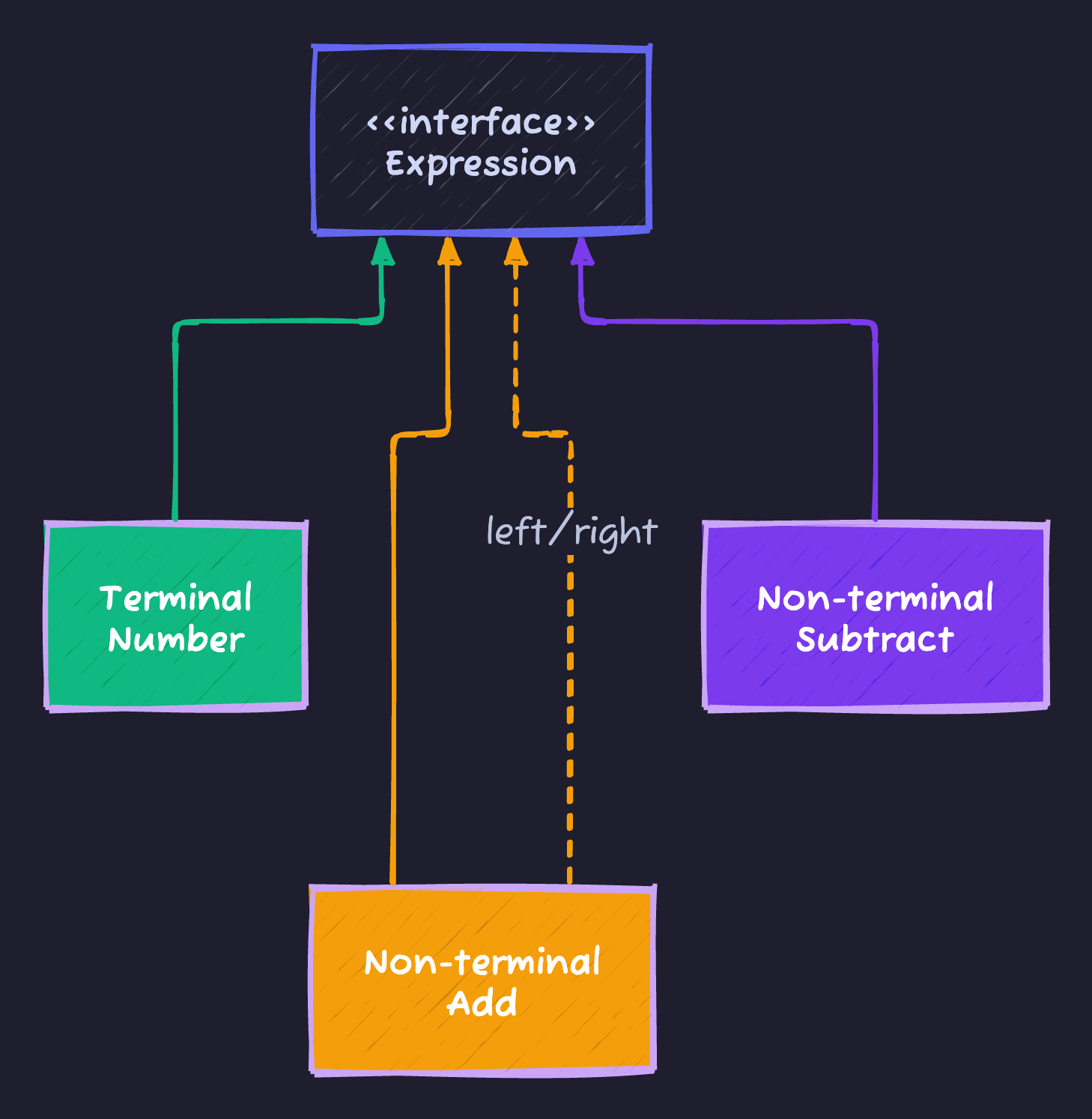
Implementation
1. The Expression Interface
// Abstract Expression
public interface Expression {
    int interpret();
}
2. Terminal Expressions (Leaf Nodes)
// Terminal: Numbers
public class NumberExpression implements Expression {
    private int number;

    public NumberExpression(int number) {
        this.number = number;
    }

    @Override
    public int interpret() {
        return number;
    }
}
3. Non-Terminal Expressions (Operators)
// Non-terminal: Addition
public class AddExpression implements Expression {
    private Expression left;
    private Expression right;

    public AddExpression(Expression left, Expression right) {
        this.left = left;
        this.right = right;
    }

    @Override
    public int interpret() {
        return left.interpret() + right.interpret();
    }
}

// Non-terminal: Subtraction
public class SubtractExpression implements Expression {
    private Expression left;
    private Expression right;

    public SubtractExpression(Expression left, Expression right) {
        this.left = left;
        this.right = right;
    }

    @Override
    public int interpret() {
        return left.interpret() - right.interpret();
    }
}
Usage
// Build expression tree for: "10 - (3 + 2)"
Expression expr = new SubtractExpression(
    new NumberExpression(10),
    new AddExpression(
        new NumberExpression(3),
        new NumberExpression(2)
    )
);

int result = expr.interpret();
System.out.println("Result: " + result); // 5
Real Parser Example
For a simple language like "x + 5" with variables:
public class VariableExpression implements Expression {
    private String variableName;

    public VariableExpression(String name) {
        this.variableName = name;
    }

    @Override
    public int interpret(Context context) {
        return context.getValue(variableName);
    }
}

// Context stores variable values
class Context {
    private Map<String, Integer> variables = new HashMap<>();

    public void setValue(String name, int value) {
        variables.put(name, value);
    }

    public int getValue(String name) {
        return variables.getOrDefault(name, 0);
    }
}

// Usage:
Context ctx = new Context();
ctx.setValue("x", 10);

Expression expr = new AddExpression(
    new VariableExpression("x"),
    new NumberExpression(5)
);

System.out.println(expr.interpret(ctx)); // 15
In The Wild (Real World Examples)
1. Regular Expressions
The Pattern class is an interpreter for regex grammar:
Pattern pattern = Pattern.compile("\\d+"); // Grammar
Matcher matcher = pattern.matcher("123"); // Interpret
2. SQL Parsers
Databases parse SQL into an AST and execute it:
SELECT * FROM users WHERE age > 18
-- Parsed into expression tree and executed
3. Spring Expression Language (SpEL)
ExpressionParser parser = new SpelExpressionParser();
Expression exp = parser.parseExpression("'Hello ' + 'World'");
String message = (String) exp.getValue(); // "Hello World"
When to Use Interpreter
✅ Use when:
- Grammar is simple
- Performance is not critical
- Need to evaluate expressions frequently (DSL, config)
❌ Don’t use when:
- Grammar is complex (use parser generators like ANTLR)
- Performance is critical (interpreter is slow)
Cheat Sheet
| Feature | Details |
|---|---|
| Category | Behavioral |
| Problem Solved | Evaluating sentences in a language/grammar |
| Key implementation | Expression tree + interpret() method |
| Pros | Extensibility (add new grammar rules easily) |
| Cons | Performance (tree traversal is slow), Complexity (for large grammars) |
Tips to Remember 🧠
- “Expression Tree”: Think of AST (Abstract Syntax Tree) in compilers.
- “Recursive”: Interpret is usually recursive (non-terminals call children’s interpret).
- “Rarely used in apps”: More common in compilers, parsers, DSLs than business apps.
Advertisement
Moshiour Rahman
Software Architect & AI Engineer
Enterprise software architect with deep expertise in financial systems, distributed architecture, and AI-powered applications. Building large-scale systems at Fortune 500 companies. Specializing in LLM orchestration, multi-agent systems, and cloud-native solutions. I share battle-tested patterns from real enterprise projects.
Related Articles
The Visitor Design Pattern: Add Operations Without Modifying Classes
Master the Visitor Pattern in Java. Learn how to add new operations to object structures using double dispatch.
JavaThe Template Method Pattern: The Recipe for Success
Master the Template Method Pattern in Java. Learn how to define the skeleton of an algorithm in a superclass but let subclasses override specific steps.
JavaThe Strategy Design Pattern: Kill the If-Else Statements
Master the Strategy Pattern in Java. Learn how to replace complex if-else logic with interchangeable algorithms and follow the Open/Closed Principle.
Comments
Comments are powered by GitHub Discussions.
Configure Giscus at giscus.app to enable comments.