The Builder Design Pattern: The Cure for Constructor Headache
Master the Builder Pattern in Java. Learn how to construct complex objects step-by-step, avoid telescoping constructors, and write readable code.
Moshiour Rahman
Advertisement
The Problem: Telescoping Constructor Hell
Imagine you are building a User class. Initially, it just needs a firstName and lastName. Easy.
public User(String firstName, String lastName) { ... }But then requirements change. You need email, phone, address, age, and isActive. Some are optional, some are required. You end up with this mess:
// The "Telescoping Constructor" Anti-Pattern
public User(String firstName, String lastName) { ... }
public User(String firstName, String lastName, String email) { ... }
public User(String firstName, String lastName, String email, String phone) { ... }
public User(String firstName, String lastName, String email, String phone, String address) { ... }
...
And calling it is a nightmare:
// What does "true" mean? Which string is the phone number?
User user = new User("John", "Doe", null, "123 Main St", 25, true);
This is unreachable, unreadable, and error-prone.
The Solution: The Builder Pattern
The Builder Pattern separates the construction of a complex object from its representation. It allows you to construct complex objects step-by-step.
Real-Life Analogy: Ordering at Subway 🥪
Think about ordering a sandwich at Subway:
- Bread: “Start with Italian Herbs and Cheese.”
- Meat: “Add Turkey.”
- Cheese: “Add Provolone.”
- Veggies: “No onions, extra pickles.”
- Sauce: “Mayo.”
You don’t just grab a random pre-made sandwich. You build it step-by-step. The final result is a Sandwich object, but the process was flexible.
Visualizing the Pattern
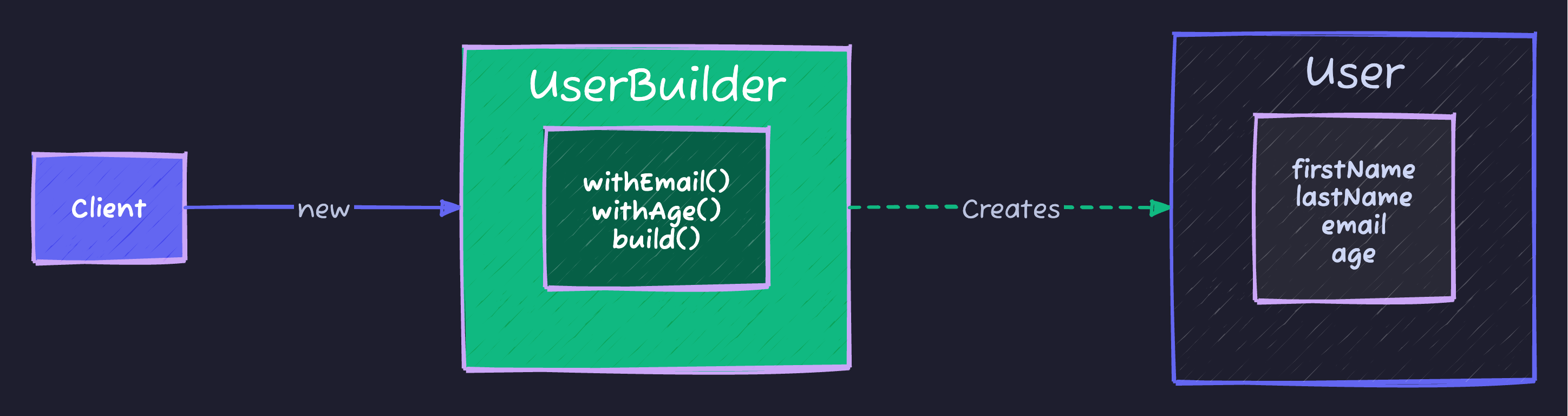
Implementation
In Java, we typically implement this using a Static Inner Class.
public class User {
    // All fields are distinct (often final/immutable)
    private final String firstName; // Required
    private final String lastName;  // Required
    private final int age;          // Optional
    private final String phone;     // Optional
    private final String address;   // Optional

    // Private constructor: only the Builder can call this
    private User(UserBuilder builder) {
        this.firstName = builder.firstName;
        this.lastName = builder.lastName;
        this.age = builder.age;
        this.phone = builder.phone;
        this.address = builder.address;
    }

    // Getters only (Immutability!)
    public String getFirstName() { return firstName; }
    // ... other getters ...

    // Static Inner Builder Class
    public static class UserBuilder {
        private final String firstName;
        private final String lastName;
        private int age = 0;           // Default value
        private String phone = null;
        private String address = null;

        // Constructor for Required Parameters
        public UserBuilder(String firstName, String lastName) {
            this.firstName = firstName;
            this.lastName = lastName;
        }

        // Methods for Optional Parameters
        // Using "Fluent Interface" (returning this)
        public UserBuilder age(int age) {
            this.age = age;
            return this;
        }

        public UserBuilder phone(String phone) {
            this.phone = phone;
            return this;
        }

        public UserBuilder address(String address) {
            this.address = address;
            return this;
        }

        // The logic to build the final object
        public User build() {
            // Validate logic here if needed
            if (this.age < 0) throw new IllegalStateException("Age cannot be negative");

            return new User(this);
        }
    }
}
Using Code
Clean, readable, and flexible:
User user = new User.UserBuilder("John", "Doe")
    .age(30)
    .phone("555-0199")
    // .address() is skipped (optional)
    .build();
In The Wild (Real World Examples)
You use this pattern every day without realizing it.
1. java.lang.StringBuilder
It’s in the name!
String s = new StringBuilder()
    .append("Design ")
    .append("Patterns ")
    .append("are cool.")
    .toString(); // .toString() is effectively .build()
2. Lombok @Builder
In modern Java development, you rarely write the boilerplate above manually. You use Lombok:
import lombok.Builder;

@Builder
public class User {
    private String firstName;
    private String lastName;
    // ...
}

// Usage is automatically generated:
User.builder().firstName("John").build();
Cheat Sheet
| Feature | Details |
|---|---|
| Category | Creational |
| Problem Solved | Complex object creation, Constructor Hell |
| Key Keyword | .build() |
| Signature Look | Method chaining: obj.a().b().c().build() |
| Pros | Readable, Immutable objects, clear separation of required vs optional |
| Cons | Verbose (requires creating a separate Builder class) |
Tips to Remember 🧠
- “Restaurant Order”: When you order food, you specify options one by one. That’s a Builder.
- “Method Chaining”: If you see dots connecting method calls on new lines, it’s likely a Builder (or Stream).
- Immutability: Use Builder when you want your final object to be Immutable (no setters) but construction is complex.
Advertisement
Moshiour Rahman
Software Architect & AI Engineer
Enterprise software architect with deep expertise in financial systems, distributed architecture, and AI-powered applications. Building large-scale systems at Fortune 500 companies. Specializing in LLM orchestration, multi-agent systems, and cloud-native solutions. I share battle-tested patterns from real enterprise projects.
Related Articles
The Factory Method Pattern: Decoupling Object Creation
Master the Factory Method Pattern in Java. Learn how to loosen coupling in your code by letting subclasses decide which objects to instantiate.
JavaThe Visitor Design Pattern: Add Operations Without Modifying Classes
Master the Visitor Pattern in Java. Learn how to add new operations to object structures using double dispatch.
JavaThe Strategy Design Pattern: Kill the If-Else Statements
Master the Strategy Pattern in Java. Learn how to replace complex if-else logic with interchangeable algorithms and follow the Open/Closed Principle.
Comments
Comments are powered by GitHub Discussions.
Configure Giscus at giscus.app to enable comments.