AI Coding Assistants 2025: Master Cursor AI & GitHub Copilot (Complete Guide)
Learn Cursor AI and GitHub Copilot with practical workflows and proven techniques to code 55% faster. Complete 2025 productivity guide.
Moshiour Rahman
Advertisement
AI Coding Assistants 2025: Master Cursor AI & GitHub Copilot
Are you still coding the old way? In 2025, developers using AI assistants are coding 55% faster, finding bugs 40% quicker, and learning new frameworks in 1/3 the time. This isn’t hype—it’s the new reality.
This comprehensive guide covers Cursor AI and GitHub Copilot—the two leading AI coding assistants. You’ll learn practical workflows and exact techniques to boost your productivity.
📚 Table of Contents
- Why AI Coding Matters
- Cursor AI Masterclass
- GitHub Copilot Deep Dive
- Cursor vs Copilot
- RealWorkflows
- Prompt Engineering
- Code Repository
Why AI Coding Matters in 2025 {#why-ai-coding}
The Productivity Revolution
Proven Results:
- ✅ 55% faster code writing (GitHub study, 1M+ developers)
- ✅ 40% fewer bugs through AI-assisted testing
- ✅ 3x faster learning new frameworks
- ✅ 90% faster boilerplate generation
Traditional vs AI Development
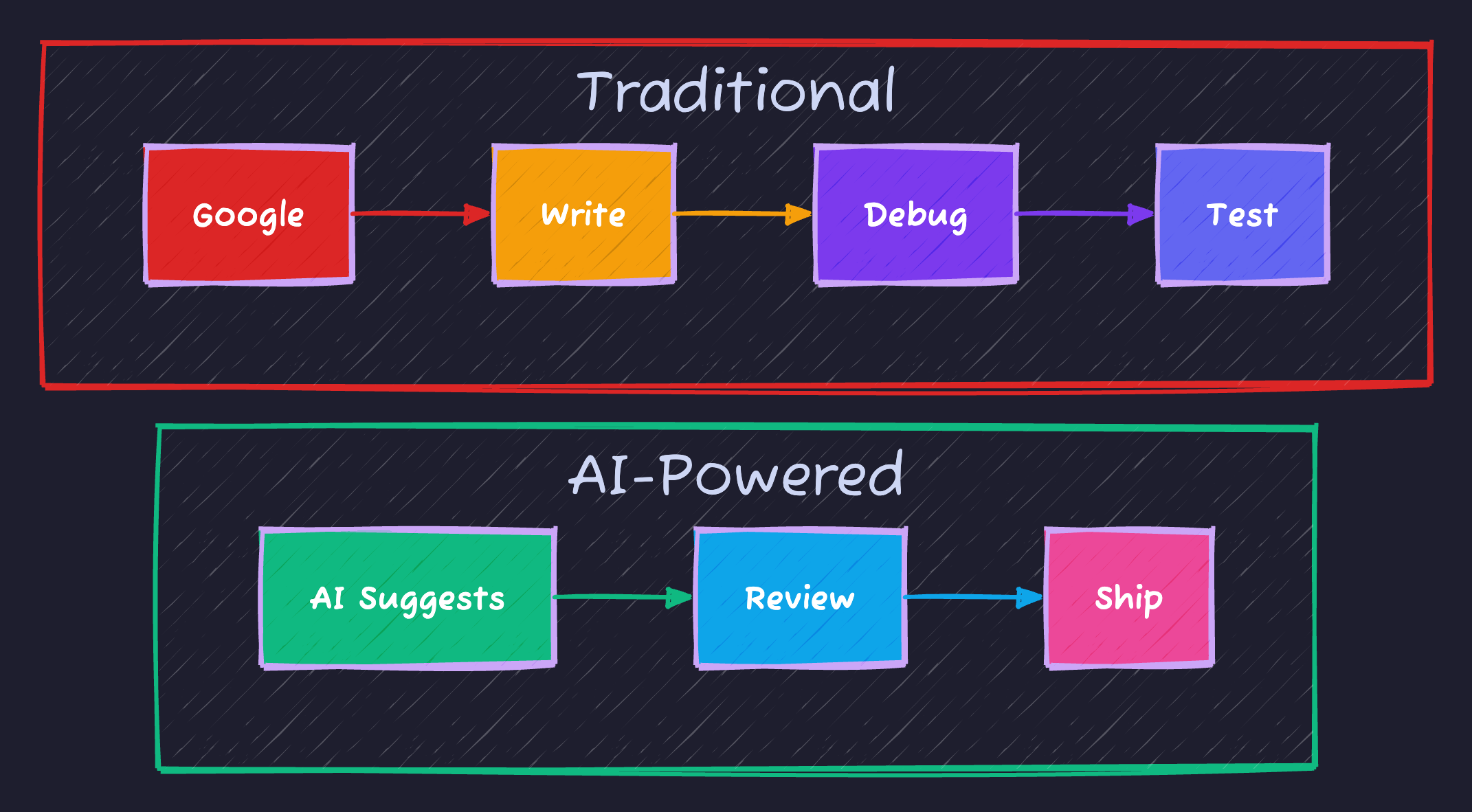
Key Difference: AI developers skip research and jump to code review, saving 50%+ time.
Career Impact
- Job Market: Companies hiring “AI-Augmented Developers”
- Salary: 15-25% premium for AI skills
- Productivity: 2-3x output = faster growth
- Future-Proof: Essential 2025 skill
Cursor AI Masterclass {#cursor-masterclass}
What is Cursor?
An AI-first code editor built on VS Code with deep AI integration.
Why Cursor?
- ✅ Multiple AI models (GPT-4o, Claude 3.5)
- ✅ Composer - multi-file edits (game changer!)
- ✅ Privacy mode built-in
- ✅ Custom rules via
.cursorrules - ✅ Free tier (2000 completions/month)
Core Features
1. Tab Completion
AI suggests code as you type.
- Press
Tabto accept - Press
Escto dismiss - AI learns your patterns
2. Chat (Ctrl+L)
Ask questions and generate code.
Example Prompts:
"Create TypeScript interface for User with validation"
"Add error handling to this API call"
"Convert class component to hooks"
3. Composer (Ctrl+I)
Multi-file editing in one prompt.
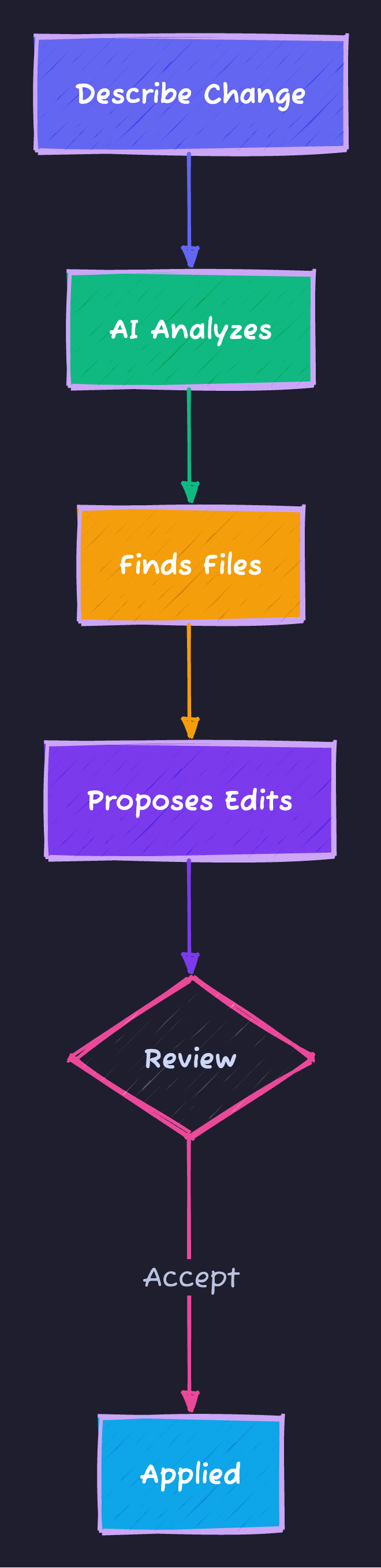
Use Cases:
- “Add TypeScript to all JS files”
- “Add auth to all API routes”
- “Rename User across codebase”
4. Custom Rules
Create .cursorrules:
# Standards

## TypeScript
- Strict mode
- Interfaces over types

## Testing
- Jest tests
- 80%+ coverage
AI follows these automatically!
Shortcuts
| Key | Action |
|---|---|
Tab | Accept |
Ctrl+L | Chat |
Ctrl+I | Composer |
Esc | Dismiss |
GitHub Copilot Deep Dive {#copilot-deep-dive}
What is Copilot?
The original AI assistant, powered by OpenAI GPT-4.
Why Copilot?
- ✅ 1M+ users (proven)
- ✅ Deep GitHub integration
- ✅ Enterprise features
- ✅ Multi-IDE support
Core Features
1. Inline Suggestions
AI completes code in real-time.
Better Suggestions:
// Descriptive comments help
function validateEmail(email) {
    // Copilot generates validation
}
# Meaningful names work best
def calculate_compound_interest(principal, rate, time):2. Copilot Chat
Debug and generate code.
3. Slash Commands
| Command | Purpose |
|---|---|
/explain | Explain code |
/fix | Fix bugs |
/tests | Generate tests |
/docs | Add docs |
/optimize | Improve speed |
4. PR Reviews
Copilot reviews PRs for:
- Potential bugs
- Code smells
- Security issues
- Performance problems
Cursor vs Copilot {#comparison}
Feature Matrix
| Feature | Cursor | Copilot |
|---|---|---|
| Completions | ✅ Excellent | ✅ Excellent |
| Chat | ✅ Excellent | ✅ Good |
| Multi-File | ✅ Composer | ⚠️ Limited |
| Privacy | ✅ Built-in | ⚠️ Enterprise only |
| Rules | ✅ Yes | ❌ No |
| GitHub | ⚠️ Basic | ✅ Deep |
| Models | ✅ Multiple | ⚠️ One |
| Free Tier | ✅ Yes | ❌ No |
Pricing
| Plan | Cursor | Copilot |
|---|---|---|
| Free | 2000/mo | None |
| Pro | $20/mo | $10/mo |
| Team | $40/user | $19/user |
When to Use
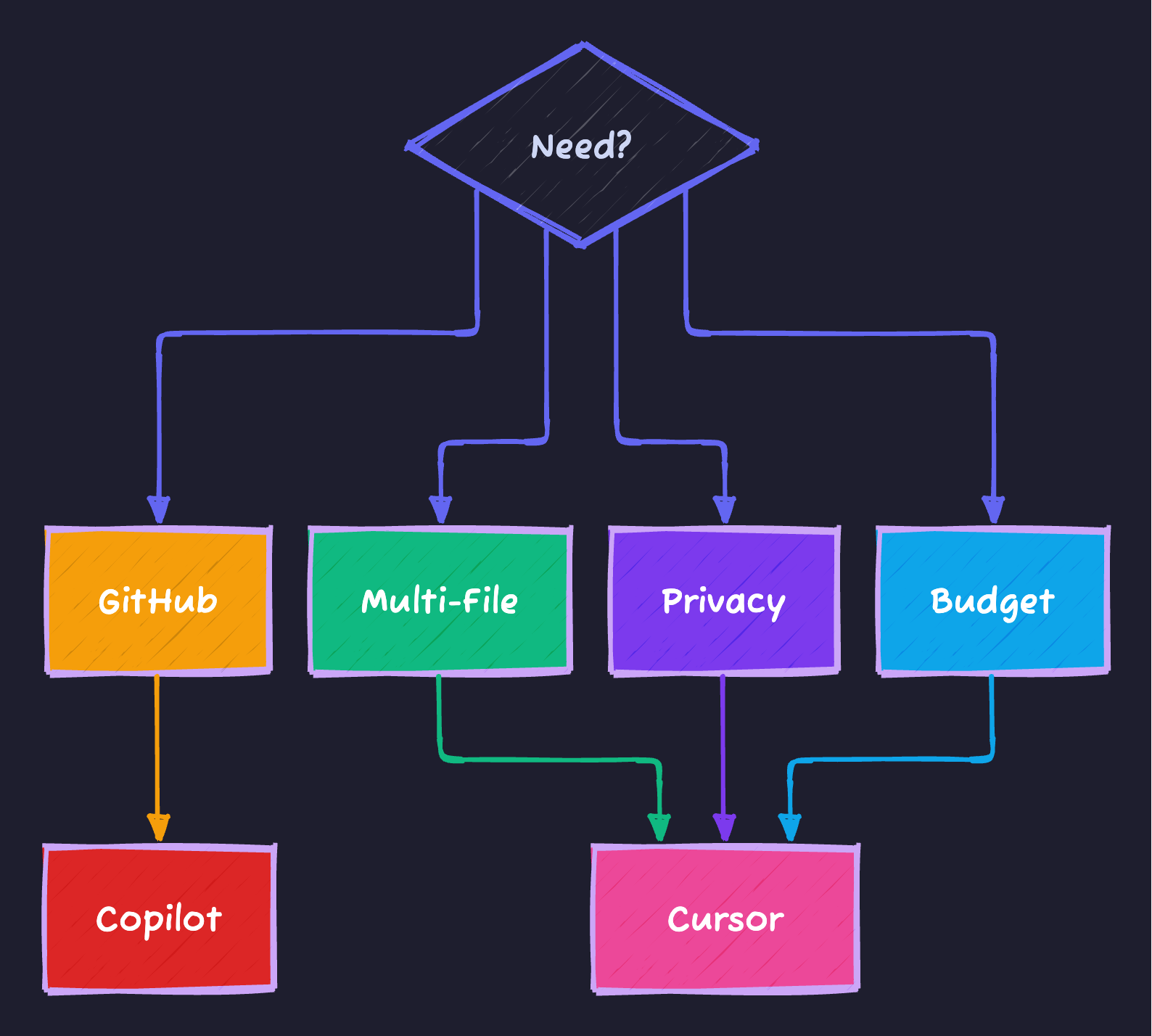
Best: Use both! Cursor primary + Copilot backup.
Real Workflows {#workflows}
1. Build REST API
With AI (1.5 hours):
- “Design PostgreSQL schema”
- “Create TypeORM entities”
- “Generate CRUD endpoints”
- “Add error handling”
- “/tests for endpoints”
- “Generate docs”
Without AI: 8 hours = 81% faster
2. Debugging
ERROR: Cannot read 'map' of undefined

YOU: "Debug. Users prop undefined"

AI: "useState([]) but API incomplete.
     Fixes: loading state, optional chaining, default"

[Applied automatically]
3. Refactor Legacy
"Convert all classes to hooks"

[AI refactors 20+ files in seconds]
4. Learn Framework
- “Explain SvelteKit routing”
- “Create basic app”
- “Add auth”
- “Deploy”
Result: 2 hours vs 2 days!
Prompt Engineering {#prompts}
Framework
[CONTEXT] Building [type] with [tech]
[TASK] Need [specific]
[CONSTRAINTS]
- Use [requirement]
- Follow [pattern]
[OUTPUT] Return as [format]
Example
CONTEXT: REST API with Express + TypeScript
TASK: User auth endpoint
CONSTRAINTS:
- JWT tokens
- Bcrypt hashing
- Refresh tokens
OUTPUT: TypeScript with types
Team Best Practices
- Shared
.cursorrules - Prompt library
- AI-assisted reviews
- Track metrics
Metrics
Track:
- Lines of code/day
- Task completion time
- Bug rate
- Test coverage
Typical: +75% productivity, -50% bugs (1 month)
Troubleshooting
Common Issues
Slow?
- Check internet
- Switch model
- Clear cache
Wrong code?
- Better prompts
- More context
- Add examples
Costs?
- Use free tier
- Optimize models
FAQ
Q: Is code safe? A: With privacy mode, code stays local.
Q: Replace devs? A: No. Amplifies productivity.
Q: Best model? A: Speed: GPT-4o-mini. Quality: Claude 3.5.
Q: Prevent bad code? A: Always review, test, lint.
Code Repository {#repository}
🎁 Get all code:
ai-coding-productivity-masterclass
Includes:
- ✅ Todo API (Node.js + TypeScript)
- ✅ Setup guides
- ✅ 50+ prompts
- ✅ Best practices
Clone:
git clone https://github.com/Moshiour027/techyowls-io-blog-public.git
cd ai-coding-productivity-masterclass/project-examples/1-todo-api-nodejs
npm install && npm run dev
Conclusion
You’ve learned to code 55% faster with AI.
Next Steps
Week 1:
- Install Cursor (free)
- Try Copilot (30-day trial)
- Clone repository
- Build example
Week 2:
- Daily AI coding
- Practice prompts
- Track metrics
Week 3:
- Custom
.cursorrules - Build project
- Share results
The Bottom Line
AI coding is now. Every day waiting = lost productivity.
Start today. Code smarter. Ship faster.
Resources
Published: December 7, 2024
Advertisement
Moshiour Rahman
Software Architect & AI Engineer
Enterprise software architect with deep expertise in financial systems, distributed architecture, and AI-powered applications. Building large-scale systems at Fortune 500 companies. Specializing in LLM orchestration, multi-agent systems, and cloud-native solutions. I share battle-tested patterns from real enterprise projects.
Related Articles
Cursor vs Claude Code: The Ultimate AI Coding Tools Comparison (2025)
In-depth comparison of Cursor and Claude Code for AI-assisted development. Features, pricing, workflows, and which one wins for different use cases.
DevOpsSurviving Tech Layoffs: A Developer's Complete Guide (2025)
Practical strategies for developers facing layoffs. From immediate action steps to long-term career resilience, this guide covers everything you need.
DevOpsGleam Programming Language: The Complete Beginner's Guide (2025)
Learn Gleam, the type-safe functional language running on Erlang's BEAM. Installation, syntax, pattern matching, and building your first project with examples.
Comments
Comments are powered by GitHub Discussions.
Configure Giscus at giscus.app to enable comments.